
Appointment Booking
Appointment Booking: Turn Website Visitors Into Qualified, Booked Meetings
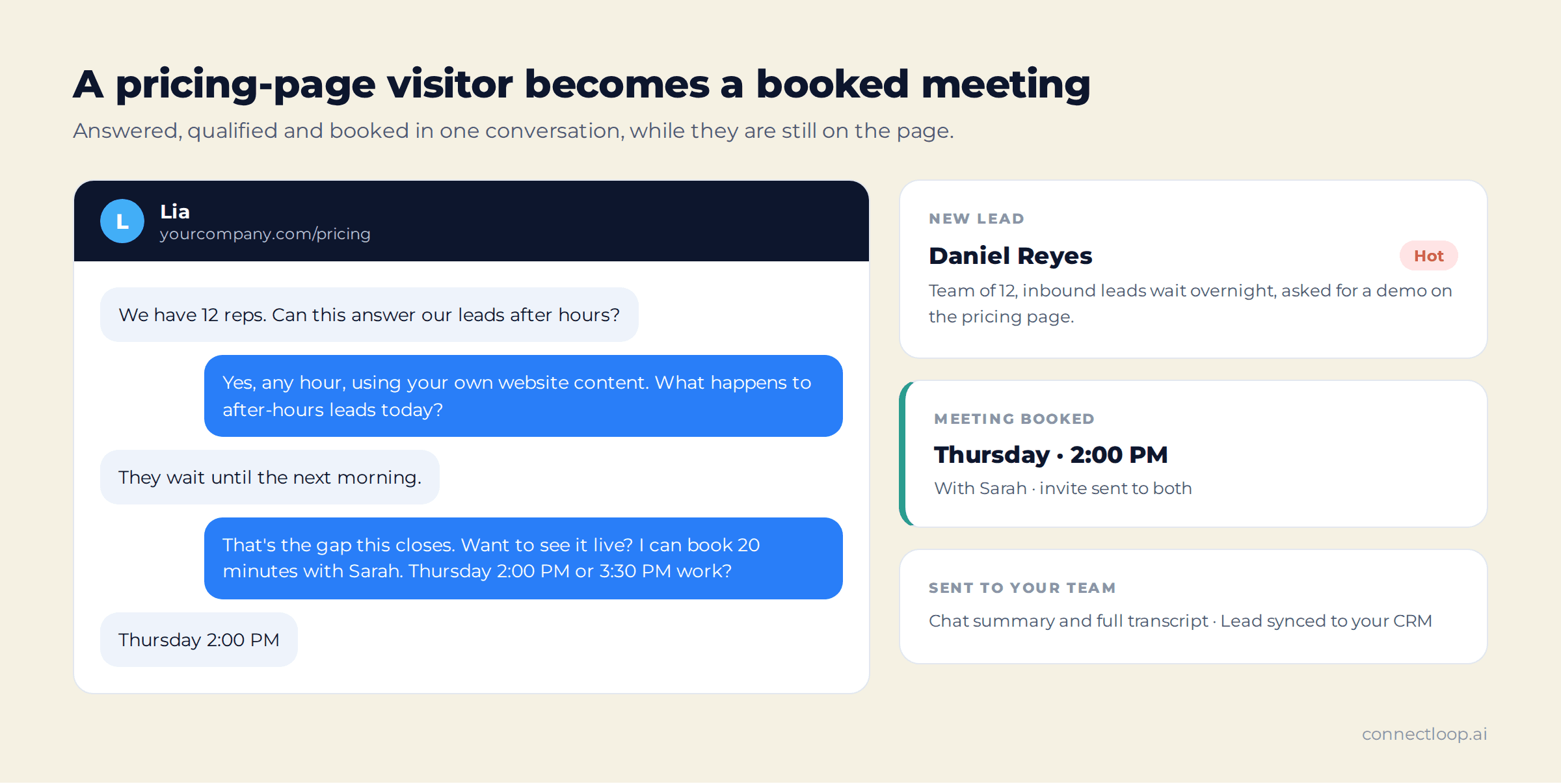
Your ads, content and SEO already bring the right people to your site. LIA, ConnectLoop's AI sales agent, meets them while they are still on the page: it answers their questions from your own content, asks the discovery questions a good rep would, scores the lead, and books the appointment straight into your team's calendar, all inside the chat.
Every lead arrives with a score, the reason for it, and the full conversation.
Free plan available · Live on your site with one line of code · Google CASA Tier 2 Verified · Official Meta Business Partner
The problem
The Most Expensive Moment on Your Website Is the Exit
A visitor reads your pricing page, has one question, and finds a contact form. They leave to compare two other tools. The traffic was paid for; the conversation never happened.
Forms
A Form Asks Buyers to Wait
Buyers who are ready to talk get a form and a promise of a reply. By the time someone answers, they have read three competitors' pricing pages.
Speed
After-Hours Leads Go Cold Overnight
The best-intent visits often happen in the evening and at weekends, when nobody is there to reply. Morning follow-up reaches a buyer who has already moved on.
Signal
Every Lead Looks the Same in the Inbox
A name and an email say nothing about intent. Reps call the tyre-kicker and the ready buyer in the same order, with the same script.
The solution
One AI Sales Agent That Answers, Qualifies and Books Appointments
LIA sits on your website as a chat widget, trained on your pages and documents. It works the conversation the way your best rep would, then hands your team a lead they can act on.
01
Answers From Your Own Content
LIA learns from your website and documents, picking your highest-value pages such as Home, Products, Pricing and About. Questions your content hasn't covered yet go to your Knowledge Gaps list, so you can fill them.
02
Qualifies in the Conversation
With Sales Methodology on, LIA weaves SPIN or MEDDICC discovery into the chat, one question at a time. It answers first, and if a visitor skips a question, it carries on helping.
03
Scores Every Lead Hot, Warm or Cold
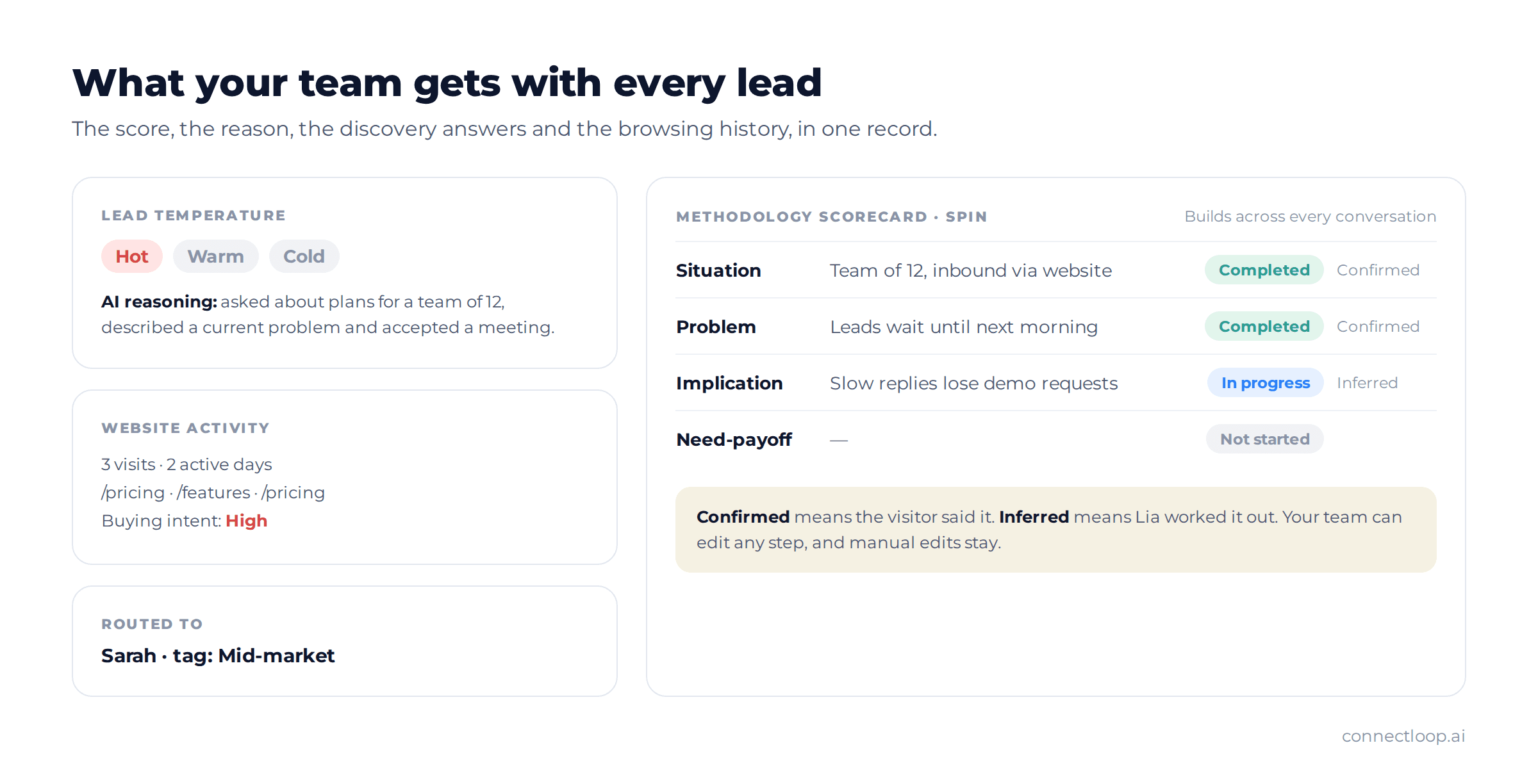
Each lead gets a temperature and the AI's reasoning for it, so your team sees who is ready to buy and why, before they pick up the phone.
04
Books on Real Availability
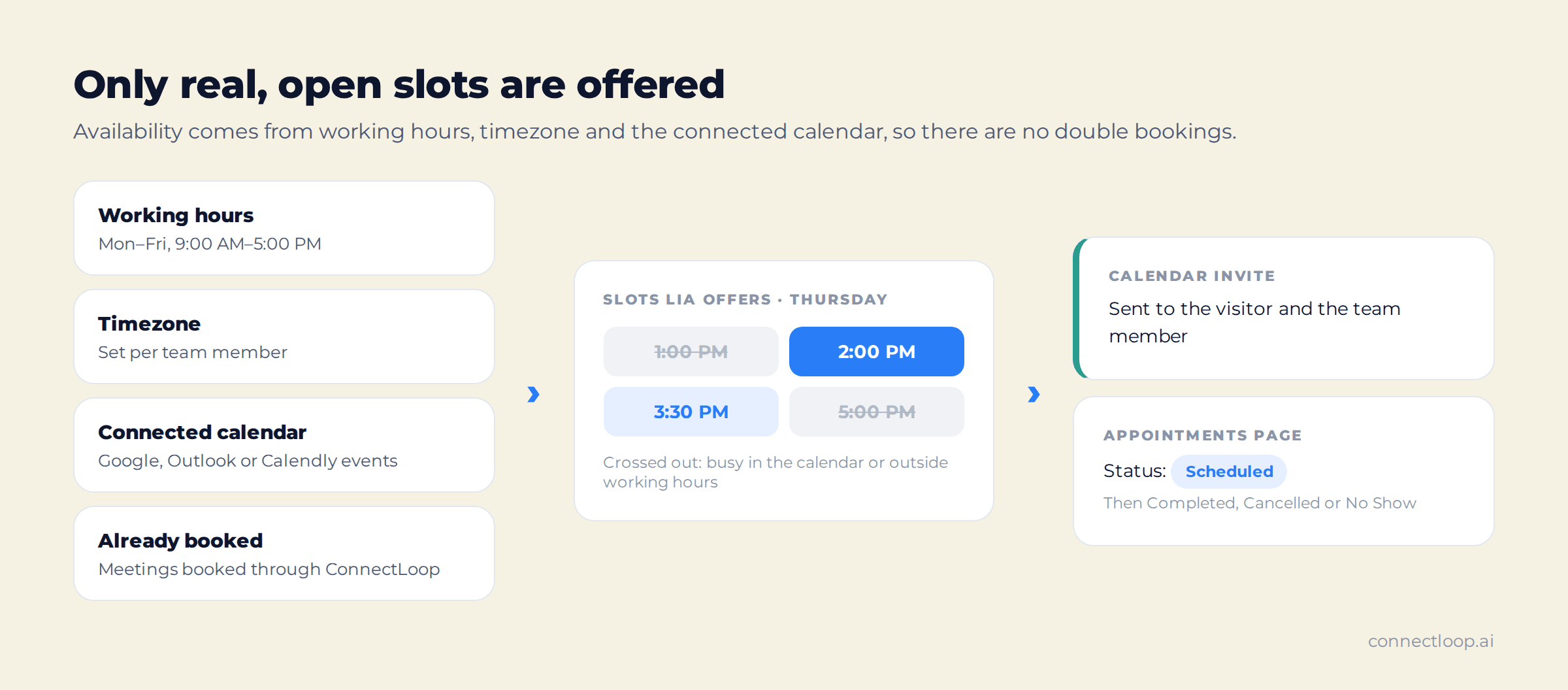
LIA offers only open slots, based on your team member's working hours, timezone and connected Google Calendar, Outlook Calendar or Calendly. Both sides get the invite.
05
Routes the Lead With Full Context
Tags send each lead to the right team member. Your team gets a chat summary with the full transcript, and the lead syncs to Salesforce, HubSpot or Zoho CRM.
06
Catches the Visitors Who Only Browse
Lead Capture popups offer a guide or a demo link for an email address, and Visitor Intelligence links a visitor's earlier browsing to their record once they identify themselves.
Inside the product
What Your Team Sees After Every Conversation
Leads, Customers and Appointments sit in the left sidebar of the ConnectLoop portal. Click any lead to open the full record.
| Where | What it shows |
|---|---|
| Lead · Chats tab | The chat summary and the full transcript, plus phone, location and the page the conversation started on |
| Lead · Temperature tab | Hot, Warm or Cold, with the AI's reasoning for the score |
| Lead · Scorecard | Each SPIN or MEDDICC step as Not Started, In Progress, Completed, Skipped or Not Applicable, with every answer marked Confirmed or Inferred |
| Lead · Status | Needs Follow Up or Followed Up. Leads left on Needs Follow Up trigger reminder emails to your team every 24 hours, for up to 72 hours |
| Appointments | Every booked meeting with customer, source, email, team member, date and time, filtered by Scheduled, Completed, Cancelled, No Show or Pending |
| Customers · Website Activity | Visits, pages viewed, first and last visit, and an AI summary of buying intent rated High, Medium or Low |
Qualification
Discovery Happens in the Chat, Not on the First Call
The questions your reps ask in the first ten minutes of a call are already answered when the lead reaches them.
SPIN Selling
Situation, Problem, Implication and Need-payoff, in order, to uncover what the visitor needs and what the problem is costing them.
MEDDICC
Metrics, Economic Buyer, Decision Criteria, Decision Process, Identify Pain, Champion and Competition, to qualify the deal itself.
One question at a time
Discovery fits into the natural flow of the chat. LIA answers the visitor's questions first, and stops asking if a question is ignored or declined.
A scorecard that builds over time
Progress carries across all of a lead's conversations. Answers are marked Confirmed when the visitor said it, or Inferred when LIA worked it out. Manual edits by your team are kept.
Booking
The Appointment Is Booked Before the Visitor Leaves
When a visitor is ready, LIA offers times and books one in the same conversation. No back-and-forth emails, no booking link to lose.
How Availability Is Worked Out
Each slot LIA offers passes two checks: it falls inside the team member's working hours and timezone, and it is free in the connected calendar and among meetings already booked through ConnectLoop. That is how double bookings are avoided.
With Google Calendar, Outlook Calendar or Calendly connected, a calendar invite goes to both the visitor and your team member. The calendar can be a shared team calendar, as long as someone watches it.
Every Appointment in One List
Booked meetings appear on the Appointments page with the customer, where they came from, the team member and the time. Filter by status to see what is Scheduled, Completed, Cancelled or marked No Show.
After the chat, LIA can also email the visitor a summary of the conversation from your connected Gmail or Outlook address. When they reply, a draft response is waiting for your team.
Beyond the chat
A Second Way In for Visitors Who Never Start a Chat
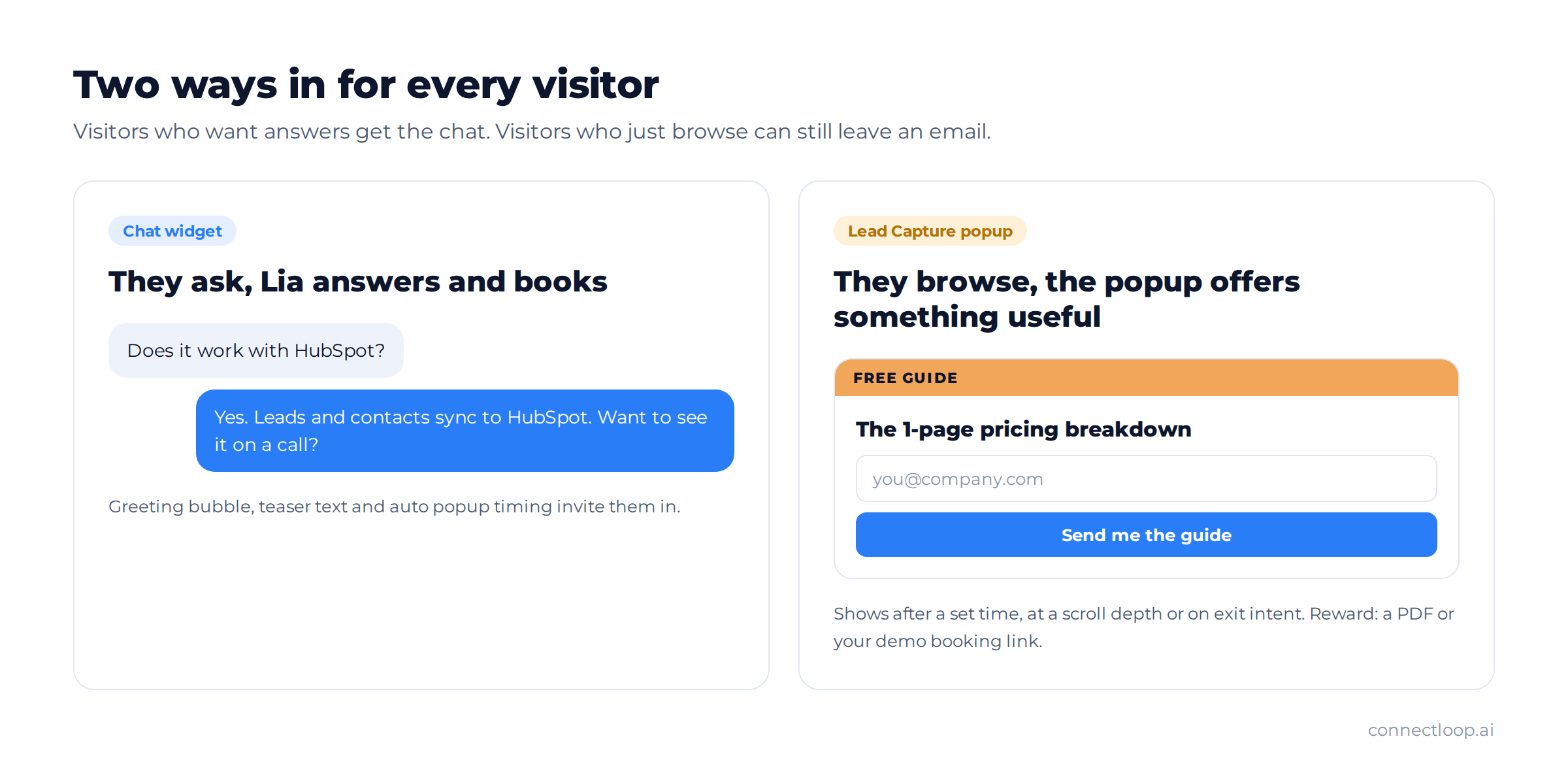
Most visitors browse without typing anything. Lead Capture shows a small popup that offers something worth having, a PDF guide or your demo booking link, in exchange for an email address. It runs from the widget script you already installed.
Every signup becomes a customer record with the popup they came from. Visitor Intelligence then links their earlier anonymous browsing to that record, so your team sees the pages that brought them in.
- Triggers after a set time, at a scroll depth, or on exit intent
- Rewards as a PDF you upload or one generated from your website, or a demo booking link
- A/B testing across popup variants, ranked by signup rate over 14 days
- Four layouts, from a centred modal to a slide-in card
Make it yours
Looks Like Your Brand, Sells Like Your Team
When LIA trains on your website, it picks up your brand colours and logo, so the widget matches your site from day one.
Personality
Choose How LIA Talks
Start with a preset: very salesy, long and detailed, or warm and concise. Then fine-tune tone, response length and how strongly LIA suggests a meeting.
Agent Studio
Train More Than One Agent
Build agents from personas such as Consultative Advisor or No-pressure Educator, add preferred terms and phrases to avoid, and activate the one that's ready.
Widget
Invite Visitors In
Set the launcher style, a greeting bubble, the teaser text and when the chat opens. Add an animated avatar that talks while LIA replies.
Your Reps Start Every Call Already Knowing the Buyer
LIA does the first conversation. Your team gets the second one, with the score, the discovery answers, the pages the buyer read and the full transcript already in front of them. That is where the time saved actually shows up.
- Answers from your contentWebsite pages and documents you choose, with gaps flagged for you to fill.
- A meeting, not a formBooked into a real open slot, with the invite sent to both sides.
- Context that travelsSummary, transcript and score emailed to your team and synced to your CRM.
Getting started
Live on Your Website in an Afternoon
- 1
Paste your URL
Create your account and enter your website. LIA reads your key pages and your branding, or learns from a document you upload.
- 2
Choose a personality
Pick a preset and LIA is generated in a couple of minutes. Fine-tune it anytime.
- 3
Connect your calendar
Connect Google Calendar, Outlook or Calendly, add a team member with booking on, and set their working hours.
- 4
Run a Live Test
Ask questions as a buyer would. Check the answers, the test lead and the booked meeting.
- 5
Add one line of code
Copy your embed snippet from Settings and paste it before the closing body tag. LIA starts answering visitors.
In production
Running In the Real World
- 82
- WhatsApp conversations at Web Summit Rio
- 37
- qualified leads from those conversations
- 5
- signups, tracked end to end
Deployed across the Colsubsidio cohort in Colombia. 37 companies onboarded, 12 live. Google CASA Tier 2 Verified · Verified Meta Business · Official Meta Business Partner.
Questions
Frequently Asked Questions
It means a visitor books a meeting with your team inside a website chat, instead of filling in a form and waiting for a reply. ConnectLoop's AI sales agent, LIA, answers visitors' questions from your content, asks discovery questions, scores the lead Hot, Warm or Cold, and books a meeting with your team while the visitor is still on the page.
From your website, documents, or both. When you enter your website, LIA selects your highest-value pages, typically 5 to 10, such as Home, About, Products and Pricing. You can add more pages by URL, upload PDF or Word files, or import from Google Drive, OneDrive or GitHub. A clear FAQ document has the biggest effect on answer quality.
The question is added to your Knowledge Gaps list and your notification emails flag it. You add the missing information to your training content and mark the gap Resolved, so the next visitor gets the answer.
Every lead gets a Hot, Warm or Cold temperature with the AI's reasoning. On Scale and Enterprise plans, Sales Methodology adds SPIN Selling and MEDDICC discovery inside the chat, saved to a scorecard on the lead with each answer marked Confirmed or Inferred.
Google Calendar, Outlook Calendar and Calendly (a paid Calendly account is needed). LIA checks the team member's working hours and timezone plus the calendar's existing events, and the invite goes to both the visitor and your team member. Without a calendar connected, bookings still appear on the Appointments page in ConnectLoop.
Leads are routed to team members by tags that LIA assigns based on the conversation. Your notification emails receive the chat summary with the full transcript, and leads sync to Salesforce, HubSpot or Zoho CRM when connected.
You set how assertive it is. Sales aggressiveness runs from Low, with soft mentions of a meeting, to High, with clear calls to action. Discovery questions come one at a time, and LIA stops asking if a visitor isn't interested.
Lead Capture popups, on Scale and Enterprise plans, offer a PDF or a demo booking link in exchange for an email address. Visitor Intelligence links a visitor's earlier anonymous browsing to their record once they identify themselves, with an AI summary of their buying intent.
Copy your embed snippet from Settings → Embed Code and paste it just before the closing body tag on your site. You can also email the installation guide to your developer from the same screen. Make sure the widget is switched on in the General tab.
Yes. Live Test lets you chat with LIA as a customer would, then review the test leads and appointments it creates, before any real visitor sees it.
Yes. The free plan includes the chat widget, lead scoring and appointment booking, with one team member and two connected apps. Paid plans add more team members, training documents, Sales Methodology, Lead Capture and advanced widget controls.
Integrations
Connects to the Tools Your Team Already Uses
Leads, meetings and conversations flow into your CRM, calendar and inbox.
- Salesforce
- HubSpot
- Zoho CRM
- Google Calendar
- Outlook Calendar
- Calendly
- Gmail
- Outlook
- WooCommerce
- Google Drive
- Google Sheets
- Microsoft OneDrive
- GitHub
Also included
Appointment Booking Is One Job LIA Does
- Visitor IntelligenceEvery anonymous journey tracked, summarised and labelled High, Medium or Low intent.How visitor intelligence works →
- Proactive OutreachWhen a known lead comes back to your site, a follow-up email is drafted for your team.How proactive outreach works →
- Conversational IntelligenceCompetitors, intent, sentiment and friction across every chat, linked to the source.How conversational intelligence works →
Give Your Next Pricing-Page Visitor Someone to Talk To
Paste your website, run a Live Test, and add one line of code. The next visitor with a question gets an answer and a meeting.
Free plan, no card required · Priced on conversations, not credits