
Salesforce Integration: Every Conversation LIA Has, on the Lead Record
Connect Salesforce with OAuth and ConnectLoop syncs leads, contacts and opportunities both ways. Each conversation on your website, WhatsApp or email lands on the record with the transcript, the intent score and its reasons, the pages viewed, the sentiment and the booked meeting. Your reps open Salesforce and the discovery is already there.
Connect with OAuth in Connected Apps · Native, no middleware · Google CASA Tier 2 Verified
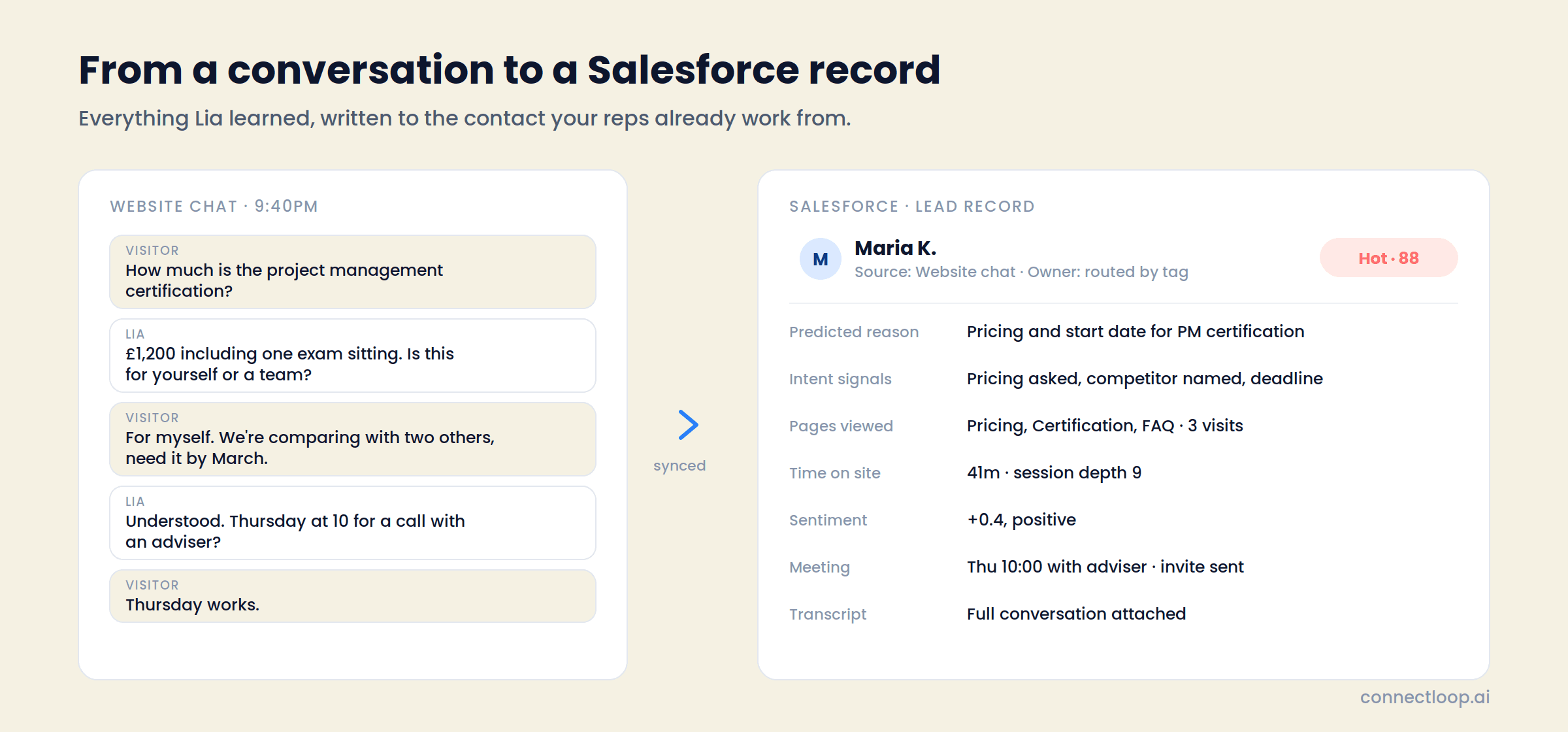
What syncs
Structured Fields, Not a Notes Box
Session data is written back to each contact as first-party intent data your reports and workflows can use.
| Field | What Salesforce receives |
|---|---|
| Lead and contact | The identified visitor, created or matched by email, with source channel: website, WhatsApp or email |
| Conversation summary and transcript | What was asked, what LIA answered, and the full exchange |
| Intent score and signals | The live score with the signals behind it: pricing viewed, competitor named, timeline stated, meeting booked |
| Lead temperature | Hot, Warm or Cold, with the AI's reasoning |
| Predicted reason | Why the visitor reached out, in one line |
| Website activity | Pages viewed including pricing and cancellation pages, visit count, first and most recent visit, time on site and session depth |
| Sentiment | Positive, neutral or negative, from the conversation |
| Qualification scorecard | SPIN and MEDDICC steps completed, skipped or open, each answer Inferred or Confirmed, when Sales Methodology is on |
| Booked meeting | The appointment LIA booked, with the calendar invite sent to both sides |
| Opportunities | Synced with the contact so pipeline stages stay in Salesforce, where your team manages them |
How it works
From First Message to Salesforce Record
01
LIA Runs the First Conversation
A visitor asks a question on your site, on WhatsApp or by email. LIA answers from your content, asks qualifying questions one at a time, and books the meeting if they're ready.
02
The Record Is Created or Matched
When the visitor identifies themselves, ConnectLoop matches on email. Their anonymous browsing history from Visitor Intelligence attaches to the same record, so nothing before the form is lost.
03
Everything Writes Back
Transcript, intent score, signals, pages viewed, sentiment and the scorecard land on the Salesforce lead as structured fields. The rep sees the same evidence the score was built from.
04
The Lead Routes by Tag
LIA assigns tags from the conversation. Leads route to the team member with matching tags, and a lead left as Needs Follow Up triggers reminder emails every 24 hours until someone acts.
05
Return Visits Update the Record
When a known lead comes back to the site, the activity fields update and Proactive Outreach drafts a follow-up email for a person to review and send.
06
The Rep Starts Where the Buyer Left Off
The first call opens with the buyer's own words, the competitor they named and the deadline they gave. Discovery continues rather than restarting.
Setup
Connected in Four Steps
- 01
Open Connected Apps
In the left sidebar, filter to CRM, find Salesforce CRM.
- 02
Connect with OAuth
Click Connect, sign in to your Salesforce org, authorise ConnectLoop. The badge turns green.
- 03
Add team members and tags
Under Team Members, add the reps who receive leads and assign the tags that decide routing.
- 04
Run a Live Test
Ask a question as a visitor, leave an email, and open the lead in Salesforce to see the fields populate.
Connected apps count against your plan limit across all workspaces: 2 on Free, 4 on Launch, 9 on Growth, unlimited on Scale. Disconnect any time from the same screen.
Who uses it
Teams That Run Pipeline in Salesforce and Get Leads Everywhere Else
Education providers, professional services and SaaS teams whose enquiries arrive on the website at 9pm, on WhatsApp on Saturday and in the inbox during a demo, and whose reps live in Salesforce.
Sales leaders
Intent distribution, meetings booked and framework coverage in Salesforce reports, alongside the pipeline stages you already track.
Reps
A lead record that says why the person reached out and what they've already said, before the first call.
Marketing
Source channel, pages viewed and return visits on every lead, so attribution reaches the conversation rather than stopping at the form.
Questions
Frequently Asked Questions
With OAuth from the Connected Apps screen. Click Connect, sign in to your Salesforce org, and authorise ConnectLoop. There are no API keys to copy and no middleware to configure.
Leads and contacts, the conversation summary and transcript, the intent score and its signals, lead temperature with reasoning, the predicted reason for reaching out, website activity including pages viewed and visit count, sentiment, the qualification scorecard, the booked meeting, and opportunities.
Matching is by email. When a visitor who already exists in Salesforce identifies themselves, ConnectLoop updates that record rather than creating a new one, and attaches their earlier anonymous activity to it.
Yes. LIA assigns tags from the conversation content, and leads route to team members with matching tags. Assign tags under Team Members.
Yes. Every channel LIA works on writes to the same record: website chat, WhatsApp Business and connected Gmail or Outlook inboxes.
Every conversation is stored in ConnectLoop regardless, and the record syncs once the connection is restored. Nothing is lost between the two systems.
Yes. Open Connected Apps and click Disconnect. Records already written to Salesforce stay as they are.
Yes, as one connected app. Limits apply across all workspaces: 2 on Free, 4 on Launch, 9 on Growth, unlimited on Scale, custom on Enterprise.
Related
Pairs Well With
- Google CalendarSo the meeting LIA books lands on a real calendar with an invite.
- GmailConversation summaries sent from your address, replies drafted for you.
- Lead scoringWhat feeds the intent score that lands on the record.Read the guide →
Connect Salesforce and Open the First Lead LIA Wrote
OAuth, one click, and the next conversation on your site becomes a lead record with the reasons attached.
Free plan, no card required · Priced on conversations, not credits