
Sales Assistance
Sales Assistance: A Coach in the Room on Every Live Call
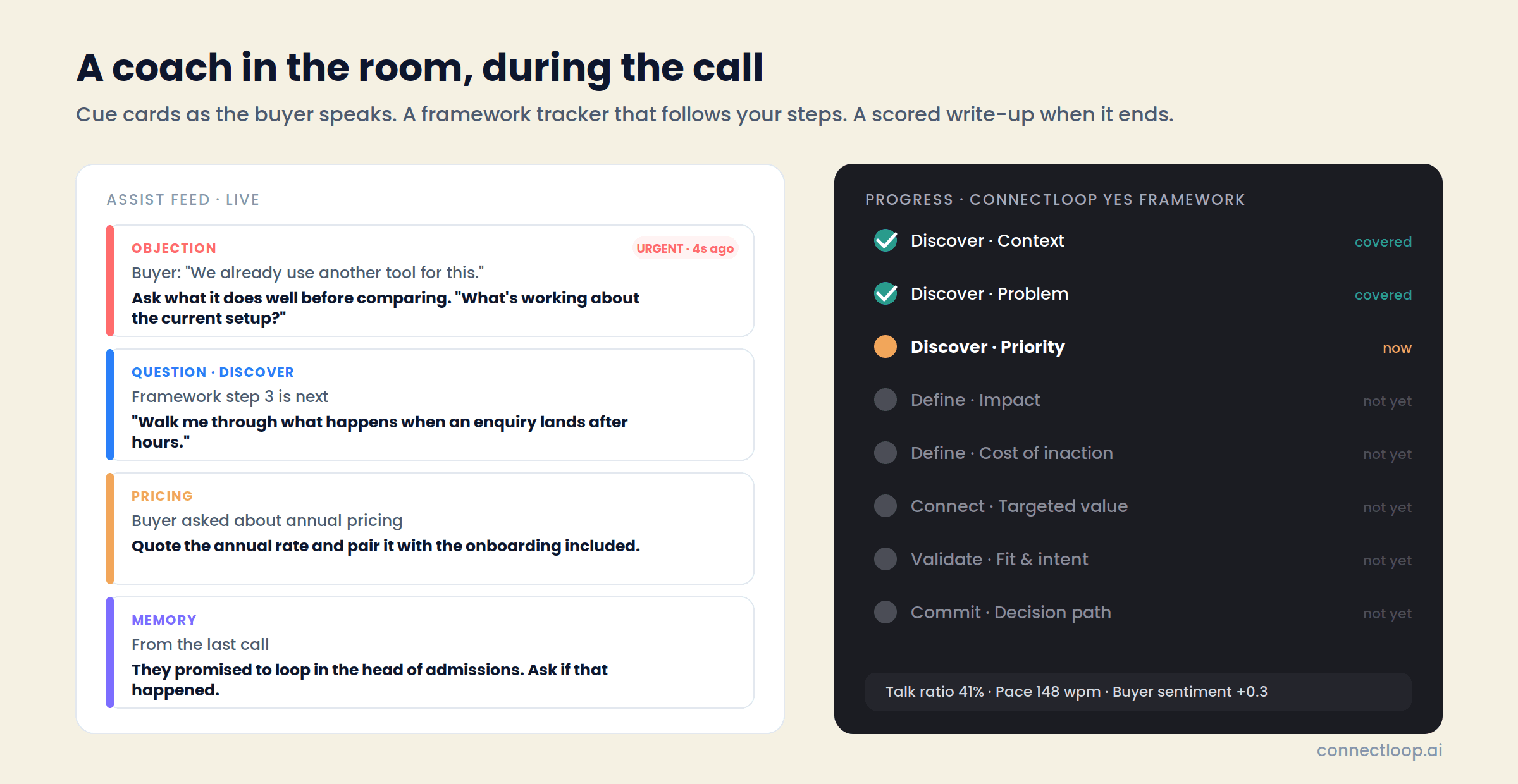
Your rep runs the call as normal. ConnectLoop listens in the browser, surfaces cue cards as the buyer speaks, tracks the call against your sales framework step by step, and turns it into a scored write-up with a follow-up draft the moment it ends.
Audio is captured in the browser tab. No bot joins the meeting.
Works with Google Meet and Zoom in Chrome or Edge · Google CASA Tier 2 Verified · Official Meta Business Partner
The problem
The Playbook Is in a Document. The Call Is Happening
Now.
Every sales team has a methodology. Almost none of it survives a live conversation, because the rep is listening, thinking and typing at once, and the framework is in another tab.
In the call
The Objection Lands and the Answer Is on Page Four
The buyer says “we already use another tool.” The battle card exists. The rep is improvising anyway, because nobody can search a document mid-sentence.
Between calls
The Second Call Re-Asks What the First One Settled
Budget was confirmed last time. The stakeholder was named. The rep opens with “so, remind me of the setup” and the buyer feels it.
After the call
The Write-Up Takes Longer Than the Call
Notes, CRM update, follow-up email, action items. Or none of it, because the next call starts in five minutes.
Coaching
Managers Coach From Memory
“Work on discovery” is the whole feedback, because nobody knows which steps were covered on which calls, or what the buyer actually said.
Consistency
Every Rep Runs a Different Call
Same product, same framework in the playbook, five different conversations in practice. The best rep's habits stay with the best rep.
Promises
Commitments Get Made and Then Forgotten
“I'll send the pricing by Friday.” Two weeks later the buyer remembers and the rep doesn't. The deal cools for a reason nobody can see.
The solution
ConnectLoop Runs Your Framework Live, Then Writes the Call Up
Sales Assistance sits beside the meeting in a browser tab. It hears both sides, follows the framework you chose, and surfaces the right cue at the right moment. When the call ends, the score, the coverage, the action items and the follow-up draft are waiting.
01
Listens in the Browser, Nothing Joins the Meeting
Audio is captured from the meeting tab plus the rep's mic. No bot appears in the participant list, no calendar integration is needed, and the buyer's experience is unchanged.
02
Surfaces Cue Cards as the Buyer Speaks
Seven kinds: memory, question, pricing, objection, battlecard, product knowledge and action. Each shows what to do, the wording to say it, why it was raised, and branches for “if they say X, respond with Y.” Urgent cards jump the queue.
03
Tracks the Call Against Your Framework
A Progress tab marks each step covered, now or not yet, in the order you wrote them. Reps can skip a step that doesn't apply and undo it. What earlier calls with the same customer settled is carried in, so nothing is re-asked.
04
Walks Your Script Alongside the Framework
Upload a script and the assistant surfaces its lines when the conversation reaches them, marking each shown or queued. Pre-call context, objective and watch-outs get their own cue when the moment fits.
05
Scores the Call and Drafts the Follow-Up
Call score, buyer sentiment, narrative summary, key moments you can click into, action items, framework coverage with the quote that proves each step, a coaching note, and a follow-up email draft to copy into your inbox.
06
Builds a Dossier for Every Customer
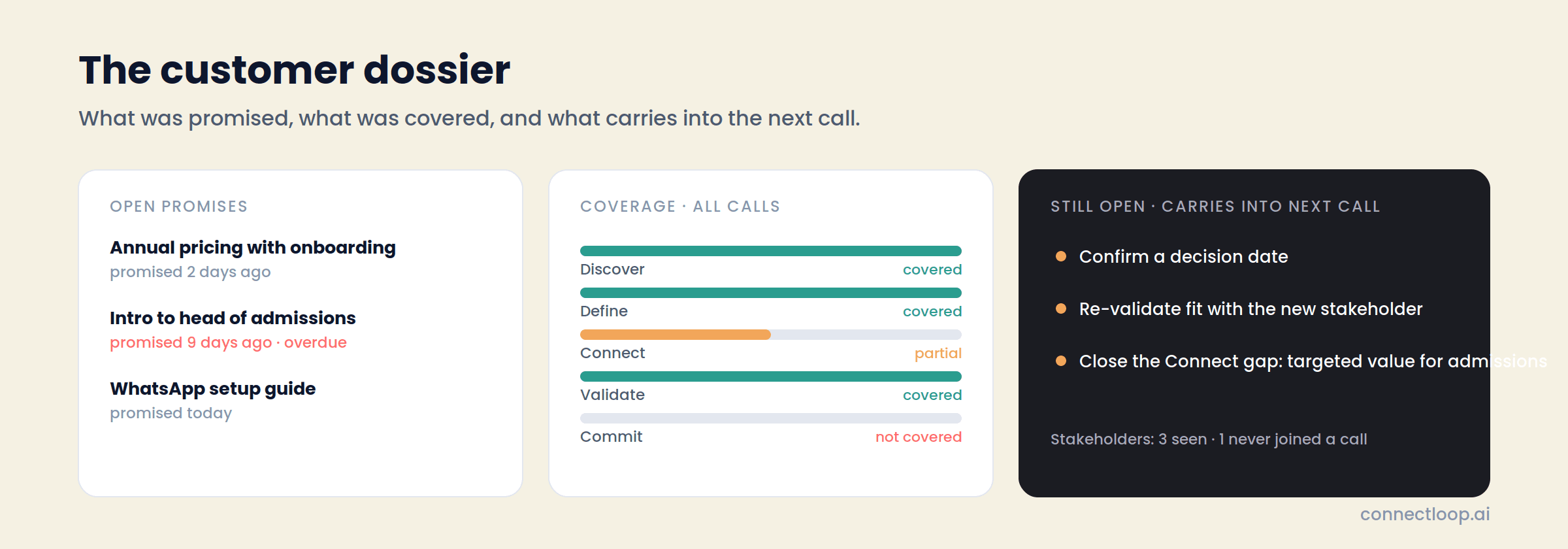
Open promises with how overdue they are, framework coverage across all calls, what still carries into the next one, the full call history, and which stakeholders have never joined a call.
The frameworks
The ConnectLoop YES Framework™, or Any
Methodology You Sell With
Frameworks are what the assistant tracks and coaches against. The library ships with ConnectLoop's own methodology and four standards, and you can build your own in minutes.
What Is the ConnectLoop YES Framework?
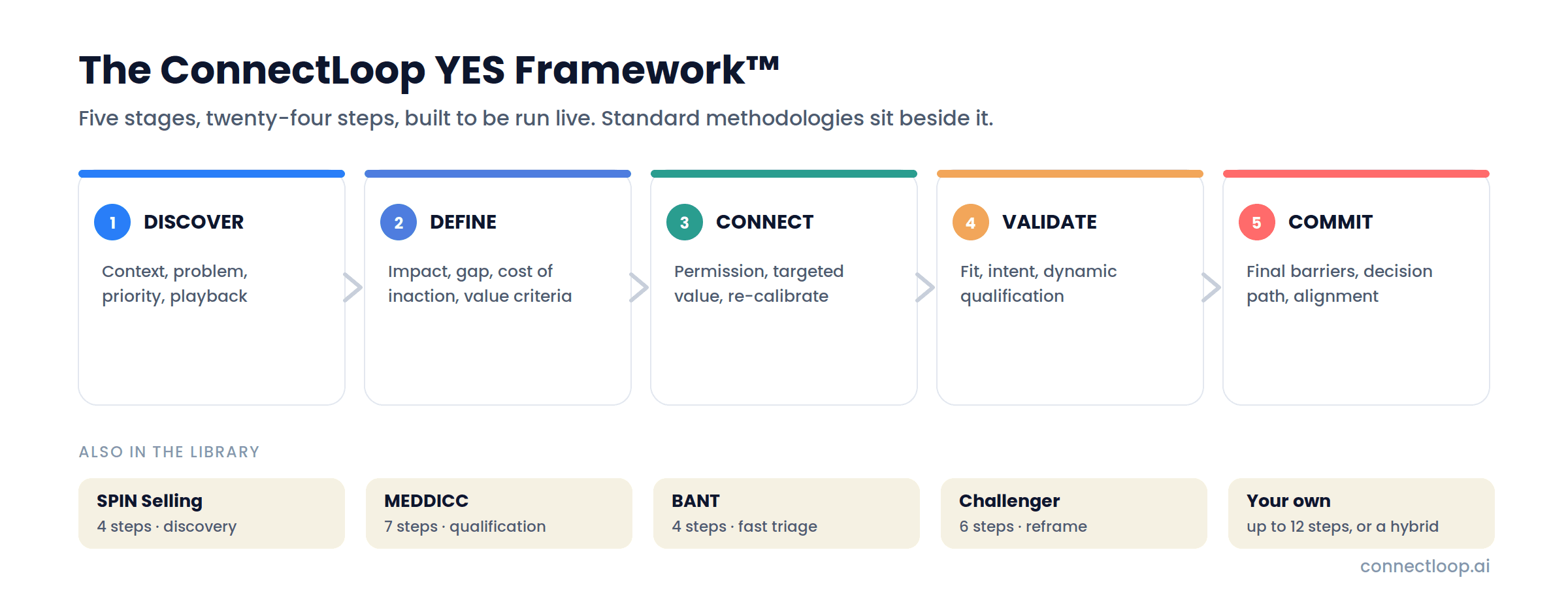
A 24-step methodology built to be run live, in five stages. Discover the context, problem and priority, and play it back. Define the impact, the gap, the cost of inaction and the buyer's value criteria. Connect with a targeted value argument, three points at most, and re-calibrate. Validate fit and secure intent. Commit by surfacing the final barriers and agreeing the decision path.
It ships as the workspace default, and each stage is also available on its own, so a discovery call can run Discover and Define while a closing call runs Validate and Commit.
Which Standards Are Included?
SPIN Selling
Situation, Problem, Implication, Need-payoff. Four steps that lead the buyer to voice the need. Best for discovery calls.
MEDDICC
Metrics, Economic Buyer, Decision Criteria, Decision Process, Identify Pain, Champion, Competition. Seven steps for complex deals with several stakeholders.
BANT
Budget, Authority, Need, Timeline. A fast four-point check for triaging inbound leads.
Challenger
Warm-up, Reframe, Rational drowning, Emotional impact, A new way, Your solution. Six steps that challenge the buyer's thinking.
Custom frameworks
Every Step You Write Becomes a Cue Card
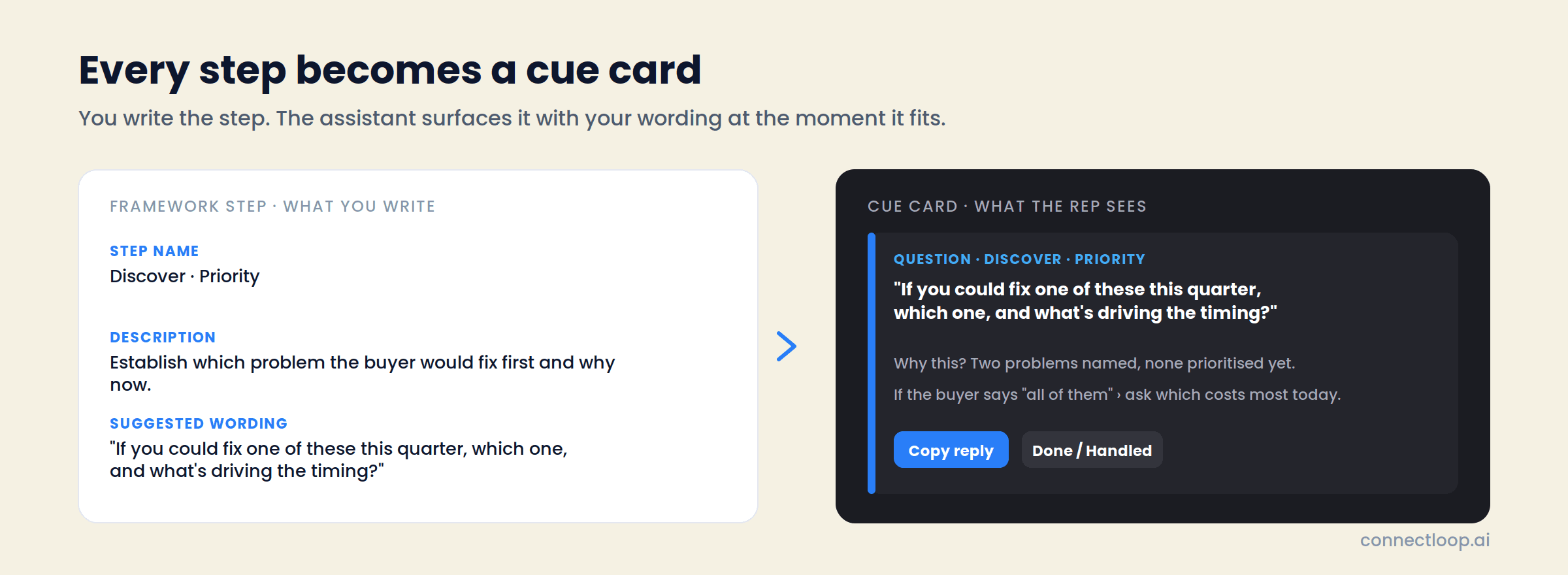
Duplicate a standard and edit it, import steps from several frameworks into one hybrid, or start from scratch. Up to twelve steps, each with three fields.
Step name
What the tracker shows the rep. Up to 80 characters, unique within the framework.
Description
What must be covered at this step. This is what drives the live cue, so it is written for the assistant as much as for the rep.
Suggested wording
The line the rep can say out loud, surfaced on the cue card with a one-tap copy.
Import steps
Pull whole frameworks or individual steps from anything in the library. SPIN plus BANT, or the YES Discover stage plus your own close.
Use for next call
Mark any framework as the workspace default. Reps can override it per call, and every recorded call keeps the framework it actually ran.
Inside the product
What the Rep Sees During the Call
The assist panel lives in the ConnectLoop tab beside the meeting window. Three views, four rail tabs, and live meters throughout.
| Element | What it shows |
|---|---|
| Assist feed | Cue cards streaming as the buyer speaks: memory, question, pricing, objection, battlecard, product knowledge and action. Each with the cue, the wording, why it was raised, branches, Copy reply and Done. |
| Views | Cockpit shows everything. Focus shows only the single most important cue. Overlay is a compact strip for a small screen. |
| Context tab | Objective, prospect and account context, watch-outs, and customer memory loaded from prior interactions. |
| Progress tab | The framework tracker: covered, now, not yet, with Skip and Undo per step, and “from previous calls” so settled steps are not re-asked. |
| Script tab | The uploaded script by section, each line marked shown this call or queued, with a running count of how much of the talk track has surfaced. |
| Transcript tab | The live diarized transcript, You versus Buyer. |
| Meters | Talk ratio, pace in words per minute, and buyer sentiment, updated throughout. Action items captured as they are agreed. |
| Controls | Pause, Resume and End session. Cue pace set per call: Relaxed, Balanced or Rapid, with objection cues always coming through. |
After the call
The Write-Up Is Done Before the Rep Stands Up
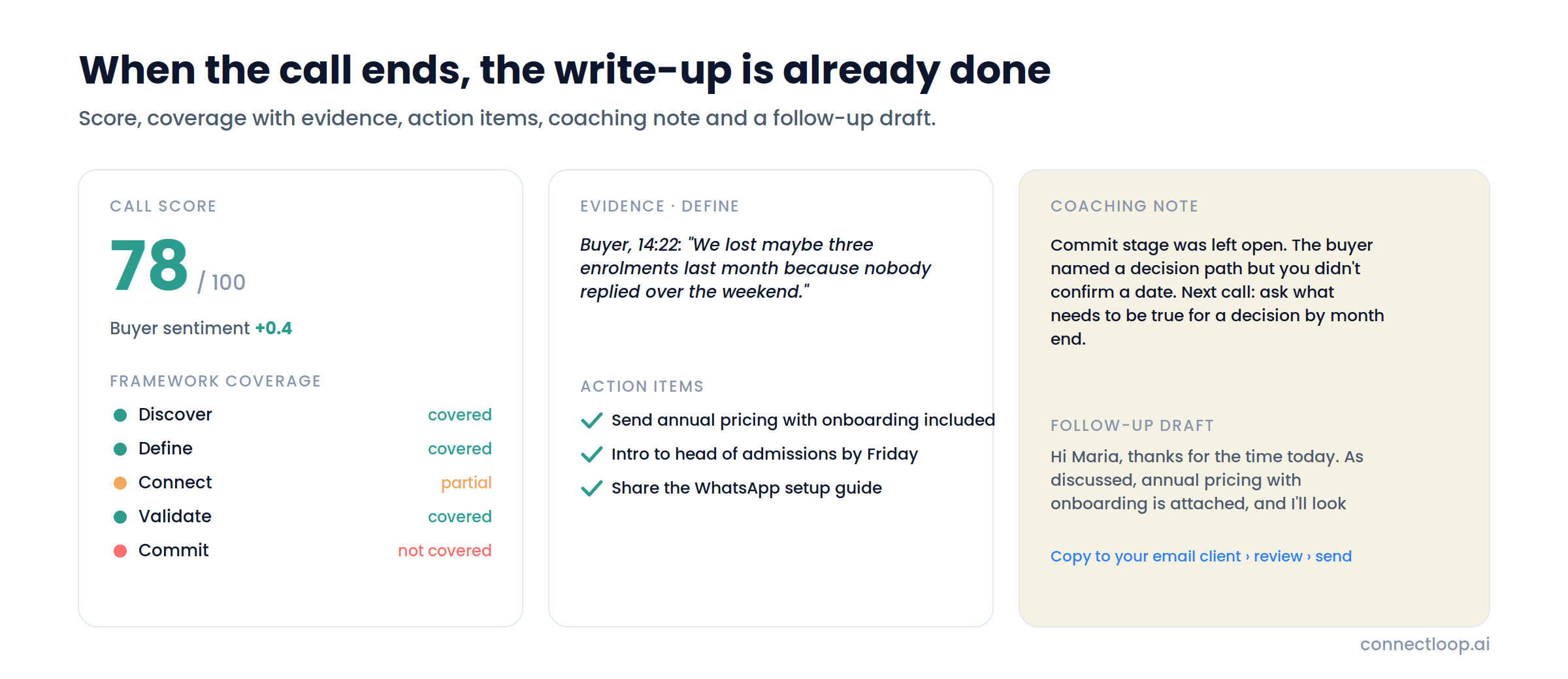
A few moments of analysis, then everything a manager would want and everything the rep would otherwise type.
Call score and buyer sentiment
One number for the call, one for how the buyer felt, with the narrative summary underneath.
Key moments
Click any moment to jump to the exact words in the transcript.
Framework coverage with evidence
Per step: covered, partial or not covered, with who said it, when, and the quote.
Action items
Everything agreed on the call, captured as it happened.
Assist performance
Cues surfaced, wording revealed, used on the call, objection cues, talk ratio.
Coaching note
Where the call could have gone better, written from the transcript.
Follow-up email draft
Generated from the call. Copy it into your email client, review, send, or regenerate.
The transcript and cues are saved even if analysis fails, and Retry analysis rebuilds the summary from them. Review live screen replays the assist panel exactly as it stood when the call ended.
Across calls
The Customer Dossier Remembers What the Rep Would Forget
For any call tied to a customer, the dossier accumulates across every session. Open promises with when they were made and how overdue they are. Framework coverage across all calls, covered, partial or not. A “still open” list that carries into the next call. The history of every session, and which stakeholders have never joined one.
Before the next call, the rep reads one page and starts where the relationship actually is.
- Open promises with overdue flags
- Coverage across all calls, not just the last one
- Still open, loaded into the next session as memory cues
- Stakeholders, including who has never been on a call
The Rep Still Runs the Call
Sales Assistance surfaces the cue and the wording. The rep decides whether to use it, marks a step skipped when it doesn't fit, and ends the session when the call is over. What the buyer hears is a person who was prepared, remembered the last conversation and asked the right next question.
Scoped per workspace: sessions, frameworks, scripts and history stay with the team that owns them
- Shown is not the same as saidWhether the rep used a cue is tracked separately from whether it appeared, so coaching is based on what happened.
- Every call keeps its frameworkChange or delete a framework later and past calls still show the steps they were scored against.
- Cost visible per callEach session shows tokens by purpose: cues, coverage, product knowledge, analysis, follow-up draft, transcription.
Getting started
First Assisted Call in Five Steps
- 01
Pick a framework
Open Sales Assistance → Frameworks. Use the ConnectLoop YES Framework, a standard, or duplicate one and make it yours. Mark it Use for next call.
- 02
Add a script, optionally
Upload a PDF, Word, text or Markdown script. Set the cue pace and whether product knowledge cues pull from your knowledge base.
- 03
Start the session
Pick the customer, add the meeting link if you want it on the record, click Start live assist.
- 04
Share meeting audio
Choose the Meet or Zoom tab and tick “Also share tab audio.” Keep the ConnectLoop tab beside the meeting window.
- 05
Work the feed
Cues arrive as the buyer speaks. End the session when the call is over; the write-up and follow-up draft are waiting.
For sales managers
Four Numbers, Every Call, Every Rep
The Assist Dashboard tracks calls assisted, cues accepted, average framework coverage and open action items, for the last 7, 30 or 90 days.
Calls assisted
Sessions started, per period and per rep.
Cues accepted
The share of surfaced suggestions reps used, so coaching starts from evidence.
Framework coverage
Average across analysed calls, with a per-framework breakdown of which methodologies are actually being run.
Open action items
Everything captured and not yet closed, so nothing promised on a call goes quiet.
Plus call volume against coverage over time, score distribution, recurring customers, and a by-rep table of calls, average score, coverage and open items.
In production
Running In the Real World
- 82
- WhatsApp conversations at Web Summit Rio
- 37
- qualified leads from those conversations
- 5
- signups, tracked end to end
Deployed across the Colsubsidio cohort in Colombia. 37 companies onboarded, 12 live. Google CASA Tier 2 Verified · Verified Meta Business · Official Meta Business Partner.
Questions
Frequently Asked Questions
No. Audio is captured in the rep's browser from the meeting tab and their microphone. Nothing appears in the participant list, and no calendar or Google integration is required. Works with Google Meet and Zoom in Chrome or Edge.
An assist feed of cue cards, a rail with Context, Progress, Script and Transcript tabs, and live meters for talk ratio, pace and buyer sentiment. Three views: Cockpit for everything, Focus for the single most important cue, Overlay for a compact strip.
Seven: memory from prior calls, discovery questions from the framework, pricing, objection responses, battlecards, product knowledge from your knowledge base, and action items. Each carries the wording to say, the reason it was raised, and branches for likely replies.
ConnectLoop's own 24-step methodology in five stages: Discover, Define, Connect, Validate, Commit. It ships as the workspace default and each stage is available on its own. SPIN, MEDDICC, BANT and Challenger are in the library beside it.
Yes. Build a framework from scratch with up to twelve steps, duplicate a standard and edit it, or import steps from several frameworks into one hybrid. Each step has a name, a description that drives the live cue, and suggested wording.
After each call, every step is marked covered, partial or not covered, with the evidence: who said it, when, and the quote. Coverage accumulates per customer across calls in the dossier, and the team average appears on the dashboard.
A call score, buyer sentiment, narrative summary, key moments linked to the transcript, action items, framework coverage with evidence, assist performance, a coaching note, the full diarized transcript, and a follow-up email draft to copy into your inbox.
It drafts it. The rep copies the draft into their email client, reviews it, edits if needed, and sends. Regenerate if the first draft isn't right.
Yes, as PDF, Word, text or Markdown up to 20 MB. It is parsed into sections and lines, and the assistant surfaces each line when the conversation reaches it, marked shown or queued. Script cues can be switched off for a single call.
A page per customer that accumulates across calls: open promises with overdue flags, framework coverage across all sessions, a still-open list that carries into the next call, the full call history, and stakeholders including who has never joined.
Company Admins, Workspace Admins and Sales Managers. Everything is scoped to the active workspace: sessions, frameworks, scripts and history. Sales Assistance is a paid feature; the pages show an upgrade notice on plans without it.
Yes. Each session in Call History shows cost and tokens broken down by purpose: assist cues, framework coverage, product knowledge, post-call analysis, follow-up draft and transcription.
Integrations
18+ Native Integrations, Not Middleware
Leads, transcripts and intent scores flow into the tools your team already uses.
- Salesforce
- HubSpot
- Zoho
- Pipedrive
- WooCommerce
- Google Calendar
- Outlook Calendar
- Gmail
- Outlook
- Calendly
- Google Meet
- Microsoft Teams
- Google Drive
- Google Sheets
- Microsoft OneDrive
- GitHub
Also included
Sales Assistance Picks Up Where the Agent Hands Over
- Conversational IntelligenceCompetitors, intent, sentiment and friction across every chat LIA has, before the call.How conversational intelligence works →
- Sales playbookHow to write the framework steps and playbook the assistant runs.Read the guide →
- Sales coachingWhat coaching from scored calls changes, and how to run it weekly.Read the guide →
Run Your Next Call With the Framework Beside You
Pick a framework, share the meeting tab, and see the first cue card arrive. The write-up will be waiting when you hang up.
Free plan, no card required · Priced on conversations, not credits