
Integrations
Integrations: One Agent, Connected to the Tools Your Team Already Uses
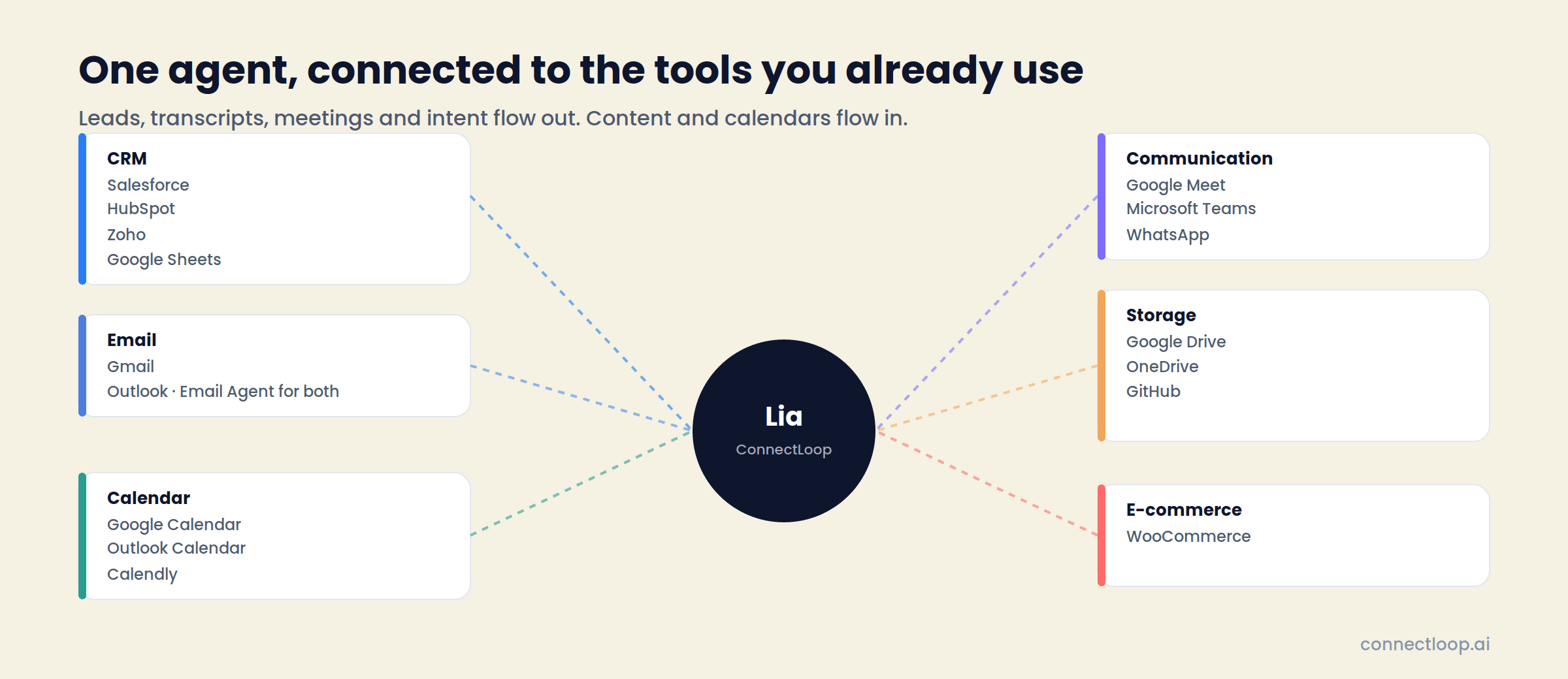
LIA answers on your website, WhatsApp and email, then writes what it learned to the systems that run your business. Leads, transcripts, intent scores and meetings flow into your CRM and calendar. Training content flows in from your drives. Every connection is native, authorised with OAuth, and managed from one screen.
18 native integrations · Connect with OAuth · Google CASA Tier 2 Verified · Official Meta Business Partner
Why it matters
Native Connections, Not Middleware
Each integration is built into ConnectLoop and authorised directly with the provider. There is no third-party automation layer to configure, no per-task pricing, and no record that lives in one tool but not the other.
- 01
One record per visitor
From the first anonymous visit to the booked call, everything LIA learns is written to the contact your team already works from.
- 02
Same agent, every connection
The Gmail draft, the WhatsApp reply and the website answer all come from the same knowledge base and the same behaviour settings.
- 03
Connect in a minute
Click Connect with OAuth, sign in to the account, authorise ConnectLoop. A green badge means connected. Disconnect any time.
All integrations
Eighteen Connections, Six Categories
The same categories you'll see under Connected Apps. Start with email and calendar; they power the conversation summary and the meeting booking.
 Salesforce CRMCRM
Sync leads, contacts and opportunities. Intent data written back as structured fields.
 HubSpot CRMCRM
Manage your deals and customers easily, with every conversation attached to the contact.
 Zoho CRMCRM
Sync leads, contacts and opportunities into the Zoho workspace your team runs.
 Google SheetsCRM
Export leads and conversation data to a sheet, or import lists, for pipelines that live in Sheets.
 GmailEmail
Send conversation summaries from your Gmail address. Draft replies when visitors respond.
 OutlookEmail
Send conversation summaries from your Outlook address. Draft replies when visitors respond.
 Gmail for Email AgentEmail
AI-powered replies to incoming Gmail, from the same knowledge LIA uses on your site.
 Outlook for Email AgentEmail
AI-powered replies to incoming Outlook mail, from the same knowledge LIA uses on your site.
 Google CalendarCalendar
Auto-schedule meetings and events, with invites sent from the connected calendar.
 Outlook CalendarCalendar
Sync Outlook events and book against real availability.
 CalendlyCalendar
Book through your existing Calendly event types. Requires a paid Calendly account.
 WhatsAppCommunication
Connect a WhatsApp Business number through Meta's guided signup. LIA answers there with the same knowledge.
 Google MeetCommunication
Create and join video meetings from your workspace. Live-call coaching from the Meet tab.
 Microsoft TeamsCommunication
Create and join Teams meetings from your workspace, connected with OAuth.
 Google DriveStorage
Sync and read documents from Drive straight into LIA's knowledge base.
 Microsoft OneDriveStorage
Connect and sync with OneDrive sites and files for training documents.
 GitHubStorage
Sync issues and repos so LIA answers technical questions from the source.
 WooCommerceE-commerce
Sync published products, prices and stock. LIA recommends products with Add to Cart in the chat.
Zoom is also supported for Sales Assistance live-call coaching.
Setup
Connecting an App Takes Three Clicks
- 01
Open Connected Apps
In the left sidebar. Every integration is listed with a green badge for connected and a grey badge for not yet.
- 02
Connect with OAuth
Click Connect, sign in to the account, authorise ConnectLoop. No API keys to copy for CRMs, email, calendars or storage.
- 03
Set the behaviour
For calendars, enable booking on a team member and set their hours. For CRMs, tags decide who each lead routes to. Disconnect any time with one click.
WooCommerce connects with a Consumer Key and Secret from your store. WhatsApp connects through Meta's Embedded Signup. If Google shows an “app not verified” notice during connection, click Advanced, then Continue to ConnectLoop; verification is in progress.
Plans
Connected Apps by Plan
Limits apply across all workspaces on the account.
| Plan | Connected apps |
|---|---|
| Free | Up to 2 |
| Launch | Up to 4 across all workspaces |
| Growth | Up to 9 across all workspaces |
| Scale | Unlimited |
| Enterprise | Custom |
Start with email and calendar on the Free plan. They power conversation summaries and meeting booking, which is most of what LIA does in a first week.
What Flows Where
Out of ConnectLoop: leads, transcripts and summaries, the intent score with its reasons, pages viewed, sentiment, booked meetings and follow-up drafts. Into ConnectLoop: your training documents, your calendar availability, your product catalogue. The agent sits in the middle, and your team keeps working in the tools it already has.
- One agent, every connectionWebsite, WhatsApp and email answers all come from the same knowledge base and settings.
- Structured, not pastedIntent data lands in CRM fields your reports can use, not in a notes box.
- Shared calendars welcomeThe connected calendar can be a team calendar; the visitor and the booked team member are both added as participants.
Questions
Frequently Asked Questions
Email and calendar. Email lets LIA send conversation summaries to visitors from your own address and draft replies when they respond. Calendar lets LIA book meetings against real availability with invites sent to both sides.
Booking works inside ConnectLoop without one, and meetings appear in the platform. Connecting a calendar adds the invites, checks real-time availability against existing events, and prevents double bookings.
One at a time. To switch from Google Calendar to Outlook Calendar, disconnect the first and then connect the second. Bookings already made stay on the record.
It can be a shared company or team calendar, as long as it is actively monitored. Invites are created from the connected calendar as the event owner, and the visitor and the booked team member are both added as participants.
Leads and contacts, the conversation summary and transcript, the intent score with the signals behind it, pages viewed, visit count, time on site, the predicted reason for reaching out, and conversation sentiment, as structured fields on the contact.
The standard Gmail connection sends conversation summaries from your address and drafts replies when a visitor responds to one. Gmail for Email Agent works inside your mailbox, drafting replies to any incoming customer email from the same knowledge base LIA uses on your site.
Once Google Drive, OneDrive or GitHub is connected, the Train screen offers Import from that source, so FAQ documents, pricing sheets and product guides go straight into the knowledge base without downloading and re-uploading.
Yes. Connect a WhatsApp Business number through Meta's guided signup and LIA answers customer chats there with the same knowledge and behaviour as on your website. ConnectLoop is an official Meta Business Partner.
With your store's Consumer Key and Consumer Secret, on the same URL as the workspace website. Published products, prices, stock, categories and images sync automatically, and LIA recommends products with Add to Cart in the chat.
Open Connected Apps and click the red Disconnect button. For WooCommerce, disconnecting removes the product sync and webhooks; your store, products and orders stay unchanged.
Google verification is in progress. Click Advanced, then Continue to ConnectLoop, and the connection completes normally.
Connect Email and Calendar, Then Watch the First Meeting Land
Two connections, a few minutes, and LIA is sending summaries and booking against your real availability.
Free plan, no card required · Priced on conversations, not credits