
Google Sheets Integration: When Your Pipeline Is a Spreadsheet
Plenty of teams run sales from a sheet: one tab for leads, one for this month, a column for who owns what. ConnectLoop treats that sheet as the system of record. Every lead LIA captures on website chat, WhatsApp or email lands as a row, with the conversation data alongside it, and a list in the sheet can be imported the other way. Connect with OAuth.
Connect with OAuth from Connected Apps · Native, no middleware · Google CASA Tier 2 Verified
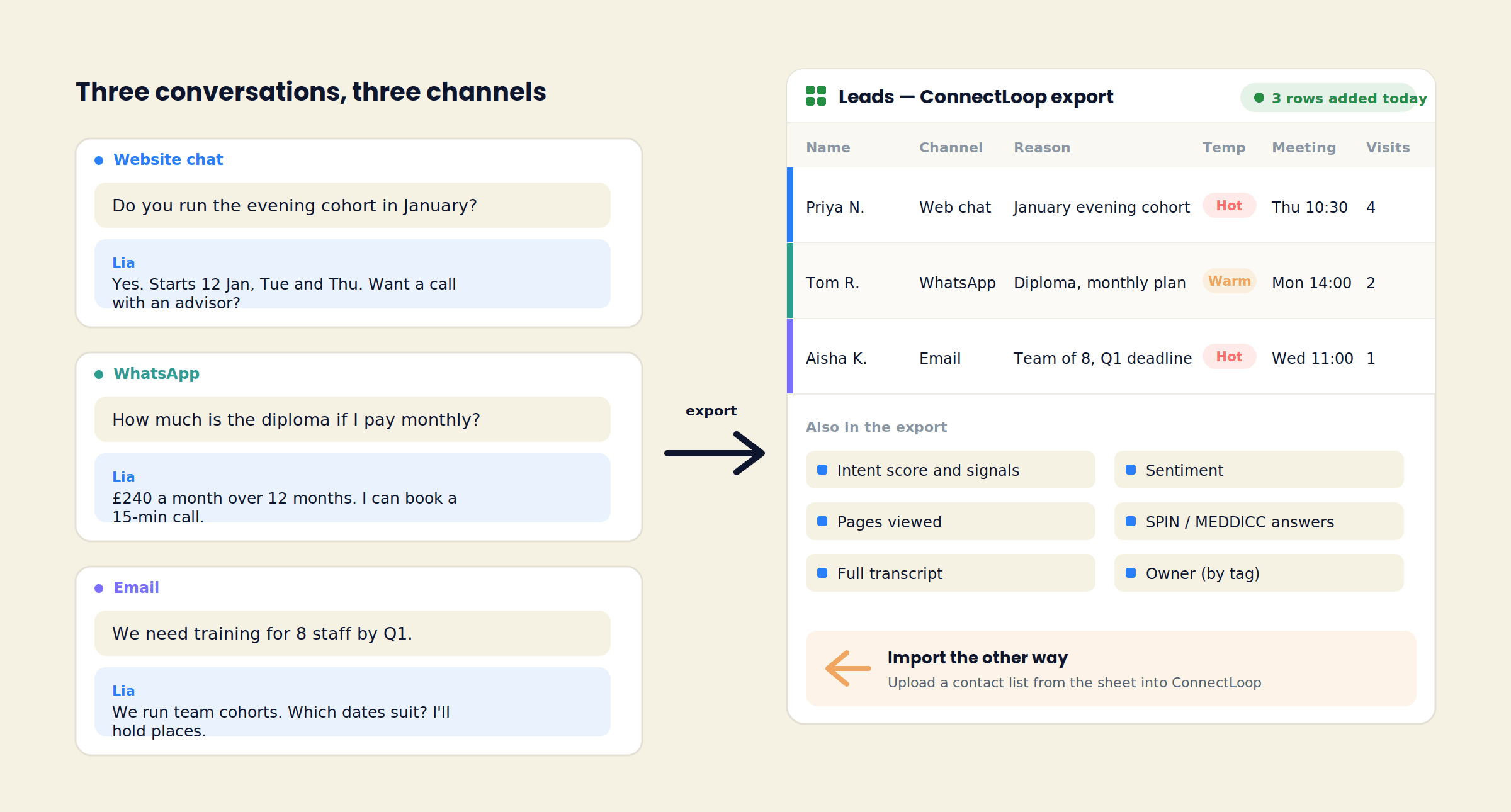
A sheet is a fine CRM
Why Teams Keep the Pipeline in Google Sheets
A sheet is shared in one click, filtered in two, and everyone already knows how to use it. What it usually lacks is the conversation behind each row. That is the part ConnectLoop supplies.
What a row normally holds
A name and an email
Typed from a form, or pasted from an inbox.
A status column
New, contacted, closed. Updated by hand when someone remembers.
A notes cell
Whatever the rep wrote after the call, if they wrote anything.
What the exported row holds
The same name and email
Captured by LIA in the conversation, on whichever channel it happened.
The reason they reached out
Predicted from what they said, in one line, before anyone calls them.
The conversation itself
Summary, transcript, intent score, sentiment, pages viewed and the meeting LIA booked.
Leads and conversation data
The Columns ConnectLoop Exports
The Connected Apps card says it in one line: export leads and conversation data to a sheet, or import lists. This is what arrives in the sheet.
| Column group | What it contains |
|---|---|
| Lead | Name, email, phone if given, channel (website chat, WhatsApp Business, or a connected Gmail or Outlook inbox), date and time captured |
| Reason | Why the person reached out, predicted from the conversation |
| Temperature | Hot, Warm or Cold, with the reasons written out |
| Intent | The intent score and the signals behind it: pricing asked, competitor named, timeline stated, meeting booked |
| Visits | Visit count, pages viewed including pricing, first and most recent visit, including sessions from before the visitor identified themselves |
| Conversation | Summary and full transcript of every exchange |
| Sentiment | How the conversation felt, and whether it crossed the handover threshold |
| Qualification | With Sales Methodology on: SPIN or MEDDICC answers, each marked Inferred or Confirmed, and the steps still open |
| Meeting | The appointment LIA booked through the connected calendar |
| Owner | The team member the lead was routed to by tag |
Column names follow the sheet you connect. Add a column for your own stage or notes; ConnectLoop leaves it alone.
Two directions
Export to the Sheet, Import From It
Export
Leads and conversations become rows
Each lead LIA captures is written to the connected sheet with the columns above. Use the sheet as the daily view: filter to Hot, sort by meeting date, share the tab with a partner, or feed a Looker Studio report from it.
Import
A list in the sheet becomes contacts in ConnectLoop
Already have a list of enquiries, event sign-ups or past customers in a sheet? Import it into ConnectLoop so the team works one list instead of two, and so the people on it are recognised when they come back to the site or write in.
Built for sheet-first teams
Who Runs Sales From a Sheet
Not every team is ready for a CRM, and some never need one. Three kinds of team connect Google Sheets first.
Training providers and course businesses
Enquiries arrive in cohorts. A tab per intake, a row per enquiry, the reason and the booked call already filled in.
Agencies and consultancies
A handful of new conversations a week. A sheet the partners can open on a phone is enough, as long as each row carries the conversation.
Early-stage SaaS
The founder still does the calls. The sheet is the pipeline until the volume justifies HubSpot or Salesforce, and ConnectLoop connects to those when the day comes.
What the sheet looks like on Monday morning
Eleven new rows since Friday. Four marked Hot: two asked about pricing twice, one named a competitor, one has a deadline in the reason column. Three meetings already booked for this week. The transcript for each is a link in the row.
The owner column is filled by tag routing, and a reminder goes to that person every 24 hours while a lead sits unattended.
Setup
Connect Google Sheets in Three Steps
- 1
Connect with OAuth
In Connected Apps, filter to CRM and find Google Sheets. Click Connect, sign in with the Google account that owns the sheet, and allow access. The badge turns green.
- 2
Choose the sheet
Pick the spreadsheet and tab that leads should go to, or create a new one. Switch on Visitor Intelligence, Sales Methodology and Conversational Intelligence to fill the matching columns.
- 3
Send a test lead
Use Live Test: ask a question, leave an email, open the sheet. The row is there with the reason, the temperature and the transcript. Import an existing list if you have one.
Google Sheets counts as one connected app against your plan limit: 2 on Free, 4 on Launch, 9 on Growth, unlimited on Scale. Disconnect any time; rows already written stay in the sheet.
Questions
Google Sheets Integration FAQ
No. The sheet can be the system of record. If you later connect HubSpot, Salesforce, Zoho or Pipedrive, the same leads and conversation data are written there too.
Leads and conversation data: the lead's name, email and channel, the reason for reaching out, temperature, intent score and signals, visit history, summary and transcript, sentiment, qualification answers, the booked meeting and the owner.
Yes. Import a contact list from the sheet into ConnectLoop so the team works one list and the people on it are recognised when they return to the site or write in.
The one that owns or can edit the spreadsheet. Access is granted with OAuth; ConnectLoop's Google integration is CASA Tier 2 verified.
Yes. Add stage, notes or anything else. ConnectLoop writes its own columns and leaves yours alone.
Yes. Website chat, WhatsApp Business and a connected Gmail or Outlook inbox all write to the same sheet, with the channel recorded in the row.
Yes, when a calendar is connected. LIA books against Google Calendar, Outlook Calendar or Calendly and the appointment is written to the lead's row.
Rows already written stay in the sheet. Conversations are always stored in ConnectLoop as well.
Related
Sheet-First Teams Usually Connect These Next
- Google CalendarSo the meeting column is a real invite on a real calendar.
- WhatsAppThe second channel writing rows to the same sheet.
- HubSpotWhen the sheet becomes a CRM, the leads come with you.How it works →
Connect Your Sheet and Watch the First Row Arrive
One OAuth click. The next enquiry on your site, WhatsApp or inbox becomes a row with the reason, the temperature, the transcript and the meeting already in it.
Free plan, no card required · Priced on conversations, not credits