
Website Visitor Intelligence
Website Visitor Intelligence That Converts Traffic Into Meetings
Your analytics say 482 visitors yesterday. Which of them were buyers? Visitor Intelligence tracks each anonymous journey, pages viewed, repeat visits, the pages that held their attention, writes a summary of what each visitor is after with a High, Medium or Low buying-intent label, and connects the whole history to a profile the moment someone shares their details.
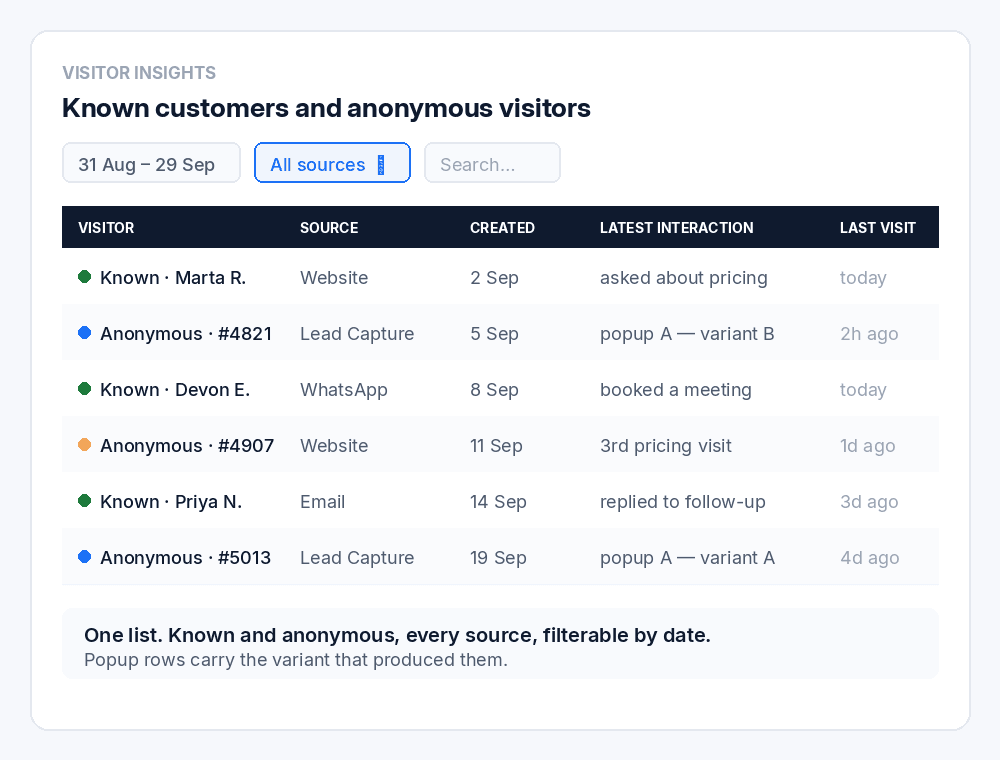
Known customers and anonymous visitors, in one list.
Free plan, no card · Live in 60 seconds · Google CASA Tier 2 Verified · Official Meta Business Partner
The problem
Analytics Counts Visitors. It Cannot Tell You Which Ones Matter.
Most of your traffic leaves anonymously, with no form fill and no trace. Analytics gives you a number. Visitor identification software gives you a company name. Neither tells you which visitor was serious, what held their attention, or which channel they came in through.
A Number Is Not a Signal
482 visitors yesterday. Which one read pricing four times this week? Which one spent nine minutes on a product page and came back twice? A total tells you traffic exists and nothing about who to call.
Sources Live in Different Tools
Website analytics holds the browsing. The chat tool holds the conversation. WhatsApp lives on a rep's phone. Nobody sees that all four touchpoints were the same person.
Form Fields Are a Weak Score
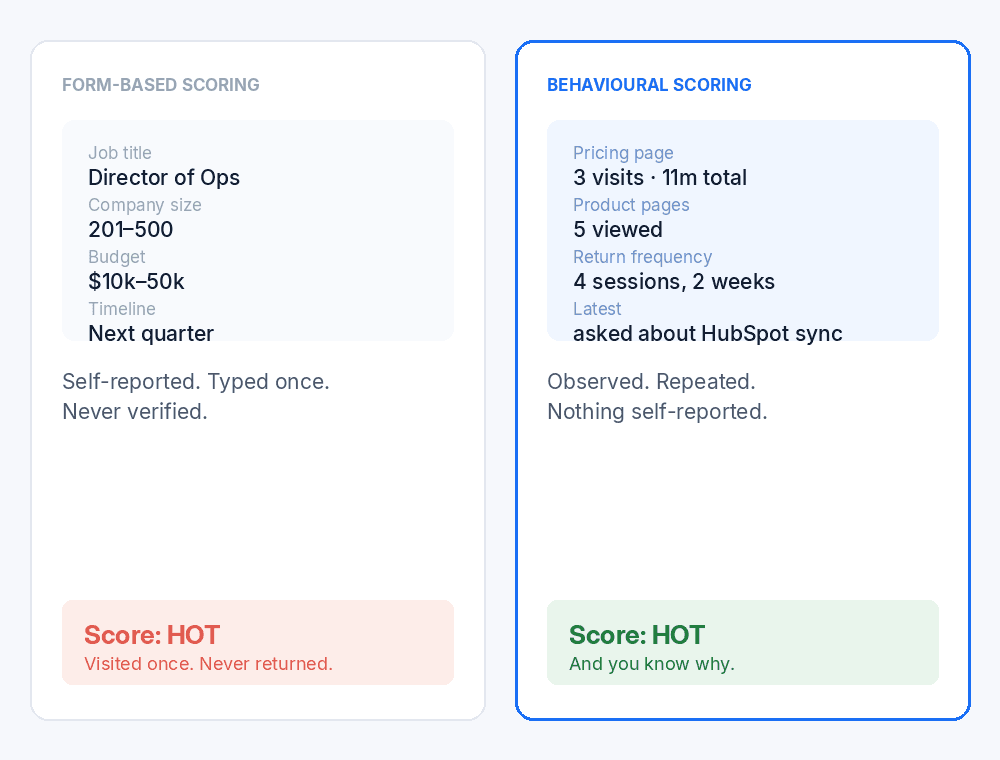
Lead scoring built on a job title someone typed into a form ranks a curious student above a buyer who read your pricing page three times. Self-reported data is the least reliable signal you have.
History Starts at the Form
Most tools begin the record when somebody submits their details. Everything they read before that is discarded, so your rep opens a contact with no idea the person has been researching for a fortnight.
Popups Convert, Then Vanish
You run a popup, it captures a lead, and the attribution stops there. Which variant produced it, and what that visitor did before and after, is usually not recorded anywhere useful.
No Coverage After Hours
Someone reads your pricing page three times, works up a question, and finds a contact form. Speed to lead is the metric everybody quotes and almost nobody covers overnight.
The solution
LIA Knows Who's Serious Before They Say a Word
LIA tracks every anonymous journey, scores intent from what people actually did, answers the question when they ask it, and keeps known customers and anonymous visitors in one list you can filter, search and act on.
01
Tracks Each Anonymous Journey From the First Visit
Pages viewed, active days, repeat visits and the pages that held their attention. The behavioural record starts at session one, whether or not the visitor ever fills in anything.
02
Connects the Whole History on Identification
The moment a visitor shares their details, every prior anonymous session attaches to their profile. Your rep opens a history, not a first impression.
03
Scores Intent From Behaviour, Not Form Fields
Every visitor gets an automatic summary of their browsing and a buying-intent label of High, Medium or Low, built from visits, active days, pages viewed and return frequency rather than what somebody typed into a dropdown. A repeat pricing visitor outranks a job title.
04
Keeps Known and Anonymous in One View
Visitor Insights lists known customers and anonymous visitors together, with source, creation date, latest interaction and latest website visit on every row. One list, not two systems.
05
Attributes Every Source, Including Popups
Filter by Website, WhatsApp, Email or Lead Capture, and by which popup a visitor came from, down to the individual A/B variant. Attribution that survives past the capture.
06
Shows the Whole Site's Pulse in One Overview
Pageviews, unique sessions, active and new users, average time on page and top referrer for the last 7, 30 or 90 days, with pageviews over time, traffic sources and a top-pages table showing views and average time on each.
Inside the product
Known Customers and Anonymous Visitors, in One List
Visitor Insights is the working screen. Filter by date range, filter by source, search by customer, and open any visitor to see the full journey underneath.
| Column | What it tells you |
|---|---|
| Visitor | Known customer or anonymous, in the same list, with pages viewed and visit count under the name |
| Source | Website, WhatsApp, Email, Lead Capture, or a specific popup variant |
| Created | When the visitor record began |
| Last interaction | The most recent touch on any channel, sortable |
| Latest website visit | When they were last on the site, sortable |
- Date range
- Website
- Lead Capture
- From any popup
- A named A/B variant
- Search by customer
Popup-level attribution is the part most tools drop. Knowing a lead came from variant B of a specific popup, and then seeing everything that visitor did before and after, is a different level of detail from “web form”.
Visitor Details
Click Any Visitor and Read Their Whole Journey
Every row in Visitor Insights opens a Visitor Details page. The Website Activity tab is where a number in a list becomes a person you can call, with the summary already written.
A summary, written for you
Every visitor gets an automatic summary of their browsing behaviour and buying intent, updated whenever new activity is detected. Three visits in 21 days, one page viewed three times, no chat started: that reads as a specific interest and an early-stage evaluation, and the summary says so.
Buying intent: High, Medium or Low
The label sits on the summary, so the verdict is the first thing you see.
Five metrics
Total Visits, Active Days, Pages Viewed, First Website Visit, Last Website Visit. Active Days is the one to watch: three visits on three separate days is a different visitor from three visits in one afternoon.
Website Activity Timeline
Every page visit, chat started and, for identified customers, appointment booked, dated and timed, filterable by activity type.
Top Pages Viewed
Which pages drew the interest, with a view count per page and a link to the full list.
Return Visitor Behavior
How many times they came back, the average time between visits and their overall visit frequency. Most tools tell you someone returned. This tells you their rhythm.
The same page exists for identified customers, under the Website Activity tab on their record. Their anonymous history is attached automatically, so the timeline runs from the first anonymous visit through to the day they became a customer.
Behaviour beats self-reporting
A Job Title Is Not Buying Intent
Traditional lead scoring runs on what somebody typed into a form. Company size, seniority, budget range, all self-reported, all optimistic, and none of it tells you whether the person is actually close to buying.
Visitor Intelligence scores from behaviour instead. Which pages they read. How many separate days they were active. How many times they came back, and how long between visits. Then it writes the summary and labels the intent High, Medium or Low.
A visitor who read your pricing page three times across two weeks is a stronger signal than a director who filled in a form once and never returned.
- Pages viewed, including which pages held attention
- Active days, not just total visits
- Return frequency and the average gap between visits, the signal most tools ignore
- An AI-written summary with a High, Medium or Low intent label
Nothing gets discarded
The History Starts Before the Name Does
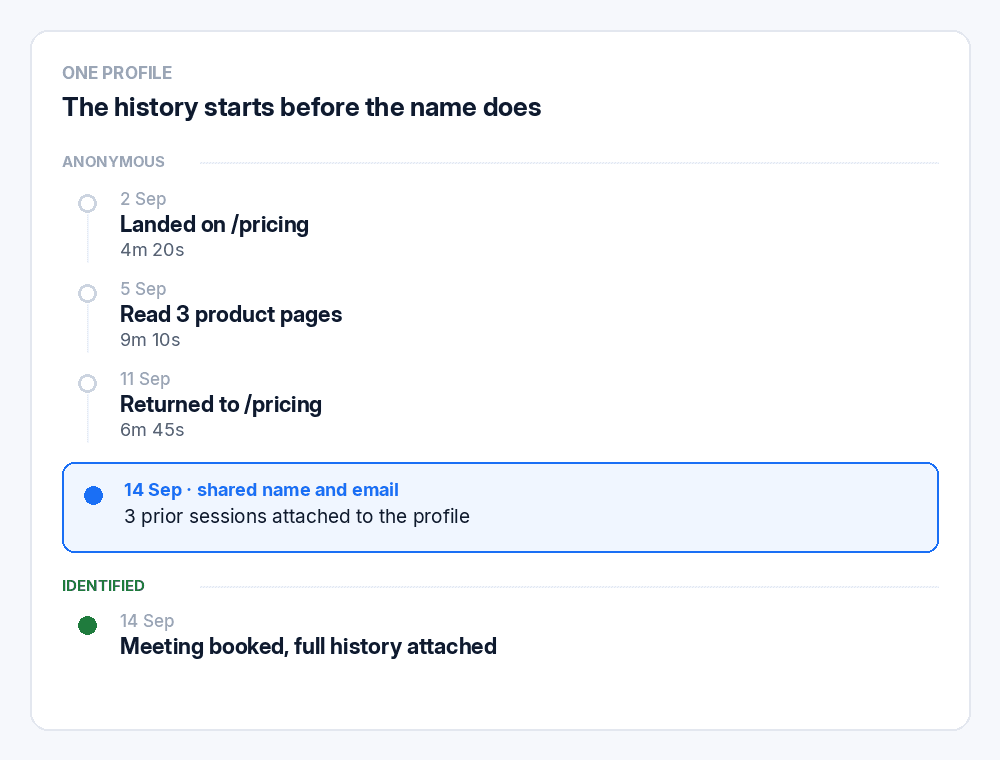
Most systems create a record when somebody submits a form. Everything before that is gone, so a rep opens a contact with no idea the person has been researching for two weeks.
LIA tracks the journey from the first anonymous session, under a unique anonymous ID assigned to that browser. When the visitor eventually submits a lead form with their email address, the entire prior history is matched on that email and connects to their customer profile.
Three anonymous sessions become one named record with everything attached. Nothing is lost, previous visits stay visible, and the history is kept even if you later switch the feature off.
- Every page viewed across every prior session
- Active days and total visits, from the first session
- Return visits, with dates, in the activity timeline
- The source that finally brought them into conversation
One list, four sources
Website, WhatsApp, Email and Lead Capture in One Place
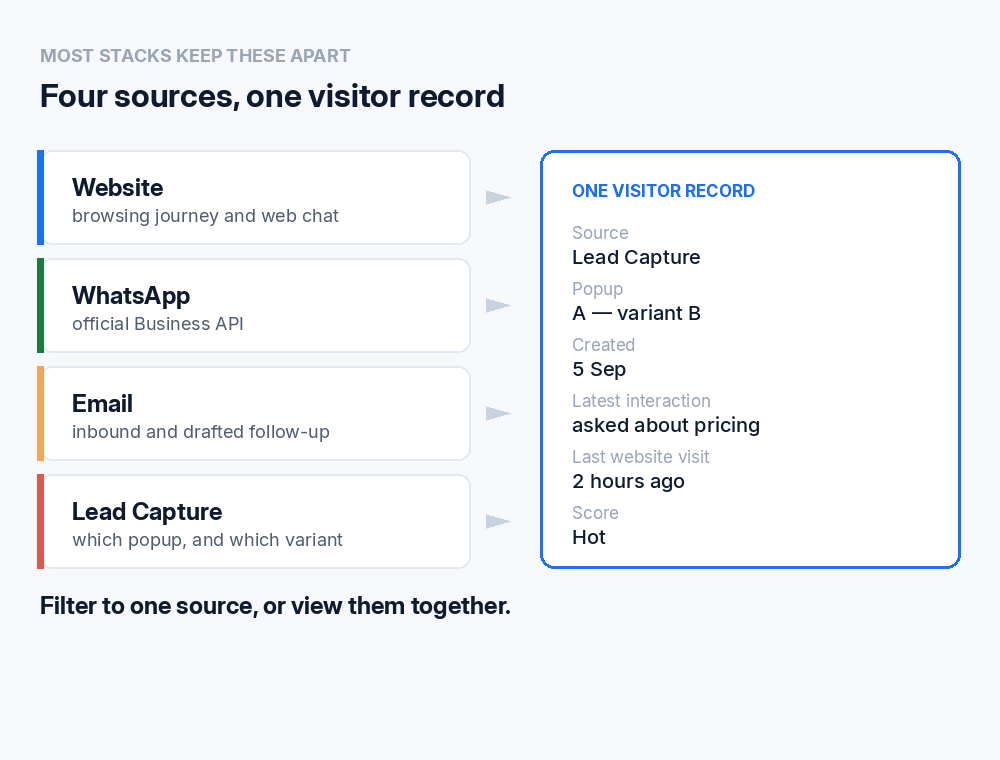
Most stacks keep channels apart. Analytics holds the session, the chat tool holds the conversation, WhatsApp lives on a rep's phone, and nothing reconciles them.
Visitor Insights lists every visitor with the source attached, whichever channel they arrived through. Filter to one source or view them together.
As a verified Meta Business Partner running on the official WhatsApp Business API, the WhatsApp thread is part of the record rather than a screenshot somebody took.
- Website — the browsing journey and web chat
- WhatsApp — on the official Business API
- Email — inbound and drafted follow-up
- Lead Capture — including which popup, and which variant
Answering is part of it
The Visitor Tells You, Because Someone Answered
Tracking tells you what somebody did. It does not tell you why they came, what they are comparing you against, or when they need it.
That comes from the conversation. LIA answers from your approved content on web chat, WhatsApp and email, at any hour, so the visitor gets a reason to identify themselves rather than a contact form.
What they say in that conversation joins the behavioural record, which is why the profile is more useful than a session log.
- The reason for the visit, not just which pages
- What they are comparing you against
- Their timeline, volunteered rather than inferred
- A booked meeting, if they are ready

Analytics tells you traffic exists.
Visitor Intelligence tells you who to call.
482 visitors is a number. One visitor who read pricing four times is a conversation.
Getting started
Five Steps, One Afternoon
- 01
Paste your URL
LIA crawls your site and builds a knowledge base in about sixty seconds. Add documents and playbooks as needed.
- 02
Add one line of code
The widget installs with a single snippet. Colours, logo, welcome messages and display rules configured to your brand.
- 03
Set the boundaries
Decide what LIA may use, what escalates to a human, and what LIA must never claim. Test before publishing.
- 04
Connect calendar and CRM
Meetings route to the right rep. Contacts, transcripts and intent scores sync automatically.
- 05
Switch on Visitor Intelligence
It is off by default. Turn it on under Agent Behavior, and Visitor Insights starts building profiles from the first session, including the visitors who never fill in anything.
In production
Running In the Real World
- 82
- WhatsApp conversations at Web Summit Rio
- 37
- qualified leads from those conversations
- 5
- signups, tracked end to end
Deployed across the Colsubsidio cohort in Colombia. 37 companies onboarded, 12 live. Google CASA Tier 2 Verified · Verified Meta Business · Official Meta Business Partner.
Questions
Frequently Asked Questions
Tracking what people do on your site, pages viewed, active days, repeat visits, which pages held their attention, and turning that into a written summary and an intent label about who is worth a rep's time. LIA does this from the first anonymous session, then connects the history to a profile once the visitor identifies themselves.
Analytics gives you totals: 482 visitors, average time on page, bounce rate. Visitor Intelligence gives you individuals. Which specific visitor read pricing four times this week, what they asked, and which source they came through.
No. ConnectLoop does not perform reverse IP lookup and does not sell contact data. Each browser gets an anonymous visitor ID, no personal information is collected until the visitor submits their contact details, and the history is matched to their profile on the email address they provide.
From real behaviour rather than form fields. Total visits, active days, pages viewed, return frequency and which pages held attention feed an automatic summary of the visitor, labelled High, Medium or Low intent. The summary updates whenever new activity is detected. A repeat pricing visitor scores higher than a job title typed into a dropdown.
Two tabs. Overview gives the headline numbers. Website Activity gives Total Visits, Active Days, Pages Viewed, first and last website visit, the AI summary with its intent label, a dated timeline of page visits, chats started and appointments booked, the Top Pages Viewed with counts, and Return Visitor Behavior with the number of returns, average time between visits and visit frequency.
No. An admin turns it on under Agent Behavior in your workspace. Once enabled, anonymous visitor profiles begin collecting website activity and the Website Activity tab appears on both anonymous visitors and identified customers. If you turn it off later, the history already collected is kept.
The journey is still tracked and still appears in Visitor Insights as an anonymous visitor, with source, latest interaction and latest website visit. You will know which pages drive interest even where no individual is named.
Website, WhatsApp, Email and Lead Capture. Lead Capture includes popup attribution, so you can filter to a specific popup or an individual A/B variant.
Yes. Visitor Insights lists both in one table, filterable by date range and source, and searchable by customer.
Yes. Website chat, WhatsApp and email share one conversation history, so a visitor who reads three pages and then messages on WhatsApp appears as one profile rather than two records.
ConnectLoop uses consent-based capture with PII controls, sensitive-data masking, controlled access and full audit records, and supports GDPR obligations. Compliance is never automatic, and how you deploy it matters.
HubSpot, Salesforce, Pipedrive and Zoho, alongside 18+ native integrations across calendars, email, collaboration and commerce.
On conversations, not per identified visitor or per credit. Every plan runs the same agent, and there is a free plan with no card required.
Integrations
18+ Native Integrations, Not Middleware
CRM, calendar, email, collaboration and commerce. Every conversation, contact and booked meeting flows into the tools your team already uses.
- Salesforce
- HubSpot
- Zoho
- WooCommerce
- Google Calendar
- Outlook Calendar
- Gmail
- Outlook
- Calendly
- Google Meet
- Microsoft Teams
- Google Drive
- Google Sheets
- Microsoft OneDrive
- GitHub
Also included
Visitor Intelligence Is One Part of the Agent
- Inbound qualificationSPIN and MEDDIC run as natural questions inside the conversation, not as a form.How qualification works →
- Appointment bookingMeetings booked in the thread against real calendar availability.How booking works →
- WhatsApp agentVerified Meta Business Partner on the official Business API.How WhatsApp works →
See Who Is On Your Site Right Now
Paste your URL and LIA trains on your content in about sixty seconds. Watch LIA answer your own visitors before you speak to anyone here.
Free plan, no card required · Priced on conversations, not credits