
Zoho CRM Integration: Leads That Arrive With the Whole Story
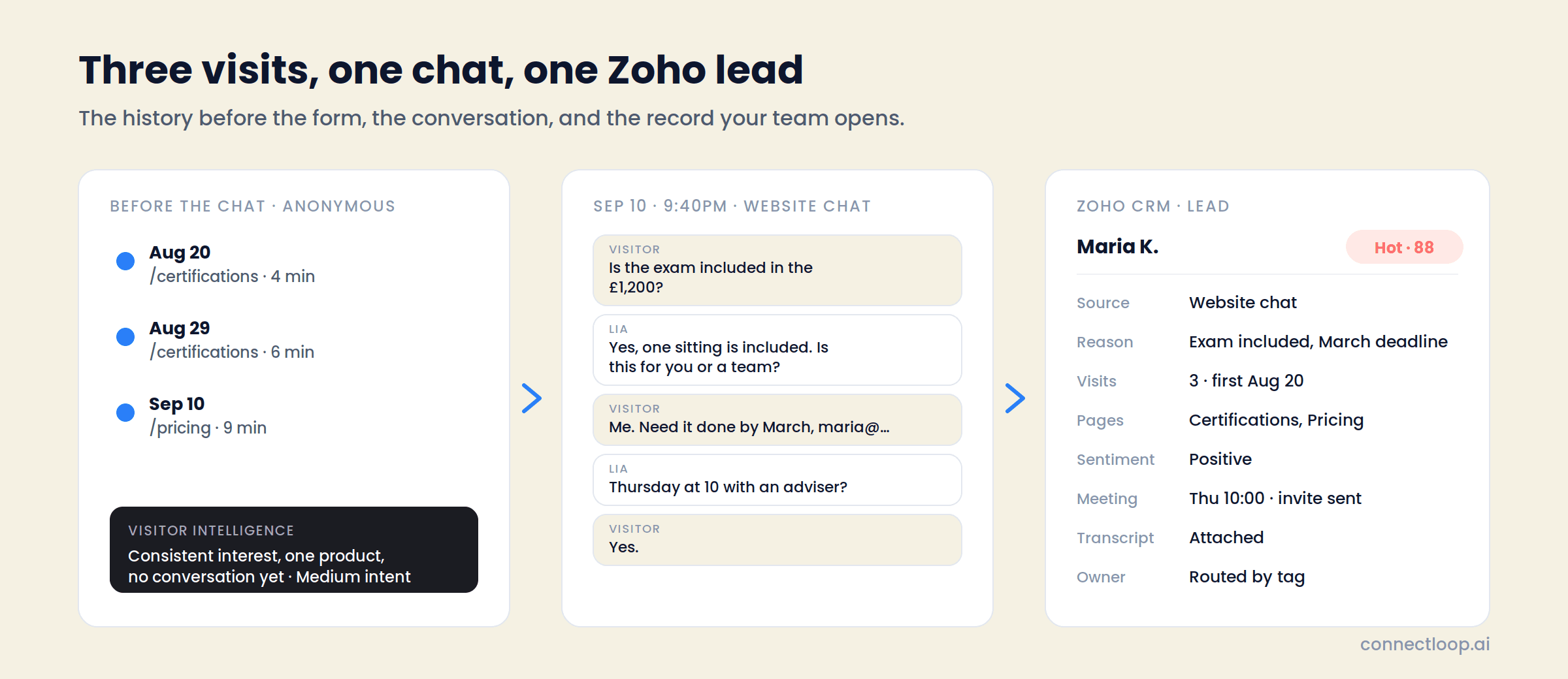
A Zoho lead usually starts as a name and an email. With ConnectLoop connected, it starts with the three visits before the chat, the question the person asked at 9:40pm, the answer LIA gave, the reason they're looking, how ready they are, and the meeting already on the calendar. Connect with OAuth; leads, contacts and deals sync from there.
Connect with OAuth from Connected Apps · Native, no middleware · Google CASA Tier 2 Verified
What a Zoho lead usually loses
The Part of the Story That Happens Before the Form
By the time someone gives you their email, they have usually visited three times, read the pricing page twice, and made most of the decision. Zoho sees the email. ConnectLoop keeps the rest and writes it to the same lead.
Weeks before
The visits nobody logged
Visitor Intelligence tracks every anonymous session from the first one: pages, time, how many times they came back, and a short summary of what they seem to be after with an intent label.
The evening they asked
The conversation
LIA answers from your approved content, asks what prompted the visit, captures the timeline and the competitor if one is named, and books the meeting against your team's real calendar.
The next morning
The Zoho lead
All of it lands on one lead: the anonymous history attached on identification, the transcript, the intent score with its reasons, the sentiment, the booked meeting, routed to the right owner by tag.
Leads, contacts and deals
What ConnectLoop Writes to Zoho CRM
The product card says it in six words: sync leads, contacts and opportunities. This is what that means on the record.
| On the lead or contact | What it holds |
|---|---|
| Identity and source | Created or matched by email. Channel recorded: website chat, WhatsApp Business, or a connected Gmail or Outlook inbox |
| Visit history | Pages viewed including pricing and cancellation pages, visit count, first and most recent visit, time on site, session depth, including sessions from before the visitor identified themselves |
| Conversation | The summary and the full transcript of every exchange, on every channel |
| Reason for reaching out | Predicted from the conversation, in one line |
| Intent score and signals | The live score and what produced it: pricing asked, competitor named, timeline stated, meeting booked |
| Lead temperature | Hot, Warm or Cold, with the reasoning written out |
| Sentiment | How the conversation felt, and whether it crossed the handover threshold |
| Qualification | With Sales Methodology on: SPIN and MEDDICC steps completed, skipped or open; each answer Inferred or Confirmed |
| Meeting | The appointment LIA booked, invite sent to both sides, calendar availability respected |
| Deals | Managed in Zoho as your team does today; the lead carries the conversation into them |
Built for Zoho teams
Small Teams, Many Channels, One CRM
Zoho CRM is often the choice of a five-to-fifty-person team that sells on the website, on WhatsApp and by email, and has one CRM for all of it. That is the team ConnectLoop is built for, and the integration is designed around three things such teams say.
“Half our enquiries come on WhatsApp.”
The same agent answers there, through Meta's guided signup, and the conversation lands on the same Zoho lead once an email is matched.
“Nobody's online after six.”
LIA answers at any hour from your content and books against the calendar. The lead is in Zoho before anyone starts work.
“We can't afford a rep re-asking everything.”
The transcript, the reason and the qualification answers are on the lead. The first call continues the conversation instead of restarting it.
What the owner sees on the lead
A lead marked Hot with the reasons underneath: pricing asked twice, competitor named, deadline in March, meeting booked Thursday. Three visits before the chat, the pricing page twice. Positive sentiment. The transcript one click away.
If the lead sits unattended, a reminder goes to the owner every 24 hours until someone acts. If the person comes back to the site later, Proactive Outreach drafts a follow-up for the owner to review and send.
Setup
Connect Zoho CRM in Four Steps
- 1
Connected Apps
Filter to CRM and find ZOHO CRM. Click Connect with OAuth, sign in to your Zoho account, and authorise ConnectLoop. The badge turns green.
- 2
Team members and tags
Add the people who receive leads and the tags each one handles. LIA assigns tags from the conversation; leads route to the matching owner.
- 3
Switch on what to capture
Visitor Intelligence for the anonymous history, Sales Methodology for the scorecard, Conversational Intelligence for sentiment. Each is a toggle.
- 4
Send a test lead
Use Live Test: ask a pricing question, leave an email, open the lead in Zoho. Then connect the calendar so the next one arrives with a meeting.
Zoho CRM counts as one connected app against your plan limit: 2 on Free, 4 on Launch, 9 on Growth, unlimited on Scale. Disconnect any time; leads already written stay in Zoho.
Questions
Zoho CRM Integration FAQ
With OAuth from the Connected Apps screen. Click Connect, sign in to Zoho, and authorise ConnectLoop. No API keys, no connector app in between.
Leads, contacts and deals sync, matched by email. A visitor who is already in Zoho is updated rather than duplicated, and their anonymous browsing history from before they identified themselves attaches to that record.
Yes. Visitor Intelligence gives every browser an anonymous ID from the first session. When that visitor gives an email, the sessions, pages and intent summary already recorded attach to the Zoho lead.
Yes. The WhatsApp Business connection uses the same agent and knowledge base. When an email is captured in the conversation, the lead is matched or created in Zoho and the WhatsApp transcript goes with it.
Whoever the tags route it to. LIA assigns tags from what the visitor said; leads go to the team member with matching tags, with a reminder every 24 hours while the lead sits unattended.
The booking is written to the lead, and the invite goes to the visitor and the team member through the connected calendar. Google Calendar, Outlook Calendar or Calendly can be connected alongside Zoho.
Every conversation is stored in ConnectLoop regardless. The lead syncs when the connection is restored.
Yes, from the same Connected Apps screen. Leads already written to Zoho stay there.
Related
Most Zoho Teams Connect These Next
- WhatsAppThe second channel writing to the same Zoho lead.
- Google CalendarSo the meeting on the lead is a real invite on a real calendar.
- Anonymous visitorsHow the history before the form gets captured.Read the guide →
Connect Zoho and See the First Lead That Arrives With Its History
One OAuth click. The next 9pm enquiry on your site becomes a Zoho lead with the visits, the conversation, the reasons and the meeting already there.
Free plan, no card required · Priced on conversations, not credits