
Proactive Outreach
Proactive Outreach: The Follow-Up Email Is Already Drafted When a Lead Comes Back
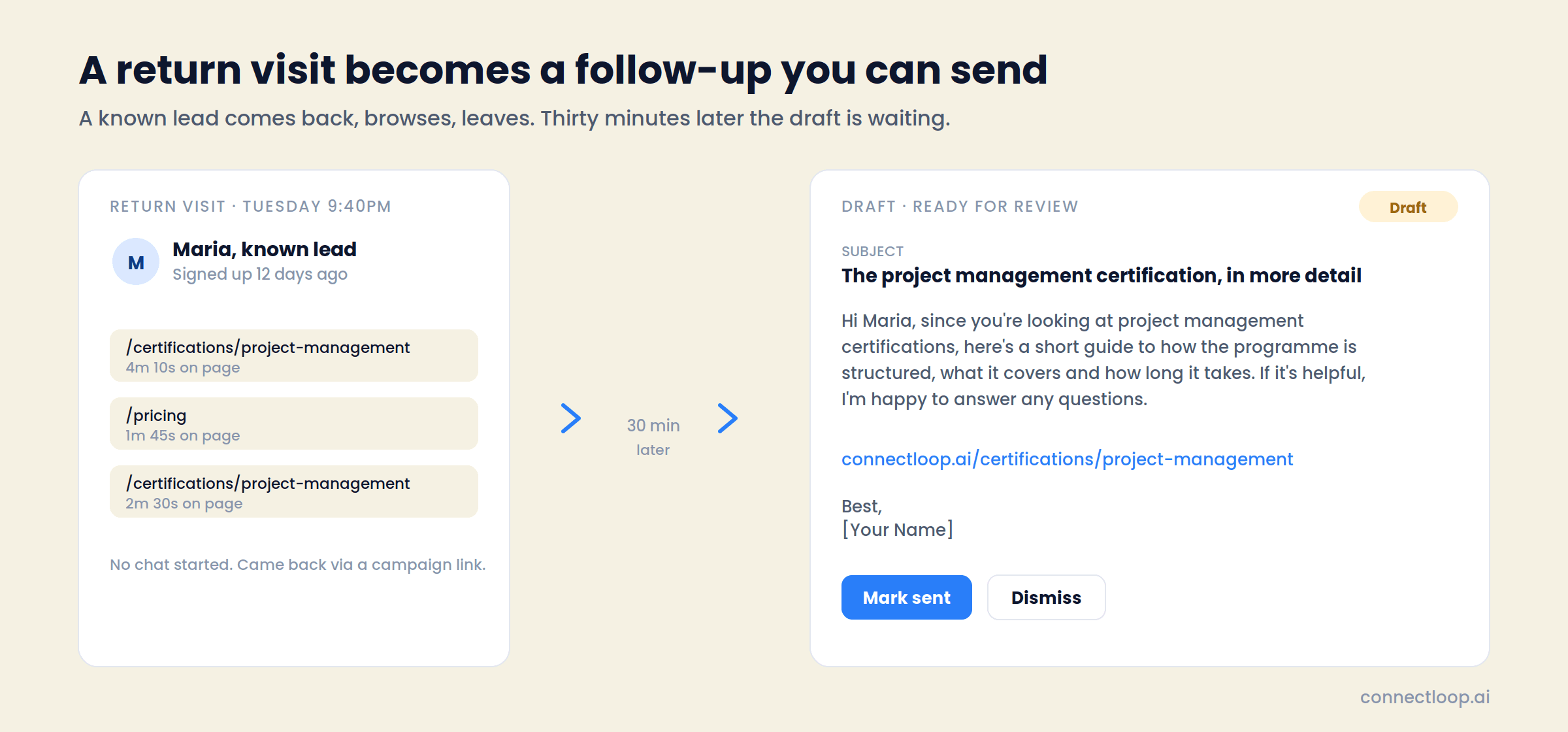
A known lead returns to your site, reads two pages and leaves without a word. Thirty minutes later there is a personalised follow-up in your dashboard, about the thing they read, with one real link, and a note explaining which pages prompted it. You review it, send it from your inbox, or dismiss it.
No chat needed. The email is built from what they looked at.
Growth, Scale and Enterprise plans · Part of Conversational Intelligence · Google CASA Tier 2 Verified · Official Meta Business Partner
The problem
The Lead Came Back. Nobody Noticed.
Most of the buying journey happens after the form and before the call. A lead who returns to read the certification page twice is telling you something. Almost no team hears it, because nobody is watching, and even if they were, writing the email takes twenty minutes they don't have.
Timing
The Return Visit Is the Signal, and It's Invisible
A lead who comes back on day twelve is warmer than on day one. Analytics count the session and move on. No one on the sales team is told.
Effort
A Good Follow-Up Takes Twenty Minutes to Write
Reading what they did, working out what they care about, finding the right page, writing something that sounds human. Multiply by every returning lead and it stops happening.
Tone
Most Follow-Ups Read Like a Sequence
“Just checking in” and “circling back” get ignored because they carry no information. The alternative, a note about the exact thing they read, is what gets a reply.
The solution
LIA Writes the Follow-Up. Your Team Decides Whether It Goes.
Proactive Outreach watches for known leads returning to your site, works out what they are interested in, and drafts a warm email about it. Every draft lands in your dashboard with the reason it was written. Nothing is sent without a person.
01
Triggers on the Return Visit, Not the First One
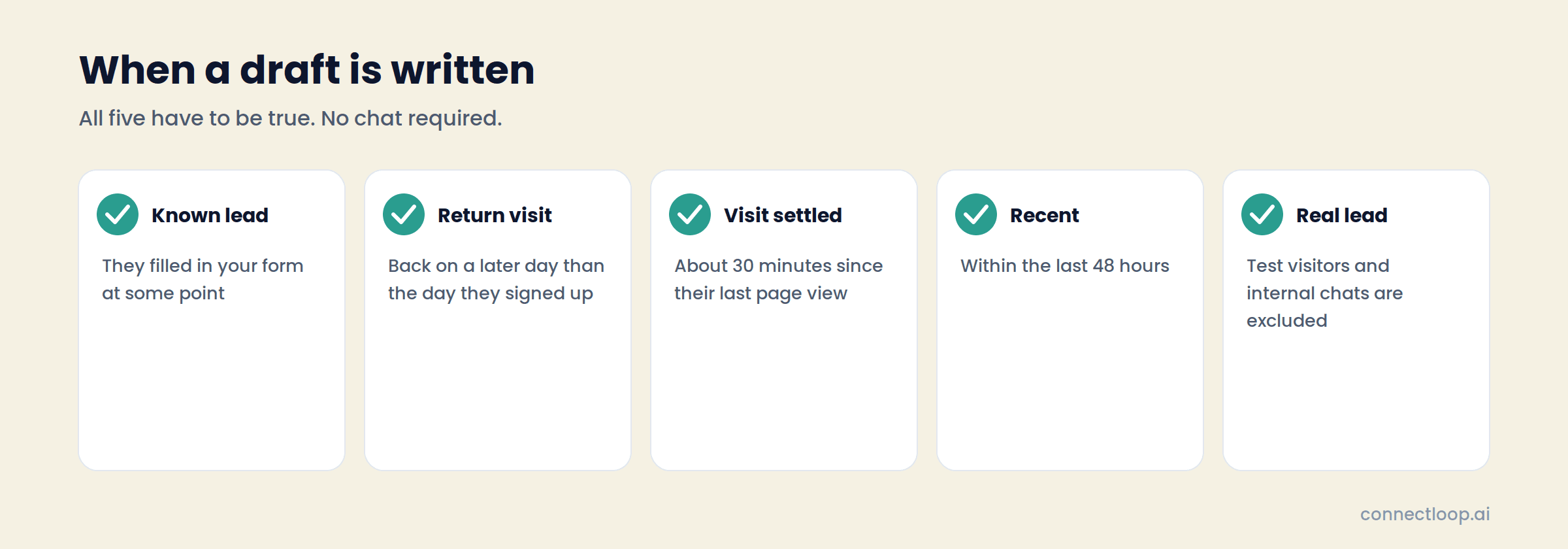
A draft is written only when an identified lead comes back on a later day than they signed up, the visit has settled for about 30 minutes, and it happened within the last 48 hours. First-day browsing and test traffic are left alone.
02
Reads the Pages, Picks the Topic
The pages they viewed and the time spent on each decide what the email is about. A lead who spent six minutes on a certification page gets an email about that certification.
03
Writes Like a Helpful Person, Never Like a Tracker
The subject is short and relevant. The body shares something useful about the topic, ends with a light invitation to reply, and leaves a [Your Name] placeholder. It reads as outreach, not surveillance.
04
Includes One Real Link
A single call-to-action link woven into the body, always a real page taken from the ones they browsed. Certification page, demo page, pricing page. The system only links to pages that exist.
05
Shows You Why It Was Drafted
Every draft carries its evidence: the pages that prompted it with time on each, and how the lead came back, whether direct, referral or a campaign. You have the context before you decide.
06
Keeps One Draft Per Visit, Forever
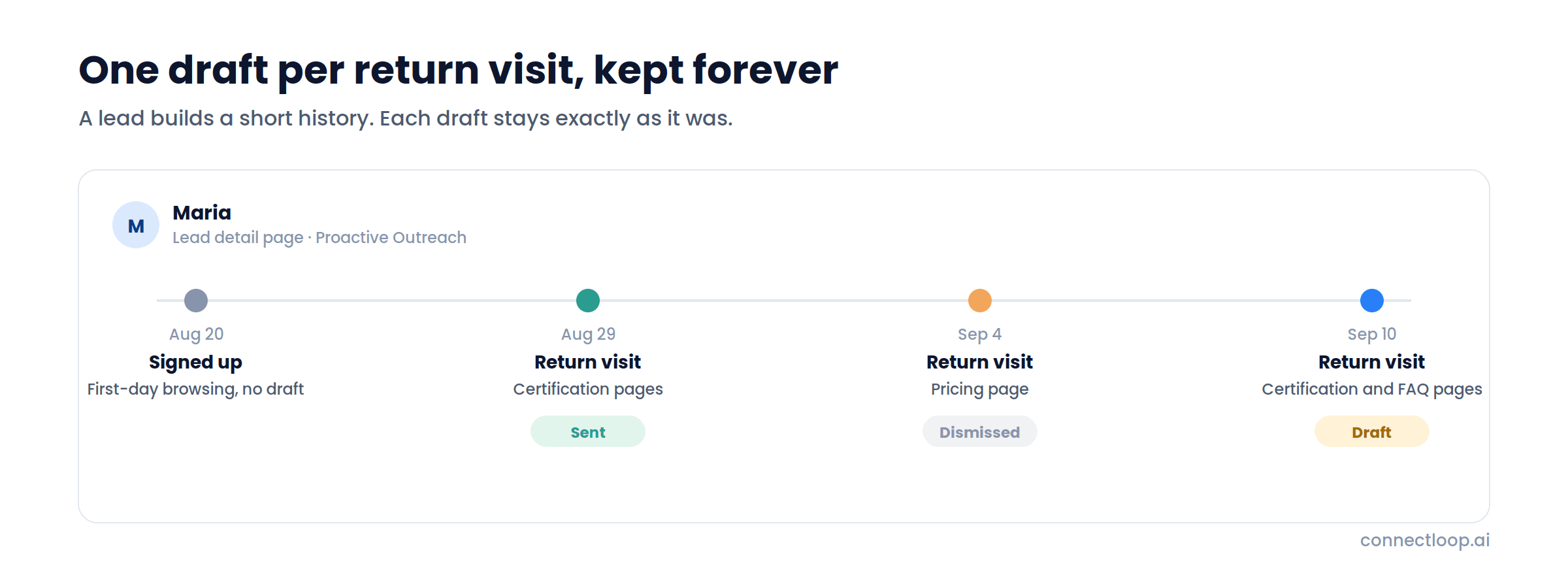
Each return visit produces its own draft. Earlier drafts stay exactly as they were, sent or dismissed, so a lead's detail page shows a short history of every moment they came back and what caught their interest.
Inside the product
What You See in the Dashboard
Sales Intelligence → Proactive Outreach lists every draft across all your leads. Each lead's detail page shows just theirs.
| Column | What it shows |
|---|---|
| Recipient | The lead's name and company |
| Subject | The drafted subject line |
| Status | Draft, Sent or Dismissed, with an All / Draft filter at the top |
| Generated | How long ago the draft was written |
| Expand | The full email, subject and body, and the “Why this was drafted” panel with pages viewed, time on each, and return source |
| Actions | Copy the email to send it from your own inbox, mark it Sent, or Dismiss it |
The draft
What a Draft Contains
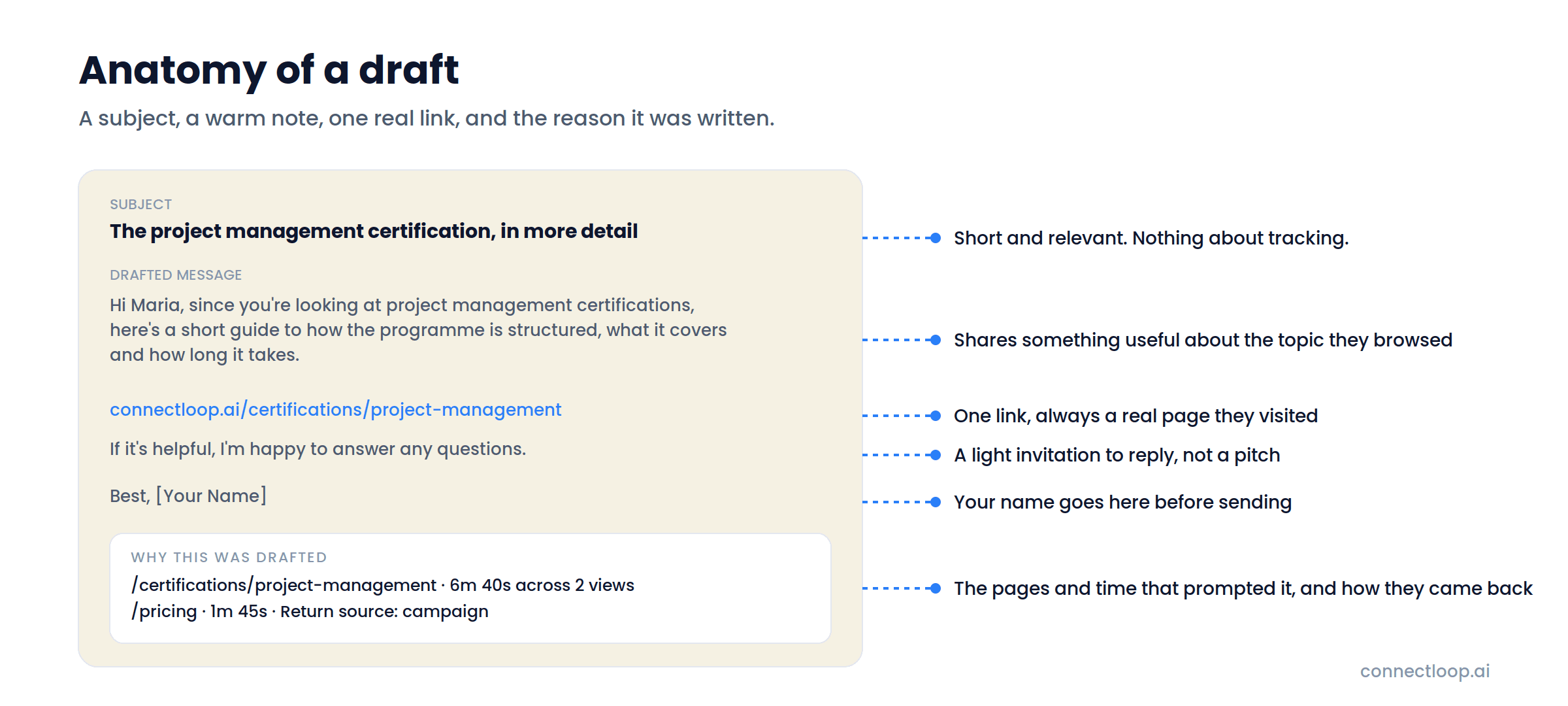
Four parts, every time. Short subject, a warm note, one link that goes somewhere real, and the reason it exists.
Subject
Short and relevant to the pages they read. Nothing that hints at tracking.
Body
A warm note that shares information about the topic, includes one relevant link, and ends with a light invitation to reply. A [Your Name] placeholder sits at the end for your signature.
Call-to-action link
One link, chosen as the most relevant page from the ones they browsed. Always a real URL from your site.
Why this was drafted
The pages that prompted it with time spent on each, and the return source: direct, referral, or a campaign.
When it fires
Five Things Have to Be True Before a Draft Is Written
The rules keep drafts rare and relevant. A draft means a real lead came back and read something worth following up on.
Why the 30 Minutes and the 48 Hours
The system waits about 30 minutes after the last page view so it sees the whole visit, not the first page of it. A lead who lands on pricing and then reads three certification pages should get an email about certifications, and that only works with the full picture.
The 48-hour window keeps every draft timely. A follow-up about something they read this week lands. One about something they read last month reads as odd, so it isn't written.
Why First-Day Browsing Is Skipped
On the day someone fills in your form, they are still exploring. A follow-up an hour later reads as pushy. Proactive Outreach waits for the next return visit, when the interest is confirmed and the email has something to say.
Test-mode visitors and internal test chats are excluded, so your team's own browsing never produces a draft.
Over time
A Lead Builds a Short History of Moments They Came Back
Each return visit produces its own draft. If a lead comes back again next week, a new draft is written for the new activity. Earlier drafts stay exactly as they were, whatever their status, and the same visit is never drafted twice.
Open a lead's detail page and you see every draft generated for them in order: what they read, what was written, and what your team did with it. Before a call, that is the whole story of their interest in one place.
- One draft per return visit
- Earlier drafts kept as they were, sent or dismissed
- Each draft fixed at creation; dismiss it and the next visit brings a fresh one
- Full history on the lead detail page
Every Email Has a Person Behind It
Proactive Outreach writes the draft and shows you why. A person on your team reads it, copies it into their inbox and sends it, or dismisses it. The lead hears from a human who knew what they were interested in, which is the whole point.
Growth, Scale and Enterprise plans · Turned on under Agent Behavior with Conversational Intelligence
- Reads like help, not like trackingThe visitor's activity decides the topic behind the scenes. The email just shares something relevant.
- One real link, never an invented oneAlways a page they actually visited.
- Sent from your inbox, in your nameCopy, sign, send. Mark it sent so the history is complete.
Getting started
Five Steps, One Afternoon
- 01
Paste your URL
LIA crawls your site and builds a knowledge base in about sixty seconds. Add documents and playbooks as needed.
- 02
Add one line of code
The widget installs with a single snippet, styled to your brand. Connect WhatsApp and email if you use them.
- 03
Capture leads
Forms and chat identify visitors. From then on, their return visits are tracked against their record.
- 04
Turn on Conversational Intelligence
Under Agent Behavior. Proactive Outreach is part of it, so both are switched on together.
- 05
Review the first drafts
Open Sales Intelligence → Proactive Outreach. Read the reason, copy the email, send it, mark it sent.
In production
Running In the Real World
- 82
- WhatsApp conversations at Web Summit Rio
- 37
- qualified leads from those conversations
- 5
- signups, tracked end to end
Deployed across the Colsubsidio cohort in Colombia. 37 companies onboarded, 12 live. Google CASA Tier 2 Verified · Verified Meta Business · Official Meta Business Partner.
Questions
Frequently Asked Questions
A feature of ConnectLoop that turns a known lead's return visit to your website into a drafted follow-up email. It works out what they were interested in from the pages they read, writes a warm, personalised note about it with one relevant link, and places it in your dashboard for review.
Not at all. The draft is built entirely from website activity. A lead who returns, reads two pages and leaves gets a draft just the same.
Your team does. Copy the draft into your own email client, add your name, send it, and mark it Sent in the dashboard so the lead's history stays complete. If it isn't a fit, dismiss it.
When a lead is identified (they filled in your form), they return on a later day than they signed up, about 30 minutes have passed since their last page view, the visit was within the last 48 hours, and they are a real lead rather than test traffic. All five must be true.
Each draft is fixed when it is created, so what you see is exactly what was written from that visit. Copy it into your inbox and change anything you like there before sending. If the draft isn't right, dismiss it; the lead's next return visit produces a fresh one.
It reads as help. The visitor's activity decides the topic and the link behind the scenes, but the email itself simply shares something helpful about that topic and invites a reply. There is no tracking language in the subject or body.
From the pages the lead actually browsed. The system chooses the single most relevant one, a certification page, a demo page, a pricing page, and never invents a URL.
The pages that prompted the draft with the time spent on each, and how the lead came back: direct, referral, or a campaign.
A new draft is written for the new visit. Earlier drafts are kept as they were, sent or dismissed, so the lead's detail page shows one draft per return visit over time. The same single visit is never drafted twice.
Growth, Scale and Enterprise. It is off by default and is switched on under Agent Behavior → Conversational Intelligence → Proactive Outreach. It is part of Conversational Intelligence, so both are enabled together.
Sales Intelligence → Proactive Outreach in the left sidebar lists every draft across your leads. Each lead's detail page shows the drafts generated for that lead.
Integrations
18+ Native Integrations, Not Middleware
Leads, transcripts and intent scores flow into the tools your team already uses.
- Salesforce
- HubSpot
- Zoho
- Pipedrive
- WooCommerce
- Google Calendar
- Outlook Calendar
- Gmail
- Outlook
- Calendly
- Google Meet
- Microsoft Teams
- Google Drive
- Google Sheets
- Microsoft OneDrive
- GitHub
Also included
Proactive Outreach Is One Part of the Agent
- Visitor IntelligenceEvery anonymous journey tracked, summarised and labelled High, Medium or Low intent.How visitor intelligence works →
- Conversational IntelligenceCompetitors, intent, sentiment and friction across every chat, with every insight linked to its source.How conversational intelligence works →
- Follow-up that gets repliesWhat to write when a lead goes quiet, and when to stop.Read the guide →
The Next Time a Lead Comes Back, Have Something to Say
Turn on Proactive Outreach, wait for the first return visit, and read the draft. It already knows what they were looking at.
Free plan, no card required · Priced on conversations, not credits