
WhatsApp Sales
WhatsApp Sales: An AI Sales Agent That Answers, Qualifies and Books on WhatsApp
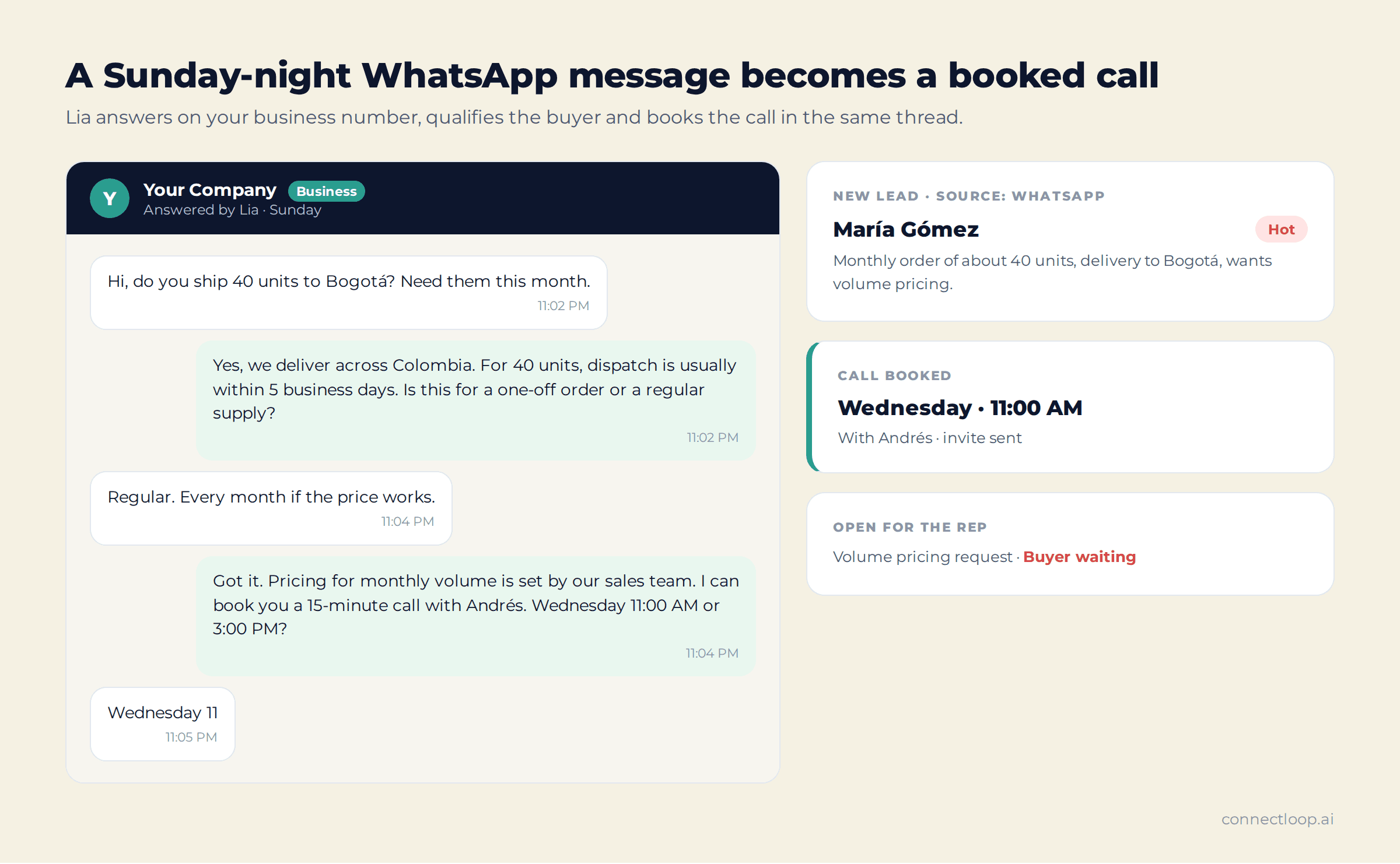
Your buyers already message you on WhatsApp, often at night and at weekends. LIA, ConnectLoop's AI sales agent, answers them on your official business number using your own content, asks the right qualifying questions, scores each lead and books the call in the same thread.
One business number, every chat answered, every lead in your CRM.
Official Meta Business Partner · Verified Meta Business · Built on the WhatsApp Business API · Google CASA Tier 2 Verified
The problem
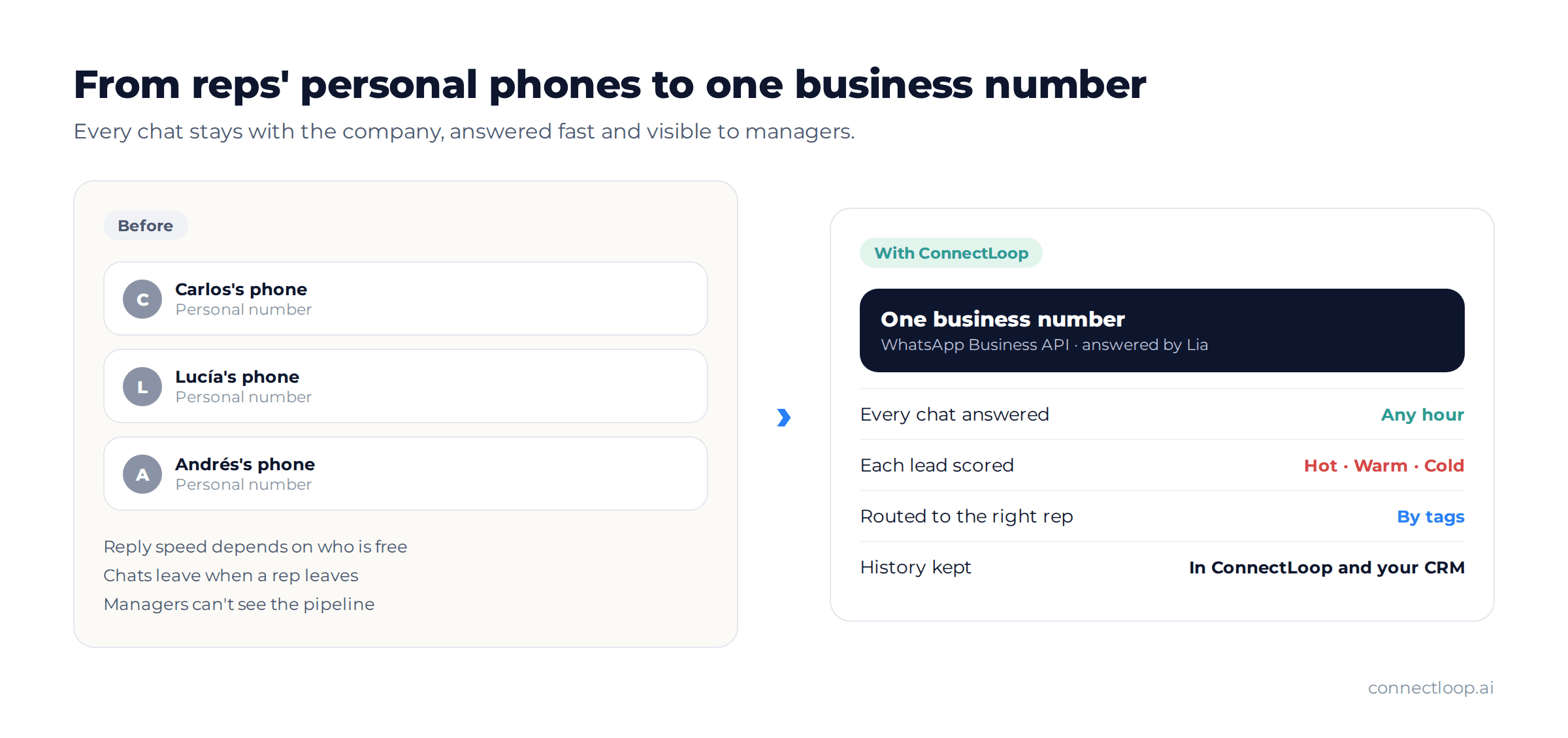
WhatsApp Selling Still Runs on Reps' Personal Phones
In many markets, WhatsApp is where buyers ask their first question. For most sales teams, those questions land on whichever rep's phone the buyer happened to save.
Speed
Reply Time Depends on Who Is Free
A buyer who messages at 11pm waits until a rep wakes up. By then they have asked two of your competitors the same question.
Ownership
Conversations Leave With the Rep
Chats on a personal phone belong to that phone. When a rep moves on, the customer history, the promises and the open deals go too.
Visibility
Managers Can't See the Pipeline
Nobody knows how many buyers asked this week, who answered, or which conversations are still waiting on your team.
The solution
One Business Number, Answered by an AI Sales Agent
ConnectLoop connects your WhatsApp Business number to the official API and puts LIA on it. LIA handles the first conversation; your team takes over with the full picture.
01
Official, Verified Connection
Connect your WhatsApp Business number through Meta's guided signup, inside ConnectLoop. ConnectLoop is an official Meta Business Partner and a Verified Meta Business.
02
Answers at Any Hour, From Your Content
LIA replies within seconds using your website pages and documents: products, delivery, pricing policy, opening hours. Questions your content hasn't covered yet go to Knowledge Gaps.
03
Qualifies and Scores Every Lead
LIA asks one qualifying question at a time inside the chat and scores each lead Hot, Warm or Cold, with the reasoning, so your team knows who to call first.
04
Books the Call in the Thread
When the buyer is ready, LIA offers open times from your team member's calendar and books the call without the buyer leaving WhatsApp.
05
Keeps One Record per Customer
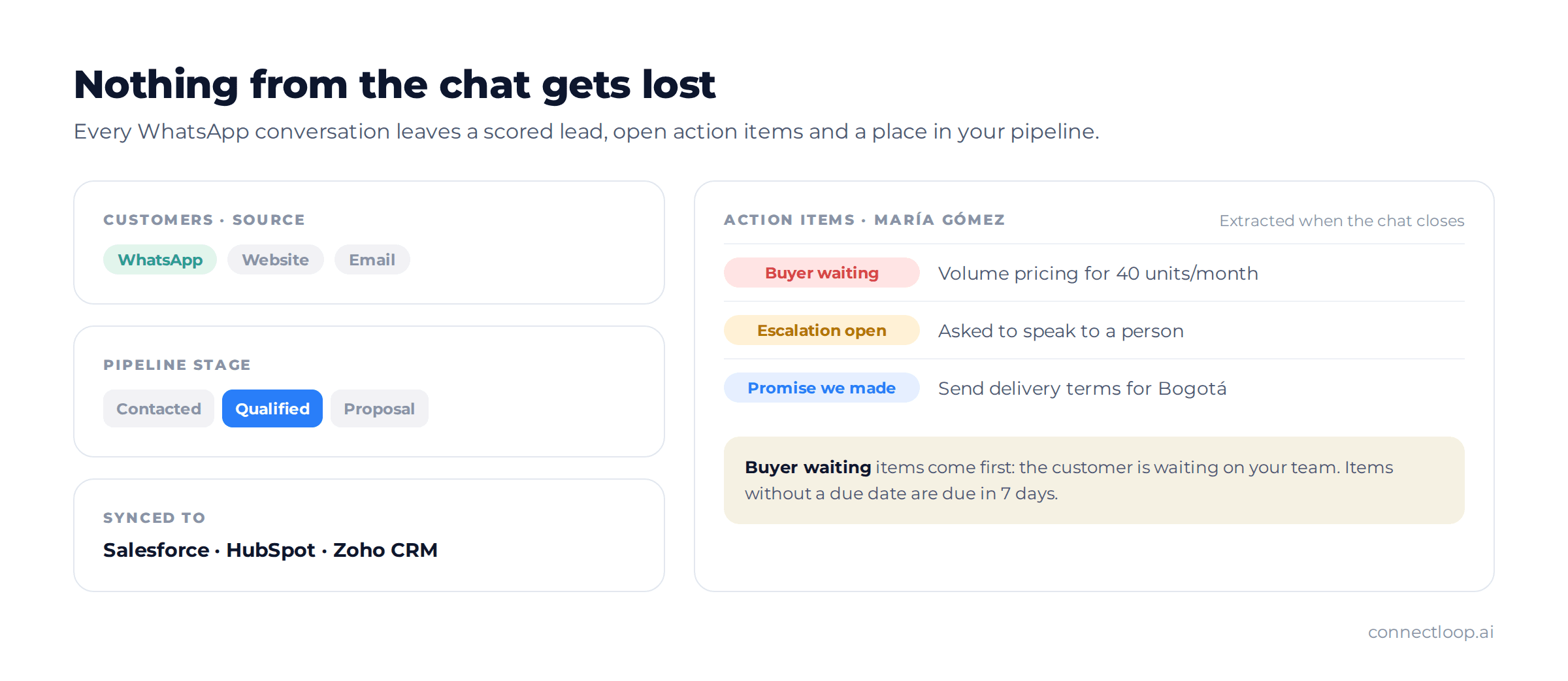
Every WhatsApp lead appears in Customers with WhatsApp as its source, with the chat summary and transcript, and syncs to Salesforce, HubSpot or Zoho CRM.
06
Hands Over With Full Context
When a buyer asks for a person, wants custom pricing or is promised a follow-up, it becomes an action item for the rep on the account, with the conversation attached.
Ownership
Every WhatsApp Chat Stays With Your Company
Moving sales chats from personal phones to one business number on the WhatsApp Business API changes who owns the conversation. The chat, the lead score and the follow-ups live in ConnectLoop and your CRM, not on a phone in someone's pocket.
Tags route each lead to the right rep, so a buyer asking about wholesale reaches your wholesale team and a buyer asking about delivery reaches operations.
- One number customers save once
- Every lead scored Hot, Warm or Cold
- Routing by tags to the right team member
- History kept when people change roles
Inside the product
Where WhatsApp Conversations Show Up
WhatsApp sits alongside your website chat and email in the same portal, so one customer is one record whichever channel they use.
| Where | What it shows |
|---|---|
| Customers | Every customer with a Source column (WhatsApp, Website, Email or Lead Capture Popup) and a filter to see one source at a time |
| Lead details | The chat summary and full transcript, the Hot, Warm or Cold temperature with the AI's reasoning, and the status history |
| Appointments | Calls booked from WhatsApp with date, time, team member and status: Scheduled, Completed, Cancelled, No Show or Pending |
| Action Items | What each chat left open: unanswered questions, promises made, requests for a person. Items where the buyer is waiting are tagged Buyer waiting |
| Pipeline | Every customer by stage, on a board or a list, with last touch and open items |
| Competitor Intel | Every competitor buyers name, with a Channel filter to see only WhatsApp mentions (Growth plan and above) |
How WhatsApp works
Built for the Conversations Buyers Start
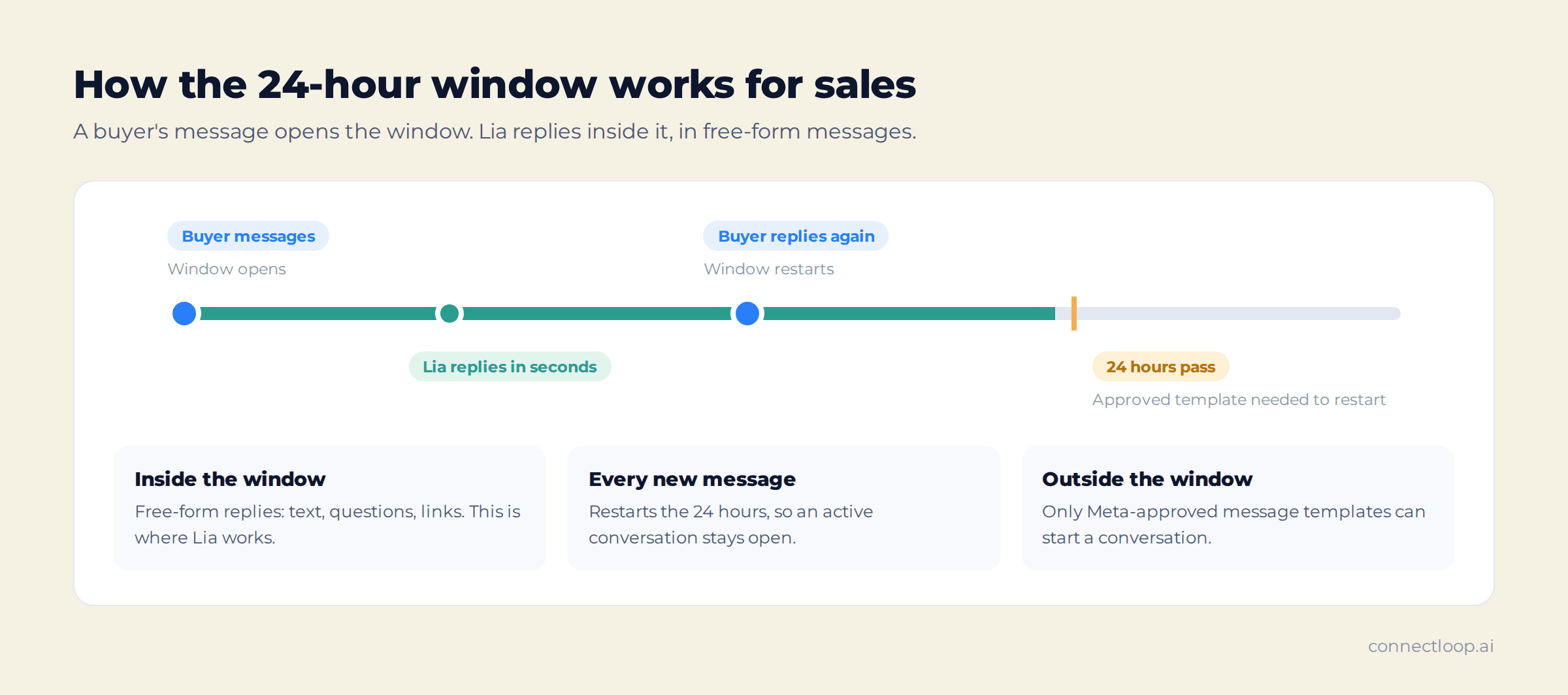
On the WhatsApp Business API, a buyer's message opens a 24-hour customer service window. Inside it, your business can reply freely. LIA answers inside that window, usually within seconds.
Why Speed Matters More on WhatsApp
Every new message from the buyer restarts the 24 hours, so a conversation that keeps moving stays open. A reply that comes the next afternoon can arrive after the window has closed, when your team can only send a pre-approved template.
Because LIA replies in seconds at any hour, the conversation happens while the buyer is still interested and the window is open.
What WhatsApp Messages Cost
Meta charges for WhatsApp Business API messages separately from your ConnectLoop plan, by message type and the buyer's country. Chats that start from an eligible click-to-WhatsApp ad are free for 72 hours.
Meta changed its pricing rules on 1 October 2026, so check Meta's current rate card for your markets before you plan volume.
Follow-through
Every Promise Made on WhatsApp Becomes a Task
When a WhatsApp conversation closes, ConnectLoop extracts what it left open. A question your team needs to answer, a promise LIA made, something the buyer agreed to do, or a request to speak to a person each becomes an action item.
Items go to the rep on the account, or to the team queue if there isn't one. Anything where the buyer is waiting is tagged Buyer waiting, so it rises to the top.
- Buyer waiting for unanswered questions and promises
- Escalation open when a buyer asks for a person
- Due dates in your company's time zone
- Ask plain-language questions across every channel, such as "Who is waiting on us?"
Compared
Personal Phones vs ConnectLoop on the WhatsApp Business API
| What changes | Reps on personal WhatsApp | ConnectLoop on the WhatsApp Business API |
|---|---|---|
| Who answers | Whichever rep the buyer saved | LIA on one business number, then the right rep |
| After hours | Waits until morning | Answered in seconds, any hour |
| Qualification | Depends on the rep | Qualifying questions and a Hot, Warm or Cold score |
| Booking a call | Back-and-forth messages | Booked in the thread against real calendar availability |
| Record of the chat | On the rep's phone | Transcript in ConnectLoop, synced to your CRM |
| Manager visibility | Ask each rep | Customers, Pipeline and Action Items in one portal |
Your Reps Pick Up the Conversation, Not the Phone
LIA handles the first reply, the questions and the booking. Your team steps in where judgment matters, like volume pricing, special terms or a complaint, with the whole WhatsApp conversation already in front of them.
- Official and verifiedConnected through Meta's guided signup by an official Meta Business Partner.
- One agent, three channelsThe same LIA answers on WhatsApp, your website chat and email.
- Decisions stay with your teamPricing exceptions and escalations go to a rep as action items.
Getting started
Live on WhatsApp in an Afternoon
- 1
Create your account
Sign up with your work email and enter your website, or upload a document about your business.
- 2
Let LIA learn
LIA reads your key pages and is generated in a couple of minutes. Pick a personality preset.
- 3
Connect WhatsApp
Choose WhatsApp on the final setup screen and connect your business number through Meta's guided signup.
- 4
Set up booking
Connect Google Calendar, Outlook or Calendly and add a team member with working hours.
- 5
Test, then go live
Run a Live Test, check the answers and the test booking, and LIA starts answering buyers.
In production
Running on WhatsApp in the Real World
- 82
- WhatsApp conversations at Web Summit Rio
- 37
- qualified leads from those conversations
- 5
- signups, tracked end to end
Deployed across the Colsubsidio cohort in Colombia. 37 companies onboarded, 12 live. Verified Meta Business · Official Meta Business Partner · Google CASA Tier 2 Verified.
Questions
Frequently Asked Questions
An AI agent that answers buyers on your WhatsApp Business number, asks qualifying questions, scores the lead and books a call with your team. ConnectLoop's agent, LIA, does this on the official WhatsApp Business API and passes every lead to your team and CRM with the full conversation.
Yes. An AI agent needs the API, because the WhatsApp Business app is built for one person replying from a phone. ConnectLoop connects your number to the API through Meta's guided signup during setup, so you don't need developers.
Yes. ConnectLoop is an official Meta Business Partner and a Verified Meta Business, and connects your number through Meta's own guided signup.
LIA answers from your website pages and the documents you upload, such as product details, delivery terms and FAQs. Questions your content hasn't covered yet appear in Knowledge Gaps, where you add the answer once and LIA uses it from then on.
Yes. LIA offers open times based on your team member's working hours, timezone and connected Google Calendar, Outlook Calendar or Calendly, and books the call in the same thread. The booking appears on your Appointments page.
The request becomes an Escalation open action item for the rep on the account, or the team queue if there isn't one, with the conversation attached. Your notification emails also receive the chat summary and full transcript.
Meta charges for WhatsApp Business API messages separately from your ConnectLoop plan, by message type and the buyer's country. Chats started from an eligible click-to-WhatsApp ad are free for 72 hours. Meta updated its pricing on 1 October 2026, so check its current rate card for your markets.
Meta offers Coexistence, which connects an existing WhatsApp Business app number to the API while the app keeps working on your phone, or you can move the number to the API fully. Talk to us about which route suits your team.
ConnectLoop is built for the conversations buyers start: answering, qualifying, booking and following up. Messages that start a conversation outside the 24-hour window need a Meta-approved template.
Yes. The same LIA answers on your website chat and email. A customer who asks on WhatsApp and later emails you stays one record, with every conversation in one place.
Salesforce, HubSpot and Zoho CRM. Each lead arrives with its source, the chat summary and transcript.
Integrations
Connects to the Tools Your Team Already Uses
WhatsApp leads, bookings and conversations flow into your CRM, calendar and inbox.
- Salesforce
- HubSpot
- Zoho CRM
- Google Calendar
- Outlook Calendar
- Calendly
- Gmail
- Outlook
- WooCommerce
- Google Drive
- Google Sheets
- Microsoft OneDrive
- GitHub
Also included
WhatsApp Sales Is One Job LIA Does
- Appointment BookingWebsite visitors answered, qualified and booked into your calendar inside the chat.How appointment booking works →
- Conversational IntelligenceCompetitors, intent, sentiment and friction across every chat, linked to the source.How conversational intelligence works →
- WhatsApp Business app vs APIWhat each one does, what the API costs, and when a sales team should switch.Read the guide →
Answer Tonight's WhatsApp Messages Tonight
Connect your business number, let LIA learn your website, and run a Live Test. The next buyer who messages at 11pm gets an answer and a call booked.
Free plan, no card required · Priced on conversations, not credits