
WhatsApp Business App vs API: Differences, 2026 Pricing and Which to Choose
The WhatsApp Business app is a free phone app for one business number, built for owners who reply to customers themselves. The WhatsApp Business API, now called the WhatsApp Business Platform, connects WhatsApp to software, so a team, a CRM and an AI agent can share one number. ConnectLoop runs its AI sales agent on the API.

Published
Both versions use the same WhatsApp your customers already have on their phones. What changes is everything behind the business side of the chat: how many people can reply, what can be automated, what it costs, and whether conversations end up in your CRM or stay on one person's phone.
This guide compares the two side by side and covers the October 2026 pricing change. It also looks at a question most comparisons skip: which version works for a sales team.
Table of contents
- What is the difference between the WhatsApp Business app and the API?
- What is the WhatsApp Business app, and who is it for?
- What is the WhatsApp API?
- How much do the WhatsApp Business app and API cost in 2026?
- How do the messaging rules differ?
- Which version works better for a sales team?
- What can you automate on each, and where does AI fit?
- Can you keep your number when you move to the API?
- How do you know it's time to switch?
- How do you move from the WhatsApp Business app to the API?
- How does ConnectLoop use the WhatsApp Business API for sales?
- Key takeaways
- Frequently asked questions
What is the difference between the WhatsApp Business app and the API?
The WhatsApp Business app is a free app for one person and one phone number. The API is a paid connection that lets software handle WhatsApp: many agents on one number, automation, CRM integration and message templates. Choose the app for a one-person business. Choose the API when a team shares the number, which is how ConnectLoop customers run WhatsApp.
The table below compares the two on the points that matter most in daily use.
| WhatsApp Business app | WhatsApp Business API (Platform) | |
|---|---|---|
| Cost | Free to download and use | Charged per delivered message, plus any provider fee |
| Who replies | Single user on one phone, plus a few linked devices | Multiple users: any number of agents (multi-agent) through a shared team inbox |
| Message types | Text, photos, voice notes, groups and status updates | Rich media, interactive messages with buttons and lists, and WhatsApp Flows forms |
| Set up by | The business owner, in minutes | A provider or in-house developer, through Meta |
| Automation | Greeting messages, away messages, quick replies | Chatbots, AI agents, routing and full workflows |
| Sending to many customers | Broadcast lists, only to contacts who saved your number | Approved message templates to customers who opted in |
| CRM integration | None built in | Two-way sync through webhooks and integrations |
| Analytics | Basic message counts | Response time, resolution, CSAT and team reporting |
| Scalability | Limited by one person's time | Built for scalability, from one agent to hundreds |
| Phone numbers | One number per app | Multiple numbers under one business portfolio |
| Interface | Phone app, WhatsApp Web and desktop | Your provider's inbox or your own software |
| Best for | Small businesses with modest daily volume | Growing teams, medium and large businesses and enterprise, for sales and customer support at scale |
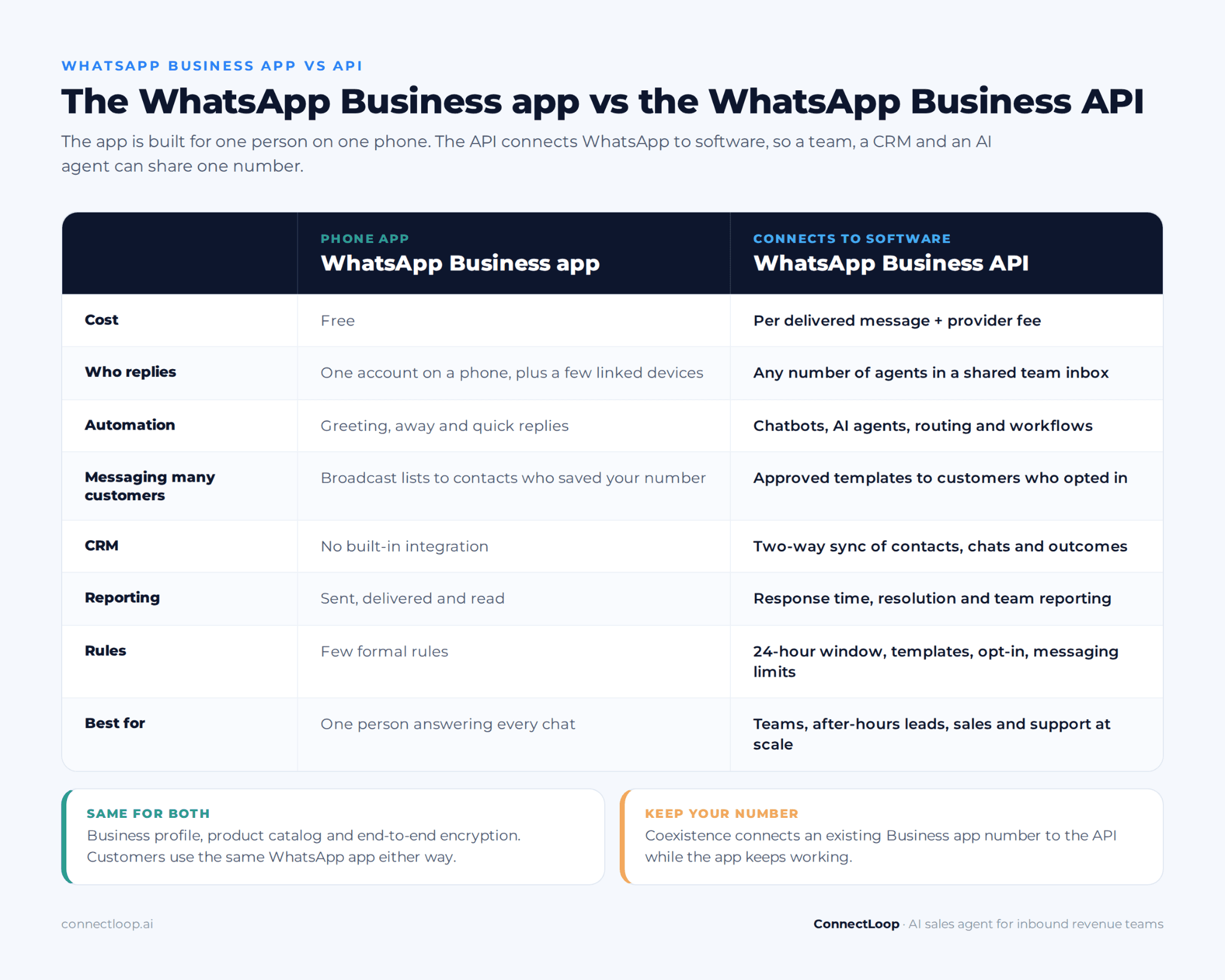
Both versions offer a business profile, a product catalog and end-to-end encryption on the customer's side of the chat.
Where does personal WhatsApp fit?
Personal WhatsApp, also called WhatsApp Messenger, is for friends and family. Like the Business app, it has voice and video calls, groups and status updates, but no business profile, catalog, labels or automated replies. It works for business briefly, but customers can't tell it's a business. ConnectLoop recommends moving any customer conversation off personal numbers.
What is the WhatsApp Business app, and who is it for?
The WhatsApp Business app is a free app from Meta for small businesses to talk to customers from a dedicated business number. It adds a business profile, catalog, labels and simple automated replies to the familiar WhatsApp experience. It suits owners who answer every chat themselves. Many businesses start here before moving to ConnectLoop on the API.
What the app gives you:
- Business profile: address, opening hours, website and a short description.
- Product catalog: products or services with photos and prices, shown inside the chat.
- Greeting and away messages: automatic replies for first contact and closed hours.
- Quick replies: saved answers you insert with a shortcut.
- Labels: colored tags to sort chats, such as "new lead" or "paid".
- Short links and QR codes: a link that opens a chat with your business.
- Broadcast lists: one message sent to a list of saved contacts.
What are the limits of the WhatsApp Business app?
The app's limits show up as soon as more than one person needs to reply or the number of chats grows. Each limit is manageable alone. Together, they mean conversations live on a phone instead of in your business systems. These are the gaps ConnectLoop is built to fill.
- One account per number. A few linked devices can share it, but there's no proper team inbox, no chat ownership and no way to see who replied.
- Manual replies. Greeting and away messages fire once. Every real answer is typed by a person.
- Broadcasts only reach saved contacts. A broadcast list is capped (256 contacts per list at the time of writing), and only people who saved your number receive it.
- No CRM integration. Lead details, notes and conversation history stay in the app.
- Basic reporting. You can see sent, delivered and read, but not response time by person or how many chats became sales.
- Fragile history. If the phone is lost, or the person holding it leaves, the conversation history goes with it.
What is the WhatsApp API?
The WhatsApp API is Meta's way for businesses to connect WhatsApp to software instead of using a phone app. Meta now calls it the WhatsApp Business Platform, and most businesses use the hosted version, the WhatsApp Cloud API. It sends and receives messages through a REST API and webhooks. ConnectLoop, an official Meta Business Partner, connects businesses to it.
There's no app to download. The API is a connection, so you need something on top of it to read and answer messages. That can be:
- A provider's platform: a shared inbox, chatbot builder or AI sales agent. Providers are often called Business Solution Providers (BSPs) or Meta Business Partners.
- Your own software: built by your developers on the Cloud API.
- Both: your CRM, help desk and AI agent all connected to the same number.
Messages arrive at your systems as webhooks. Replies go back out through the API, either typed by an agent in an inbox or sent automatically. For a deeper look at the setup, see our WhatsApp Business API glossary entry.
Who can get access to the WhatsApp Business API?
Any registered business can apply. You need a Meta Business Portfolio (formerly Business Manager), a phone number that can receive a code, a display name that matches your brand, and acceptance of Meta's commerce and messaging policies. Business verification unlocks higher messaging limits. ConnectLoop's setup uses Meta's Embedded Signup, so these steps happen in one guided flow.
Is the WhatsApp API only for large companies?
No. The API is used by companies of every size. The deciding factor is how many people reply and how many chats you handle, not headcount. A five-person company that gets inquiries every evening often needs the API sooner than a large company that rarely uses WhatsApp. Small teams can run ConnectLoop on the API to cover after-hours inquiries.
How much do the WhatsApp Business app and API cost in 2026?
The WhatsApp Business app is free. The API is charged per delivered message, by message type and the customer's country, plus whatever your provider charges for its software. Meta changed the rules again on 1 October 2026, so many pricing guides are now out of date. ConnectLoop customers pay Meta's message charges in addition to their ConnectLoop plan.
How Meta's pricing has changed:
| Date | Change |
|---|---|
| 1 November 2024 | Customer service conversations became free for all businesses |
| 1 July 2025 | Meta moved from per-conversation to per-message pricing for templates |
| 1 October 2026 | Replies inside the 24-hour service window are charged after a monthly free allowance per business number, and utility templates sent inside the window are now billable |
What is charged under the October 2026 rules:
| Message type | What it's for | Charged? |
|---|---|---|
| Customer message to you | Any message a customer sends | Free |
| Service reply | Your reply inside the 24-hour customer service window | Free up to Meta's monthly allowance per number, then per message |
| Utility template | Order updates, appointment reminders, account notifications | Per message, inside or outside the window |
| Authentication template | One-time passcodes and login codes | Per message |
| Marketing template | Offers, re-engagement, announcements | Per message, the highest rate |
| Messages after click-to-WhatsApp ads | Chats started from an eligible ad on Facebook or Instagram | Free for 72 hours |
Rates differ by country and change from time to time, so check Meta's current rate card before you budget. Two practical points:
- Automated replies count. A chatbot or AI agent answering inside the service window sends service messages, so the allowance applies to them too.
- Template category matters. Meta can reclassify a utility template as marketing if the content is promotional, and marketing costs more. Keep utility templates purely informational.
The app has no message charges, but it has hidden costs. Those include unanswered evening inquiries, a phone one person has to carry, and chats that never reach your CRM. Our speed to lead guide covers what a slow first reply costs.
How do the messaging rules differ?
The app lets you message anyone who has your number saved, with few formal rules. The API follows stricter rules: a 24-hour customer service window, approved templates for anything outside it, recorded opt-in, and messaging limits tied to your quality rating. ConnectLoop's agent replies to buyers inside the window, where every reply is allowed.
What is the 24-hour customer service window?
The 24-hour customer service window opens every time a customer messages you. While it's open, you can reply freely with text, images, buttons or documents. When it closes, you can only start a conversation with a pre-approved message template. Each new customer message restarts the window. ConnectLoop's agent answers inside the window, often within seconds.
What are message templates?
Message templates are pre-written messages that Meta reviews before you can send them. They're grouped as marketing, utility or authentication. They can include variables such as a name or order number, plus buttons. Templates are how API users start conversations or follow up after the window closes. Approval usually takes minutes to hours.
What are opt-in, quality rating and messaging limits?
- Opt-in: customers must agree to receive messages from you on WhatsApp before you send templates, for example through a checkbox on a form or a reply in chat.
- Quality rating: Meta tracks blocks and reports. If too many customers block you, your rating drops.
- Messaging limits: new numbers can start a limited number of conversations with new customers each day. The limit rises as you send more messages and keep quality high, and business verification helps.
These rules protect customers from spam, and they're also why WhatsApp messages get opened. Teams that only reply to inbound customer messages rarely run into the limits.
Which version works better for a sales team?
For a sales team, the API is almost always the better choice. Sales needs chat ownership, a record of every conversation, fast replies outside office hours and leads in the CRM, and the app can't provide any of these. ConnectLoop built Lia on the API for exactly this reason: WhatsApp is where many buyers ask their first question.
Most comparisons focus on support and broadcasts. Sales teams run into a different set of problems:
| Sales team problem | With the WhatsApp Business app | With the API and a sales platform |
|---|---|---|
| Reps use personal numbers | Each rep owns their chats, and the history leaves when they do | One business number, with chats stored in the platform |
| Two reps reply to the same customer | Nobody can see who owns the chat | Each chat is assigned to one owner |
| Managers can't see conversations | Only whoever holds the phone sees them | Managers see every conversation and response time |
| Leads arrive after hours | They wait until morning | An AI agent answers, handles lead qualification and books immediately |
| CRM records go stale | Details are copied by hand, if at all | Contacts, transcripts and outcomes sync automatically |
| Hot leads look like every other chat | Labels are added by hand | Leads are scored hot, warm or cold as the chat happens |
What happens when sales reps use personal WhatsApp numbers?
When reps sell from personal WhatsApp numbers, the company loses visibility and ownership. Managers can't see promises made or reply speed. When a rep leaves, their customer conversations leave with them. Moving to one business number on the API keeps every chat with the company. ConnectLoop records each WhatsApp conversation with its transcript and lead score, synced to your CRM.
How should a sales team use WhatsApp alongside chat and email?
Buyers rarely stick to one channel. They might ask a question on your website chat, follow up on WhatsApp and reply to a proposal by email. Treat WhatsApp as one channel in a single sales conversation, not a separate inbox. ConnectLoop's agent works on website chat, WhatsApp and email. Our guide to conversational messaging covers how the channels fit together.
What can you automate on each, and where does AI fit?
The app automates three things: greeting messages, away messages and quick replies. The API can automate almost any part of a conversation, from a simple menu bot to an AI agent that answers in natural language. ConnectLoop's agent answers questions from your own content, qualifies the buyer and books a meeting in the same WhatsApp thread.
There are two kinds of automation on the API, and they behave very differently:
| Decision-tree chatbot | AI agent | |
|---|---|---|
| How it works | Buttons and menus follow a fixed path | Understands free-text questions and replies in natural language |
| Off-script questions | Falls back to "please choose an option" | Answers from your approved content |
| Best for | Order status, simple FAQs, routing | Product questions, qualification, booking, sales conversations |
| Setup | Every path is built by hand | Trained on your website and documents |
For a fuller comparison, see chatbot vs AI agent.
When should automation hand the chat to a person?
Automation should hand over when a buyer asks for a person, when a question needs judgment (custom pricing, contract terms, complaints), or when the conversation turns negative. A good handoff passes the full chat, so the customer never repeats themselves. ConnectLoop keeps the buyer in the same WhatsApp thread and gives the rep the transcript and detected intent.
Our guide to AI to human handoff explains which triggers to set and what the rep should receive.
Can you keep your number when you move to the API?
Yes. You have two options. Coexistence connects your existing WhatsApp Business app number to the API while the app keeps working on your phone. A full migration moves the number to the API entirely. Coexistence suits owners who want to keep replying from their phone. ConnectLoop can advise which route fits your team.
Coexistence (app and API on the same number):
- Messages sent or received in either place appear in both.
- Up to six months of one-to-one chat history can be brought across during setup.
- Contacts saved in the app sync to the API.
- Some app features change: broadcast lists move to the API, group chats stay in the app only, and features such as disappearing messages are switched off for one-to-one chats.
- The app must stay installed and be opened regularly to keep the connection.
Full phone number migration:
- The number moves to the API completely and stops working in the app.
- Your phone's chat history doesn't transfer.
- It suits teams that will work only from a shared inbox or sales platform.
Either way, your customers keep messaging the same number they already know, so no one gets lost in the switch.
How do you know it's time to switch?
It's time to switch when WhatsApp stops being one person's job. Count the signals below. If three or more are true, the API will save more time than it costs. The most common triggers are evening inquiries piling up or a second person starting to answer, and ConnectLoop covers both.
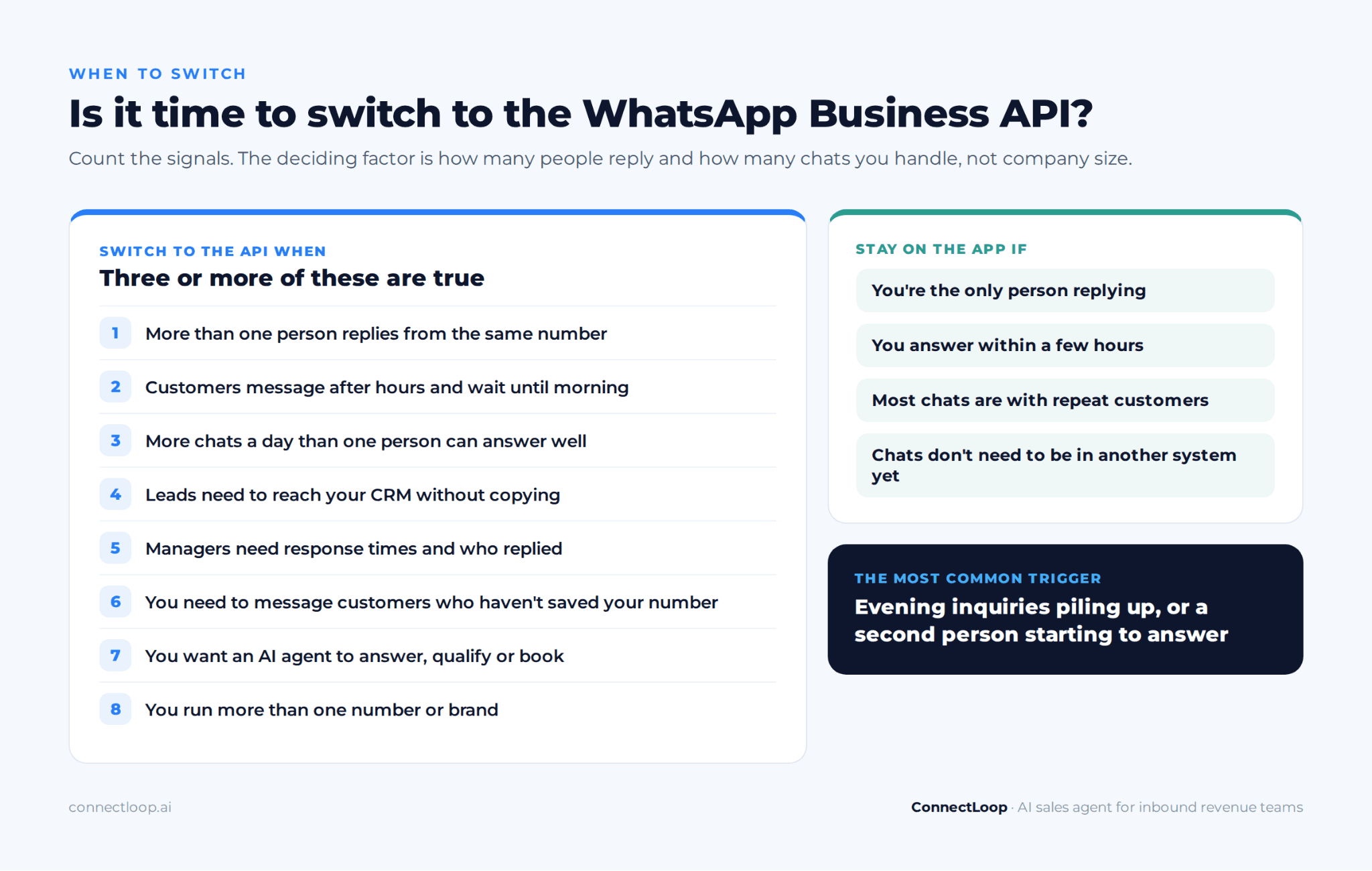
Switch to the API when:
- More than one person needs to reply from the same number.
- Customers message outside office hours and wait until morning.
- You handle more chats a day than one person can answer well.
- Leads need to be in your CRM without copying by hand.
- Managers need to see response times and who replied.
- You want to send updates or follow-ups to customers who haven't saved your number.
- You want an AI agent to answer, qualify or book meetings.
- Your business needs to work with more than one phone number or brand.
Stay on the app if:
- You're the only person replying, and you can answer within a few hours.
- Most of your chats are with repeat customers who know you.
- You don't need the conversations in another system yet.
| Situation | Best fit |
|---|---|
| Freelancer or owner-led shop answering every chat personally | WhatsApp Business app |
| Small team, mostly daytime chats, no CRM yet | App, with Coexistence when you're ready |
| Sales team with leads arriving at all hours | API with an AI agent |
| Customer support team with several agents and reporting needs | API with a shared inbox |
| Online store sending order updates and abandoned cart reminders from Shopify or WooCommerce | API with utility and marketing templates |
| Business sending order updates or reminders at volume | API with utility templates |
How do you move from the WhatsApp Business app to the API?
Moving to the API takes a few steps and usually less than a day of work. Most of the time goes on decisions, not technical setup. With ConnectLoop, Embedded Signup handles the Meta steps in one flow, and the AI agent trains on your website in about 60 seconds.
- Create or open your Meta Business Portfolio. This is the business account that owns your WhatsApp number.
- Choose your route. Pick a provider, a sales platform like ConnectLoop, or Meta's Cloud API with your own developers.
- Decide on Coexistence or full migration. Keep the app working on your phone, or move the number entirely.
- Connect the number through Embedded Signup. Verify it with a code and confirm your display name.
- Verify your business. Submit your business details to Meta to unlock higher messaging limits.
- Prepare your templates. Write the utility and marketing templates you'll need and submit them for approval.
- Collect opt-in. Add WhatsApp consent to your forms and checkout before sending templates.
- Connect your CRM and calendar. Make sure contacts, transcripts and bookings land in the right place.
- Set handoff rules and test. Send your ten most common questions, including one after hours, and fix any gaps before you go live.
For how an AI agent runs on WhatsApp once you're connected, see how a WhatsApp AI agent works.
How does ConnectLoop use the WhatsApp Business API for sales?
ConnectLoop connects your WhatsApp number to the API and puts Lia, an AI sales agent, on it. Lia answers buyers from your approved content at any hour, qualifies them, scores each lead hot, warm or cold, and books meetings into your calendar. Every conversation syncs to your CRM. ConnectLoop is an official Meta Business Partner and a Verified Meta Business.
What happens when a buyer messages your WhatsApp number:
- Lia answers within seconds, using your website, pricing and policies, day or night.
- Lia qualifies the buyer in the chat, one question at a time, using frameworks such as SPIN selling questions and MEDDIC rather than a long form.
- Each lead gets a score: hot, warm or cold, so your team knows who to call first. Our guide to lead scoring explains how scores work.
- Lia books the meeting against real availability in Google Calendar or Outlook, without leaving WhatsApp. See AI appointment booking.
- The lead and transcript sync to Salesforce, HubSpot or Zoho. See all integrations.
- A person takes over when needed. The buyer stays in the same thread, and the rep receives the full transcript and the buyer's intent.
- Unanswered questions are logged in a Knowledge Gaps report, so you can add the missing content.
The same agent works on your website chat and email, so a buyer who switches channels is still one conversation. More detail is on the WhatsApp sales solution page.
What stays with your team?
Your team keeps the decisions that need judgment: custom pricing, discounts, contract terms and complaints. Lia captures these requests in the chat and passes them to a rep with the context. Follow-up emails to returning leads are drafted by ConnectLoop's Proactive Outreach, and a person reviews and sends each one, so every message reflects your team's judgment.
Key takeaways
- The WhatsApp Business app is free and built for one person on one phone. The API connects WhatsApp to software so a team can share one number.
- The WhatsApp API, now the WhatsApp Business Platform, has no app of its own. You use it through a provider, a sales platform or your own software.
- Since 1 October 2026, replies inside the 24-hour service window are charged after a monthly allowance, and utility templates in the window are billable. Many pricing guides are out of date.
- The API has stricter rules: the 24-hour window, approved templates, opt-in and messaging limits.
- For sales teams, the API solves the real problems: personal numbers, chat ownership, after-hours leads and CRM sync.
- Coexistence lets you keep your number and your app while connecting to the API.
- Switch when three or more of the signals in the checklist are true.

About the author
ConnectLoop Staff
Written by the ConnectLoop team. ConnectLoop is an AI sales agent for inbound revenue teams, based in Cambridge, Massachusetts.
About ConnectLoop →Frequently asked questions
No. Customer messages to you are free, and chats started from an eligible click-to-WhatsApp ad are free for 72 hours. Otherwise Meta charges per delivered message: marketing, utility and authentication templates, plus service replies beyond the monthly allowance. Providers also charge for their software. ConnectLoop customers pay Meta's charges alongside their plan.
Yes, through Coexistence. Your existing WhatsApp Business app number connects to the API, and messages appear in both the app and your API platform. Some app features change, such as broadcast lists moving to the API. You can also migrate the number fully to the API. ConnectLoop can help you choose between the two.
Not if you use a provider or a ready-made platform. Providers handle the technical connection, and Embedded Signup lets you connect your number in a guided flow. You only need developers if you build your own software on Meta's Cloud API. ConnectLoop's setup needs no developer.
For bulk messaging, the app offers broadcast lists, but only contacts who saved your number receive them, and each list is capped. With the API, you send approved templates to any customer who opted in, at a per-message cost. ConnectLoop focuses on conversations buyers start, not bulk campaigns.
You can, but it's best not to. Customers see your business profile and catalog, and mixing personal and business chats makes both harder to manage. Most owners keep personal WhatsApp on one number and WhatsApp Business on another, often on the same dual-SIM phone. ConnectLoop recommends a dedicated business number for sales.
The app runs on one phone, with a small number of linked devices such as computers or tablets that can share the account. There are no separate agent logins, chat assignment or per-person reporting. For a team, the API with a shared inbox or sales platform works better. ConnectLoop syncs every WhatsApp conversation to your CRM.
Meta offers a verified business badge, often called the green checkmark, for businesses that meet its requirements. App users can apply through Meta Verified, a paid subscription available in supported countries. API accounts apply through their business portfolio once the business is verified. Rules vary by country, so check Meta's current requirements. ConnectLoop's own business is Verified by Meta.
Meta has added business calling to the WhatsApp Business Platform, so customers can call a business number and businesses can call customers who agree to it. Availability depends on the country and on your provider, so check before you plan around it. ConnectLoop's Lia works in WhatsApp chat, where she answers, qualifies and books meetings.
A Business Solution Provider (BSP) is a company approved by Meta to connect businesses to the WhatsApp Business Platform. It handles the technical setup and usually offers software on top, such as an inbox, chatbot or AI agent. ConnectLoop is an official Meta Business Partner offering an AI sales agent on WhatsApp.
Are your WhatsApp leads waiting until morning?
Look at the last 30 days of WhatsApp messages and check how many arrived after office hours, and how long those buyers waited for a reply. That wait is usually the clearest sign it's time for the API. ConnectLoop connects your number through Meta's Embedded Signup and trains on your website in about 60 seconds.