
Conversational Intelligence
Conversational Intelligence That Reads Every Chat So You Don't Have To
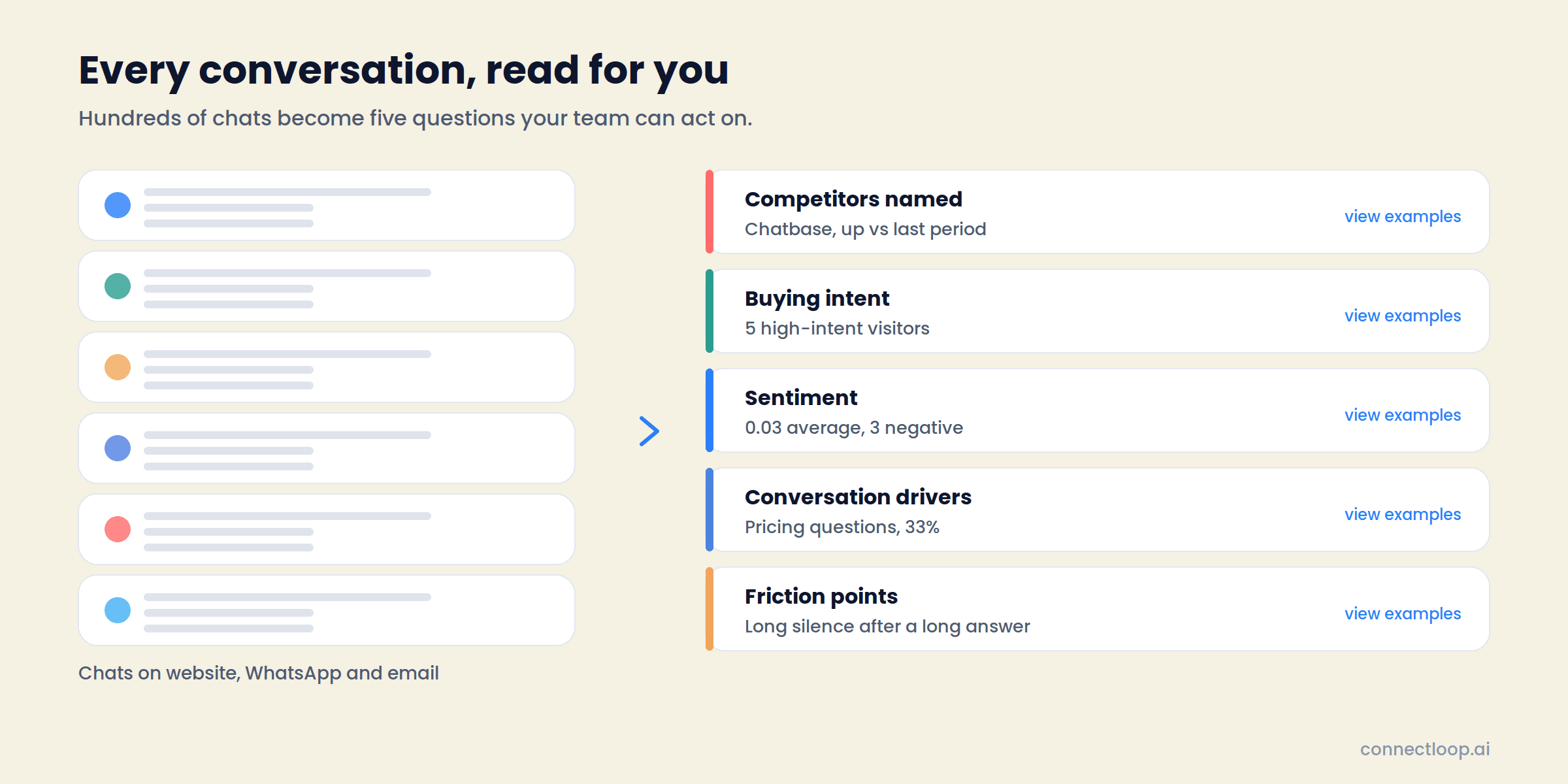
Your AI agent talks to hundreds of visitors a month. Conversational Intelligence turns those chats into patterns: which competitors come up, what visitors get stuck on, who is ready to buy, where the mood turns, and which questions the agent couldn't answer. Every insight links to the exact conversation it came from.
Six tabs, one time range, and a follow-up list your team can act on today.
Growth, Scale and Enterprise plans · Website, WhatsApp and email · Google CASA Tier 2 Verified · Official Meta Business Partner
The problem
The Answers Are in the Transcripts. Nobody Reads the Transcripts.
An agent handling a few hundred conversations a month produces a few hundred records of what buyers actually said. Reading them one at a time is a full-time job, so the patterns stay invisible.
Competitors
You Learn Who You Lost To at Renewal
Prospects name the alternatives they are weighing while they chat. That name sits in a transcript nobody opens until the deal is already gone.
Intent
Hot Leads Look Like Everyone Else in the Inbox
Every lead arrives as a name and an email. The one who asked about pricing twice and booked a meeting looks identical to the one who asked about the weather.
Sentiment
Frustration Shows Up as Churn, Months Later
A visitor who asked to compare features and got nothing useful leaves quietly. Nobody is told, so nobody follows up.
Knowledge gaps
The Same Question Goes Unanswered for Weeks
When the agent can't answer something, the visitor moves on. Without a count of how often it happens, the knowledge base never gets the fix.
Drivers
You Guess Why People Reach Out
Pricing, features, integrations, setup, billing. Without a breakdown, positioning and content decisions run on anecdote.
Evidence
Summaries Without Sources Get Ignored
A dashboard that says “pricing objections are up” earns a shrug. The same claim with the three chats behind it earns a change.
The solution
LIA Reads Every Conversation, Then Shows You the Pattern
Conversational Intelligence sits under Sales Intelligence in your workspace. One 7 / 30 / 90-day toggle controls every tab, and every theme, score and friction point links back to the chat it came from.
01
Tells You What Changed This Period
The Overview opens with a written summary: how many conversations were analysed, what drove them, the fastest-moving theme and the average sentiment. Five KPI tiles underneath, then sentiment over time, why visitors reached out, and your fastest-rising themes.
02
Surfaces Competitors, Comparisons, Objections and Confusion
Trends & Patterns groups every recurring theme into four types and ranks them by share of conversations, with trend versus the prior period, sentiment, a recommendation and clickable examples on each card.
03
Ranks Identified Visitors by Buying Intent
Intent Scoring shows the High / Medium / Low split, then a prioritised list with the score, the predicted reason for reaching out, pages viewed, time on site, sentiment and last seen. Session data is written back to each CRM contact as first-party intent data.
04
Flags the Conversations That Need a Human
Sentiment tracks the mood trend against a handover threshold you control, splits conversations into positive, neutral and negative, and lists every frustration and escalation with the reason and whether a handover happened.
05
Shows Why Visitors Reach Out, and How Well Each Reason Is Resolved
Conversation Drivers breaks conversations into pricing, features, integrations, setup and billing, with a resolved-by-agent rate and a recommendation for each driver, so you can see which topics the knowledge base handles and which it needs.
06
Ranks Where the Agent Let a Visitor Down
Friction Points count three failure types: a question left unanswered, a visitor repeating the same question, and a long silence after a long reply. Each comes with the conversations behind it and a specific fix.
Inside the product
Six Tabs, One Question Each
The tabs are built to be read in order. Big picture first, then what is trending, then who to call, then what to fix.
| Tab | The question it answers | What you see |
|---|---|---|
| Overview | What changed this period? | Written summary, five KPI tiles, sentiment over time, why visitors are reaching out, fastest-rising themes, recent frustration signals, outreach alerts waiting on your team |
| Trends & Patterns | What keeps coming up? | Theme cards filtered by Comparison, Competitor, Unresolved or Confusion, each with share of conversations, trend, sentiment, a recommendation and example quotes |
| Intent Scoring | Who is ready to buy? | High / Medium / Low distribution, CRM enrichment fields, and a prioritised visitor list with score, predicted reason, activity, sentiment and last seen |
| Sentiment | Where did the mood turn? | Sentiment over time against the handover threshold, positive / neutral / negative breakdown, and the frustration and escalations list |
| Conversation Drivers | Why are people reaching out? | Share per driver, sentiment per driver, resolved-by-agent rate, and a recommendation where resolution is weak |
| Friction Points | Where does the agent lose them? | Three friction types ranked by frequency, share of friction events, the fix, and the exact conversations |
A separate Discussed Topics view tracks the individual topics visitors raise most, how each trends over 7, 30 or 90 days or all time, and which is growing fastest.
Trends & Patterns
Every Theme Comes With Its Evidence and Its Fix
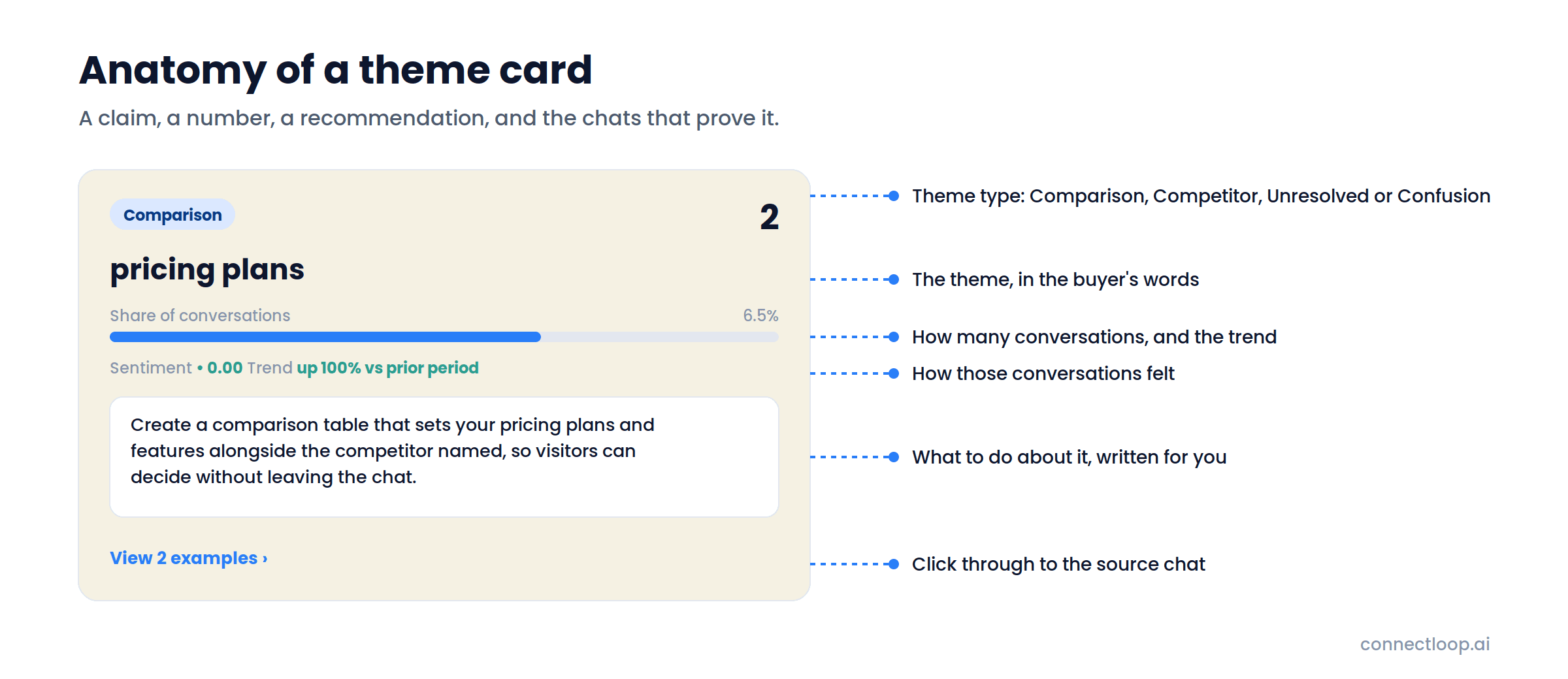
A theme card is a claim, a number, a recommendation and the chats that prove it. Click any example and you land in the source conversation.
Four theme types
Competitor for the rivals prospects name. Comparison for what they weigh you against: plans, features, approaches. Unresolved for objections the agent didn't close. Confusion for what visitors misunderstand.
Share of conversations and trend
Each card shows what percentage of chats mentioned the theme and whether that is up, flat or down against the prior period.
Sentiment per theme
A comparison theme at −0.50 and a competitor mention at +0.20 tell you which conversations went badly, not just which happened.
A written recommendation
Not “pricing is trending” but what to do about it: build the comparison table, publish the pricing page, add the document.
Filter and search
Filter to one type or search themes by name. Every card has a “view examples” link.
Intent Scoring
Your Outreach List, Ranked and Explained
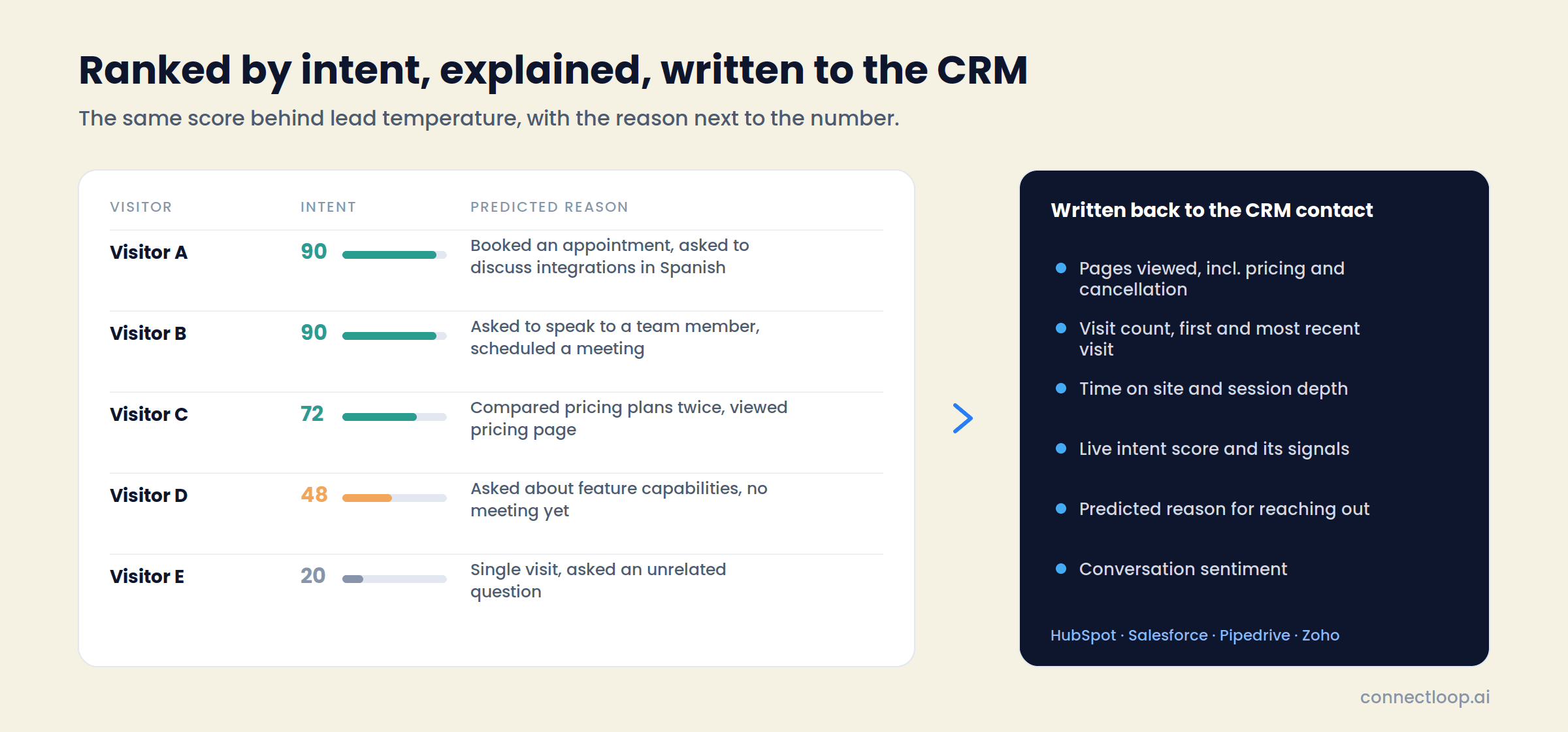
The same score that powers lead temperature everywhere else in ConnectLoop, shown as a distribution, then as a list you can filter to High and work top to bottom.
High / Medium / Low distribution
How many identified visitors sit in each band, as a count and a percentage, for the selected period.
Predicted reason for reaching out
One line per visitor, written from the conversation: “booked an appointment and asked to discuss integrations in Spanish,” “requested to speak to a team member.”
Activity, sentiment, last seen
Pages viewed, time on site, conversation sentiment and recency, on every row.
CRM enrichment
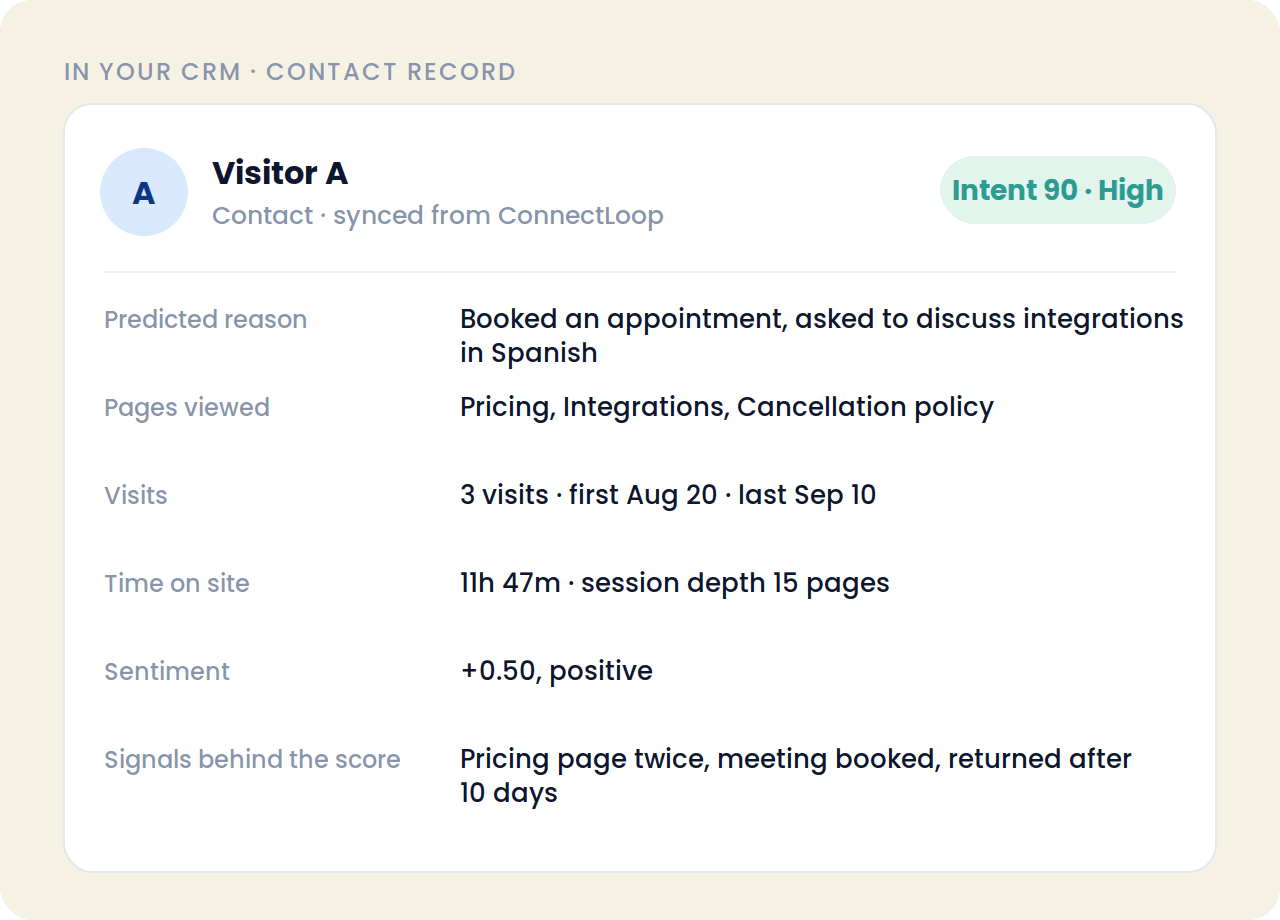
Session data is written back to each contact as structured first-party intent data: pages viewed including pricing and cancellation pages, visit count, first and most recent visit, time on site and session depth, the live intent score and the signals behind it, predicted reason, and sentiment. Reps see the same signals the score is built from.
Sentiment
The Follow-Up List Writes Itself
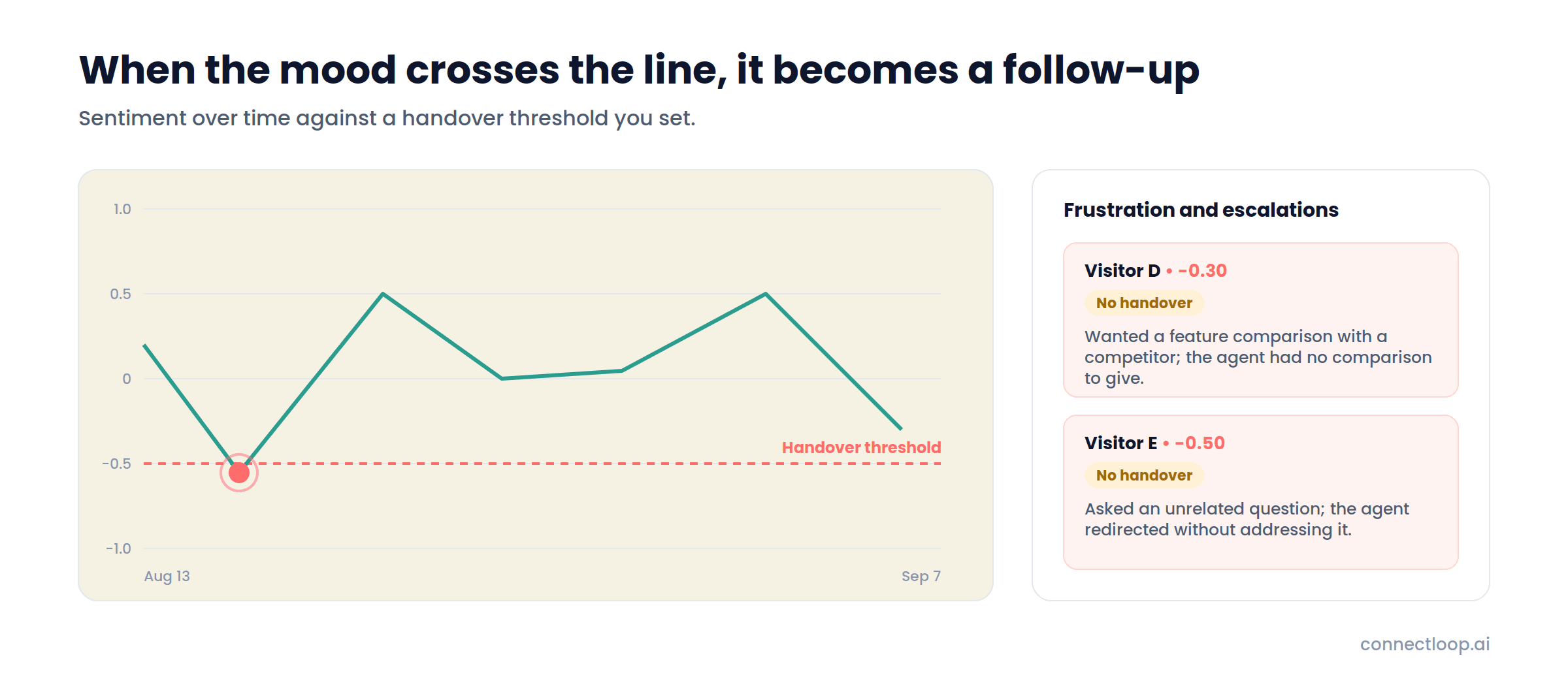
Every conversation is scored for sentiment once analysed. When its lowest point falls at or below your handover threshold, or the visitor asks for a person or a meeting after the agent couldn't help, it appears here with the reason.
Sentiment over time, against the threshold
The mood trend plotted with a dashed handover line, so the dips that crossed it are obvious at a glance.
Positive, neutral, negative breakdown
A count and share for each, for the selected period.
Frustration and escalations
Each entry shows the visitor, the sentiment score, whether a handover happened, how long ago, and a one-line explanation of what went wrong.
A threshold you control
The handover threshold is set under Agent Behavior → Conversational Intelligence. Lower it to catch more, raise it to catch only the serious ones.
Conversation Drivers and Friction Points
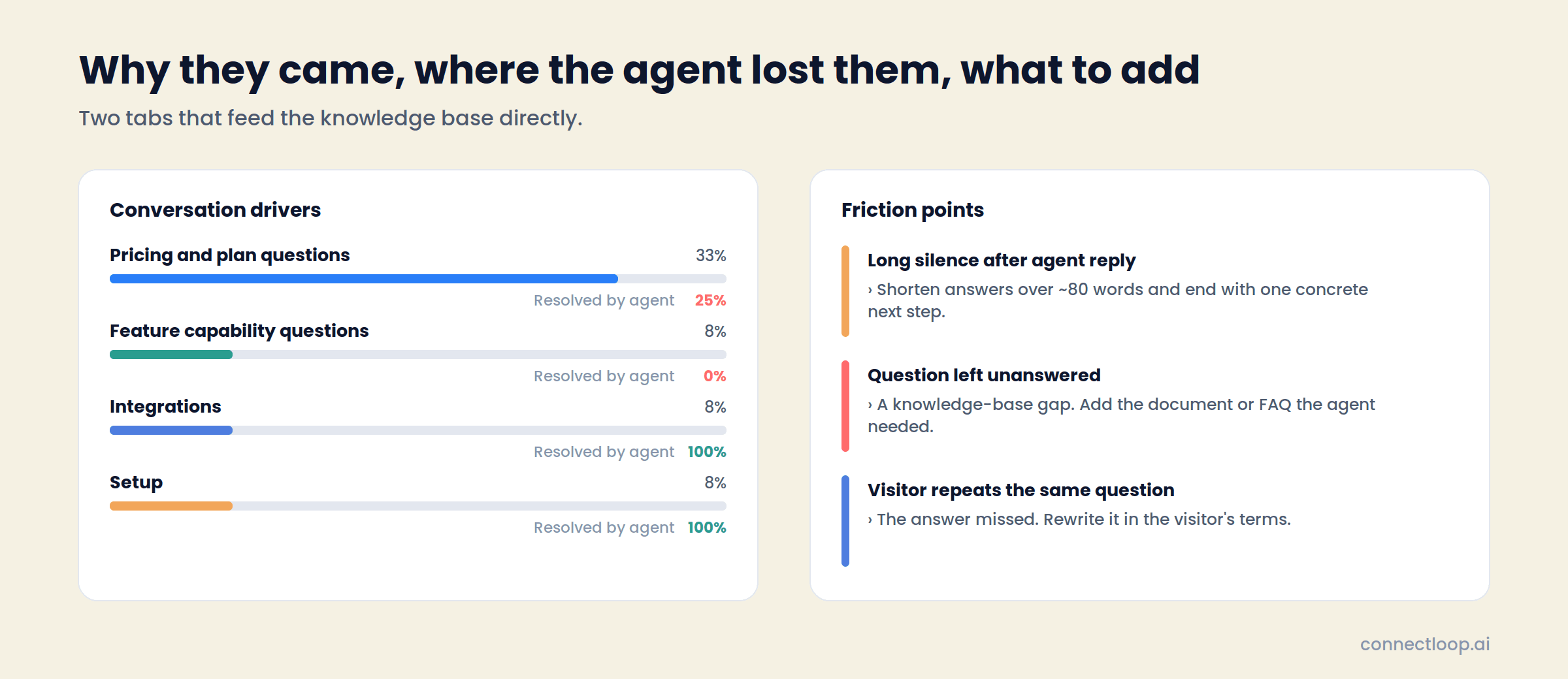
Why They Came, and Where the Agent Lost Them
Two tabs that feed the knowledge base directly. Drivers show what pulls people into a conversation and how often the agent resolved it. Friction Points show the specific moments it didn't.
What you do with it
Four Things That Change the Week After You Turn It On
Positioning
A Competitor Question Becomes a Comparison Page
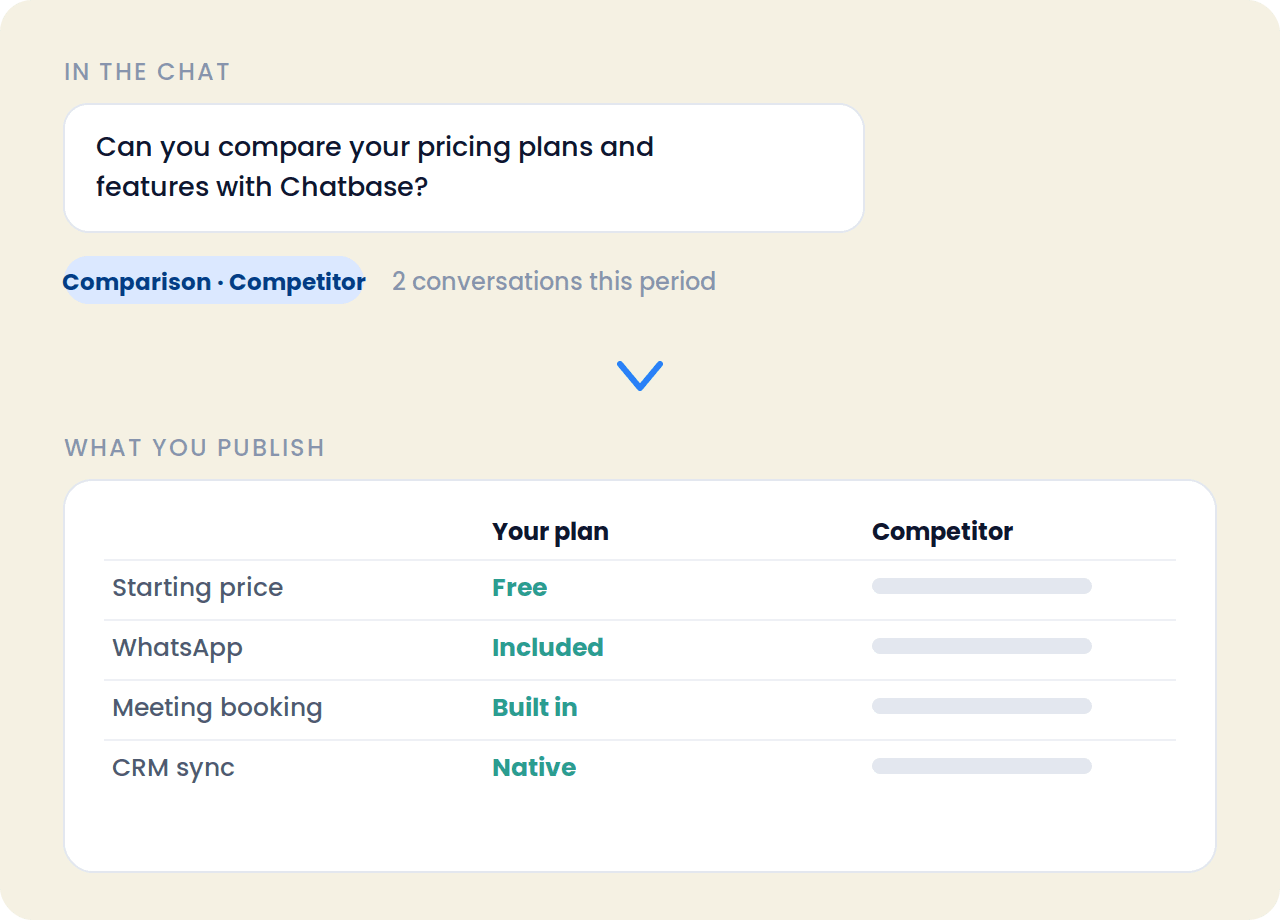
When several visitors ask how you compare with the same rival, that is a marketing job, not a support ticket. Trends & Patterns tells you which name came up, how many chats mentioned it, and whether it is rising.
Underneath, a plain-English recommendation, usually “publish a comparison table” or “add a pricing page”, with the example chats linked so whoever writes it starts from what buyers actually asked.
- Which competitors visitors name, ranked by mentions
- What they compare: plans, features, approaches
- Up or down against the last period
- The exact chats, one click away
Follow-up
A Bad Moment in a Chat Becomes a Call the Same Day
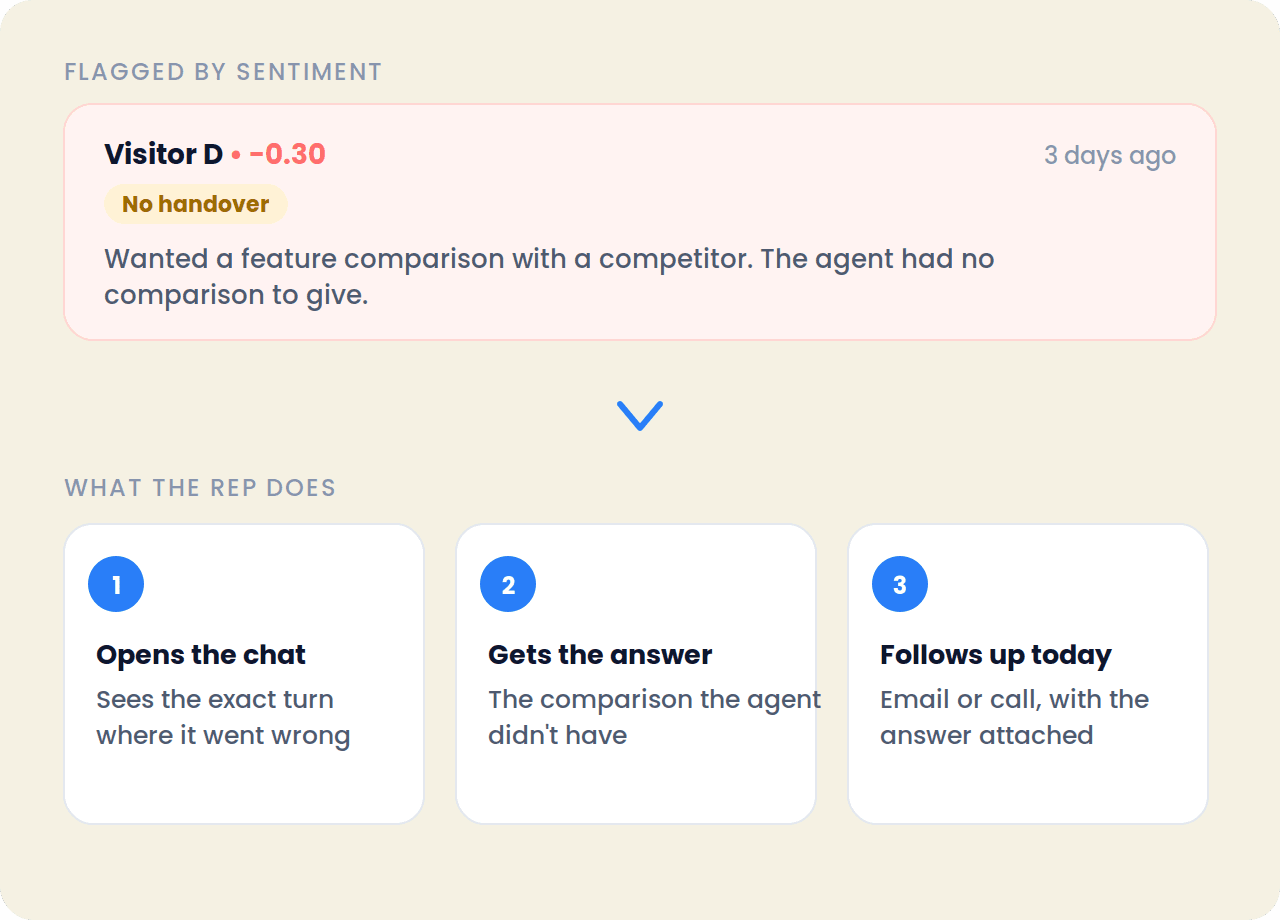
A visitor who wanted a feature comparison and got nothing useful is a deal about to go quiet. The Sentiment tab lists that conversation with the score, whether a handover happened, and a one-line reason written from the transcript.
The rep opens the chat, sees the exact turn where it went wrong, and follows up with the answer the agent didn't have. Alerts waiting on your team also show on the Overview, so nothing sits.
- Score and the low point that triggered the flag
- Handover status on every entry
- One-line reason, written for you
- Threshold you set under Agent Behavior
Knowledge base
A Question the Agent Kept Missing Becomes a Document
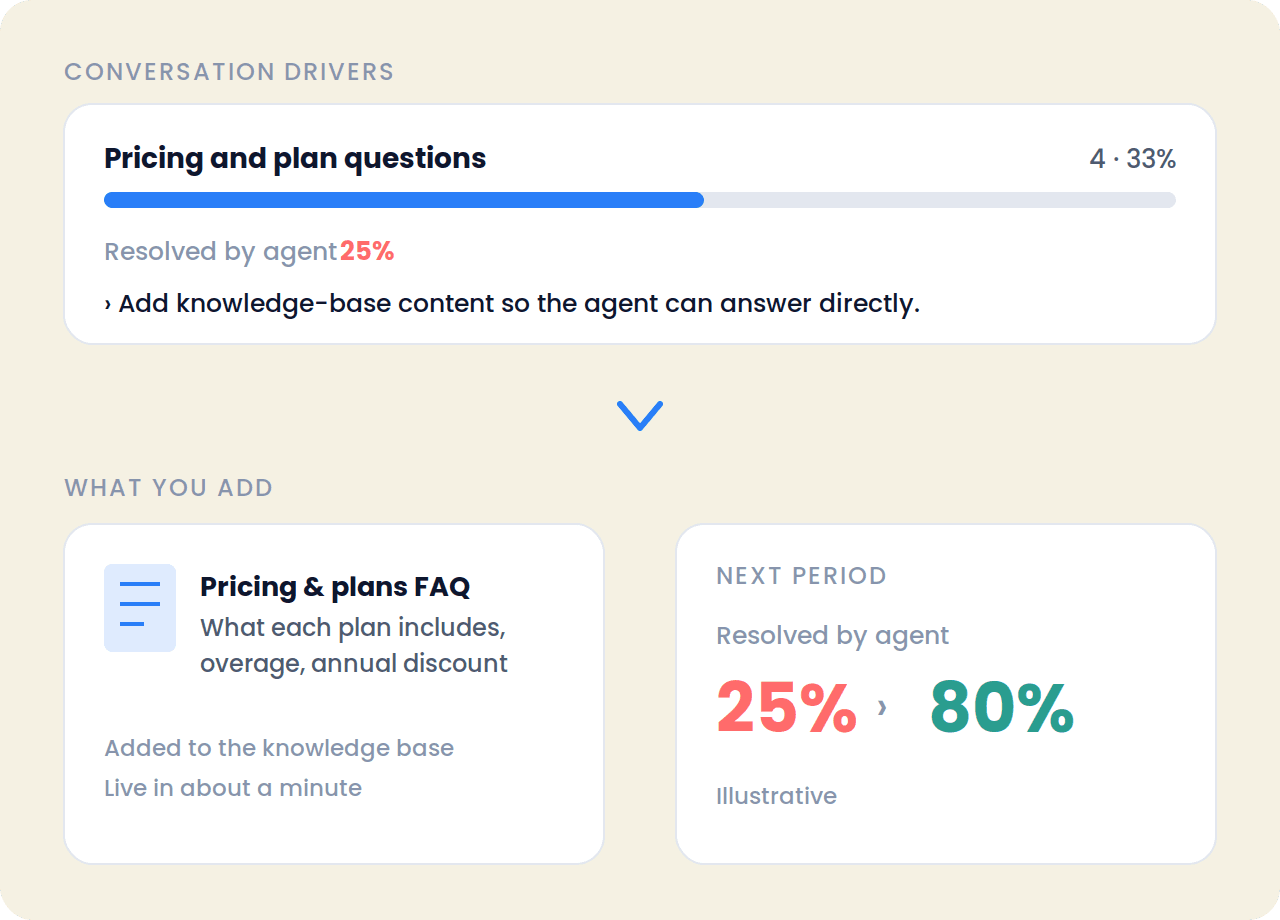
Conversation Drivers show that pricing questions are a third of all chats and the agent resolves a quarter of them. That is a document waiting to be written, and the tab says so in plain words.
Friction Points go one level down: a long silence after a long answer gets the fix “shorten answers over 80 words and end with one next step.” Add the content, then watch the resolution rate move next period.
- Resolved-by-agent rate for every driver
- A recommendation wherever that rate is weak
- Three friction types, ranked by how often they happen
- The exact chats behind each one
CRM
The Intent Score Shows Up in the CRM With Its Reasons
Intent Scoring writes what it learned about each visitor back to their CRM contact. The rep sees the score and the signals it was built from, instead of a number with no explanation.
Pages viewed, including pricing and cancellation pages. Visit count, first and latest visit. Time on site and how deep they went. The predicted reason they reached out. The sentiment of the conversation. All on the contact record, in HubSpot, Salesforce, Pipedrive or Zoho.
- Live intent score and the signals behind it
- Predicted reason for reaching out, in one line
- Pages, visits, time on site
- Sentiment from the conversation
Built on What Buyers Said, in Their Own Words
Conversational Intelligence works on the conversations LIA actually had, on your website, on WhatsApp and by email. Every theme, score and friction point links back to a real exchange you can open. Your team keeps the decisions: the positioning change, the follow-up call, the document added to the knowledge base.
Growth, Scale and Enterprise plans · Off by default, on in one click under Agent Behavior
- Every insight has a sourceClick any theme, score or friction point and the chat opens.
- One time range for everything7, 30 or 90 days, set once at the top right.
- Reads every channel LIA works onWebsite chat, WhatsApp and email, in one view.
Getting started
Five Steps, One Afternoon
- 01
Paste your URL
LIA crawls your site and builds a knowledge base in about sixty seconds. Add documents and playbooks as needed.
- 02
Add one line of code
The widget installs with a single snippet, styled to your brand. Connect WhatsApp and email if you use them.
- 03
Set the boundaries
Decide what LIA may use, what escalates to a human, and what LIA must never claim. Test before publishing.
- 04
Connect calendar and CRM
Meetings route to the right rep. Contacts, transcripts and intent scores sync automatically.
- 05
Switch on Conversational Intelligence
It is off by default. Turn it on under Agent Behavior, set the handover threshold, and analysis fills in as conversations complete.
In production
Running In the Real World
- 82
- WhatsApp conversations at Web Summit Rio
- 37
- qualified leads from those conversations
- 5
- signups, tracked end to end
Deployed across the Colsubsidio cohort in Colombia. 37 companies onboarded, 12 live. Google CASA Tier 2 Verified · Verified Meta Business · Official Meta Business Partner.
Questions
Frequently Asked Questions
Analysis run across every conversation a sales channel has, rather than one transcript at a time. It surfaces which competitors people name, what they ask, how they feel and where the conversation broke down. In ConnectLoop it runs on the chats LIA has with your visitors on the website, WhatsApp and email.
Growth, Scale and Enterprise. On other plans the page shows an upgrade prompt.
No. An admin turns it on per workspace under Agent Behavior → Conversational Intelligence, where the handover threshold is also set. Analysis starts on conversations from that point and fills in as each one completes.
Sales Intelligence → Conversational Intelligence in the left sidebar, with the Overview and Discussed Topics views underneath. It also opens from any lead detail page scoped to that customer, or scoped to a single conversation.
Every tab. The 7 / 30 / 90-day toggle at the top right applies to Overview, Trends, Intent, Sentiment, Drivers and Friction together. Discussed Topics adds an all-time view.
Yes. Intent Scoring uses the score behind lead temperature. The tab shows the High / Medium / Low distribution, lets you filter to one band, and writes the score and its signals back to each CRM contact as first-party intent data.
Any competitor a visitor names in a conversation. Trends & Patterns ranks them by how many chats mention them, shows the trend against the prior period and the sentiment, and links to the example quotes.
A conversation whose lowest sentiment point falls at or below your handover threshold, or where the visitor asked for a person or a meeting after the agent couldn't help. Each entry shows the score, whether a handover happened, and a one-line reason.
Three things: the agent said it couldn't answer, the visitor asked the same question twice, or the visitor went quiet after a long agent reply. Each is counted, ranked by frequency, and linked to the conversations behind it with a specific fix.
The reason a visitor reached out: pricing and plan questions, feature capability questions, integrations, setup, billing. Each driver shows its share of conversations, sentiment, the rate at which the agent resolved it, and a recommendation where that rate is weak.
A separate view under Conversational Intelligence that tracks individual topics visitors raise, how each trends over time, the top topic, the fastest-growing one and which are stable, with a key insights summary.
Yes. Open Conversational Intelligence from a lead detail page and it shows that customer's context. It can also be scoped to a single conversation.
HubSpot, Salesforce, Pipedrive and Zoho, alongside 18+ native integrations across calendars, email, collaboration and commerce.
Integrations
18+ Native Integrations, Not Middleware
Intent scores, transcripts and booked meetings flow into the tools your team already uses.
- Salesforce
- HubSpot
- Zoho
- Pipedrive
- WooCommerce
- Google Calendar
- Outlook Calendar
- Gmail
- Outlook
- Calendly
- Google Meet
- Microsoft Teams
- Google Drive
- Google Sheets
- Microsoft OneDrive
- GitHub
Also included
Conversational Intelligence Is One Part of the Agent
- Visitor IntelligenceEvery anonymous journey tracked, summarised and labelled High, Medium or Low intent.How visitor intelligence works →
- Inbound qualificationSPIN and MEDDIC run as natural questions inside the conversation, not as a form.How qualification works →
- Appointment bookingMeetings booked in the thread against real calendar availability.How booking works →
Stop Guessing What Your Buyers Are Saying
Turn on Conversational Intelligence, wait one period, and read what changed. The transcripts were always there. Now they add up to something.
Free plan, no card required · Priced on conversations, not credits