
Gmail Integration: The Follow-Up Comes From You, Not a Noreply Address
A visitor talks to LIA at 9:42pm, gets their answers and books Thursday. Minutes later a summary of the conversation lands in their inbox, sent from your Gmail address with the invite attached. When they reply, the reply comes to you, and LIA has a draft response ready for you to edit and send. Connect with OAuth.
Connect with OAuth from Connected Apps · Native, no middleware · Google CASA Tier 2 Verified
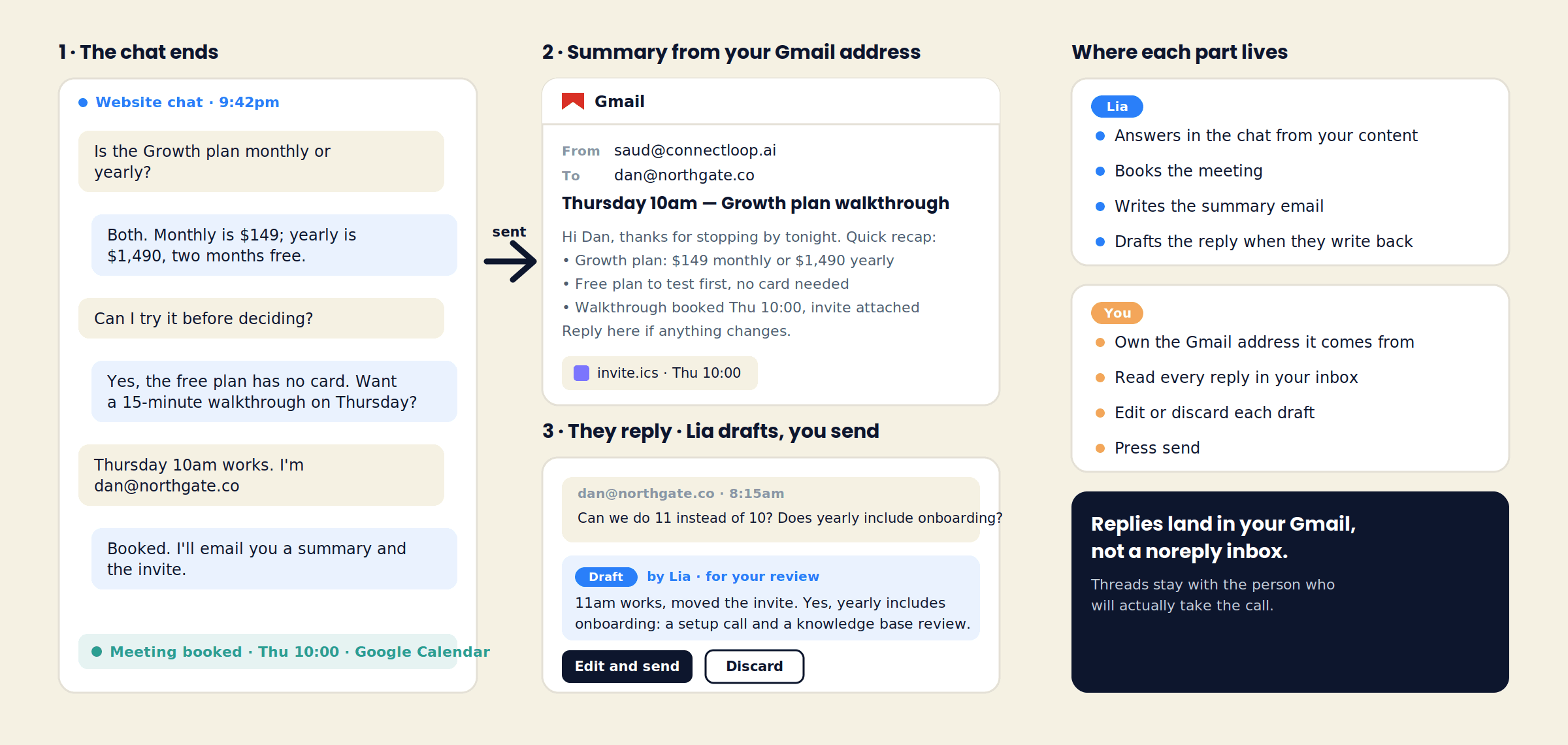
Why the sender matters
Three Things That Change When the Email Comes From a Person
Most chat tools send their follow-up from a noreply address, or from nothing at all. Sending it from the Gmail account of the person who will take the call changes what happens next.
Delivery
It reaches the inbox
Mail from an established Google Workspace address, with its own sending history, is treated like any other message from your company. There is no shared sending domain to worry about.
Reply
They can answer it
“Can we do 11 instead of 10?” goes to a real inbox. The thread is between the visitor and the person they will meet, and it stays in Gmail where that person already works.
Continuity
The call starts where the email left off
The summary the visitor received is the same one on their lead record. Both sides walk into Thursday with the same notes.
The summary email
What LIA Puts in the Summary
The email is written from the conversation, not from a template. Each one is short, specific to what was discussed, and signed with the connected team member's name.
A recap of what was answered
The plan they asked about, the price LIA quoted from your content, the feature they compared.
What was agreed
The meeting time, the trial they said they would start, the document they asked to receive.
The calendar invite
When a calendar is connected, the booking LIA made is attached, and the same invite goes to the team member.
An open line
A one-line invitation to reply if anything changes, so the visitor knows a person is on the other end.
The subject line does the work
“Thursday 10am — Growth plan walkthrough.” The visitor sees what it is before they open it. No “Your conversation with our assistant”, no ticket number.
Summaries go out for conversations where LIA captured an email address. A visitor who asked one question and left gets no email.
When they write back
LIA Drafts the Reply. You Send It.
The visitor's reply arrives in your Gmail like any other message. ConnectLoop reads it against the conversation and the lead record, and prepares a draft. Nothing goes out until you press send.
- 1
The reply lands
“Can we do 11 instead? Does yearly include onboarding?” arrives in the connected inbox, in the same thread as the summary.
- 2
LIA reads it in context
The draft is written with the original chat, the lead's visit history and your approved content in view, so the answer matches what LIA already told them.
- 3
You edit or discard
The draft appears for review. Change the wording, add a line, or throw it away and write your own. Your name, your voice.
- 4
You send
The reply goes from your Gmail address. The exchange is added to the lead's conversation history alongside the original chat.
Two Gmail connections
Gmail for Follow-Ups vs Gmail for the Email Agent
ConnectLoop has two Gmail integrations. They do different jobs, and many teams connect both.
| Aspect | Gmail (this page) | Gmail for Email Agent |
|---|---|---|
| What it does | Sends conversation summaries from your address; drafts replies when visitors respond | LIA answers new inbound emails to the connected inbox as a channel, the way it answers website chat |
| Who starts the thread | LIA, after a chat or WhatsApp conversation | The visitor, by emailing you |
| Who sends | You, after reviewing the draft | LIA, from your approved content, with handover to a person when needed |
| Best for | Teams that want every follow-up to come from a named person | Teams whose enquiries arrive by email and want them answered at any hour |
Each counts as one connected app against your plan limit.
Setup
Connect Gmail in Three Steps
- 1
Connect with OAuth
In Connected Apps, filter to Email and find Gmail. Click Connect, sign in to the Google account the follow-ups should come from, and allow access. The badge turns green.
- 2
Choose whose address
Connect the inbox of the person who takes the calls. With tag routing, the summary is signed by the team member the lead was routed to.
- 3
Run a test conversation
Use Live Test, leave an email, and check the summary arrives from your address. Reply to it from another account and watch the draft appear.
Gmail counts as one connected app against your plan limit: 2 on Free, 4 on Launch, 9 on Growth, unlimited on Scale. Disconnect any time; emails already sent stay in your Sent folder.
Questions
Gmail Integration FAQ
LIA sends the conversation summary after a chat where the visitor gave an email. Replies to anything the visitor writes back are drafted for you and sent only when you press send.
Website chat and WhatsApp conversations where LIA captured an email address. A visitor who asked a question and left without sharing an email receives nothing.
Every summary is saved on the lead record and in your Gmail Sent folder. The wording comes from the conversation and your approved content, so it says only what LIA already told the visitor.
In ConnectLoop, attached to the lead and the thread. Edit, send or discard from there; the sent reply goes out through your Gmail address.
Yes. Connect each person's Gmail and use tag routing. The summary for a lead is sent from the address of the team member it was routed to.
No. This integration handles follow-ups after a chat. Gmail for Email Agent makes the inbox itself a channel where LIA answers new enquiries. They can be connected together.
Permission to send mail from the connected address and to read replies in the follow-up threads, granted with Google OAuth. ConnectLoop's Google integration is CASA Tier 2 verified.
Both. A Workspace address on your own domain is the usual choice for a sales team.
Related
Usually Connected Alongside Gmail
- Google CalendarSo the invite in the summary is a real booking on a real calendar.
- Gmail for Email AgentLet LIA answer the enquiries that arrive by email.
- Follow-up emailsWhat a good follow-up says, and when to send it.Read the guide →
Connect Gmail and Send the First Follow-Up From Your Own Name
One OAuth click. The next visitor who books with LIA gets a summary from you, and their reply comes back to you with a draft already waiting.
Free plan, no card required · Priced on conversations, not credits