
AI Sales Agents
AI Knowledge Base: What It Is, How It Works and How to Build One for Sales
An AI knowledge base is the company content an AI agent answers from: website pages, FAQs, product and pricing documents. Instead of showing a list of articles, the AI finds the right passage and replies in plain language, using only that content. ConnectLoop uses one so Lia can answer buyers on website chat, WhatsApp and email.

Published
Most guides to AI knowledge bases are written for support teams cutting ticket volume. This one is written for teams whose AI talks to buyers. When a prospect asks about pricing, integrations or whether your product fits their business at 10 PM, the answer comes from your knowledge base, and a wrong answer can cost the deal.
You'll learn what an AI knowledge base is, what a grounded answer means, which documents to include first, how to write content an AI can answer from, and how to keep it accurate as your product changes. It includes a ready-to-use FAQ question list and a simple weekly routine for fixing gaps.
Table of contents
- What is an AI knowledge base?
- How does an AI knowledge base work?
- What is a grounded answer?
- Why does a sales team need an AI knowledge base?
- What should go into an AI knowledge base for sales?
- How do you build an AI knowledge base, step by step?
- How do you write content an AI can answer from?
- How do you keep an AI knowledge base up to date?
- How do you know if your AI knowledge base is working?
- What are the most common AI knowledge base mistakes?
- Can one knowledge base answer on chat, WhatsApp and email?
- How does ConnectLoop build and maintain Lia's knowledge base?
- Key takeaways
- Frequently asked questions
What is an AI knowledge base?
An AI knowledge base is a collection of approved company information that an AI agent searches and answers from. It holds website pages, documents and FAQs, and the AI turns them into direct replies in a conversation. It replaces "read these five articles" with one clear answer. ConnectLoop builds one for each Lia agent from your website and documents.
Think of it as the difference between handing a buyer a brochure and having someone who has read the brochure answer their question. The content is the same. What changes is that the buyer gets the one sentence they needed, in their own words, at the moment they asked.
An AI knowledge base usually contains:
- Website pages: home, product, pricing, about and solution pages.
- Documents: FAQs, product sheets, pricing and plan details, case studies, policies.
- Answers added over time: responses written by your team when the AI couldn't answer a question.
Support teams have used AI-powered knowledge base software for customer support and self-service for years, mostly to reduce support tickets with how-to guides and product documentation. A sales knowledge base uses the same idea for a different reader: the buyer.
How is an AI knowledge base different from a traditional knowledge base?
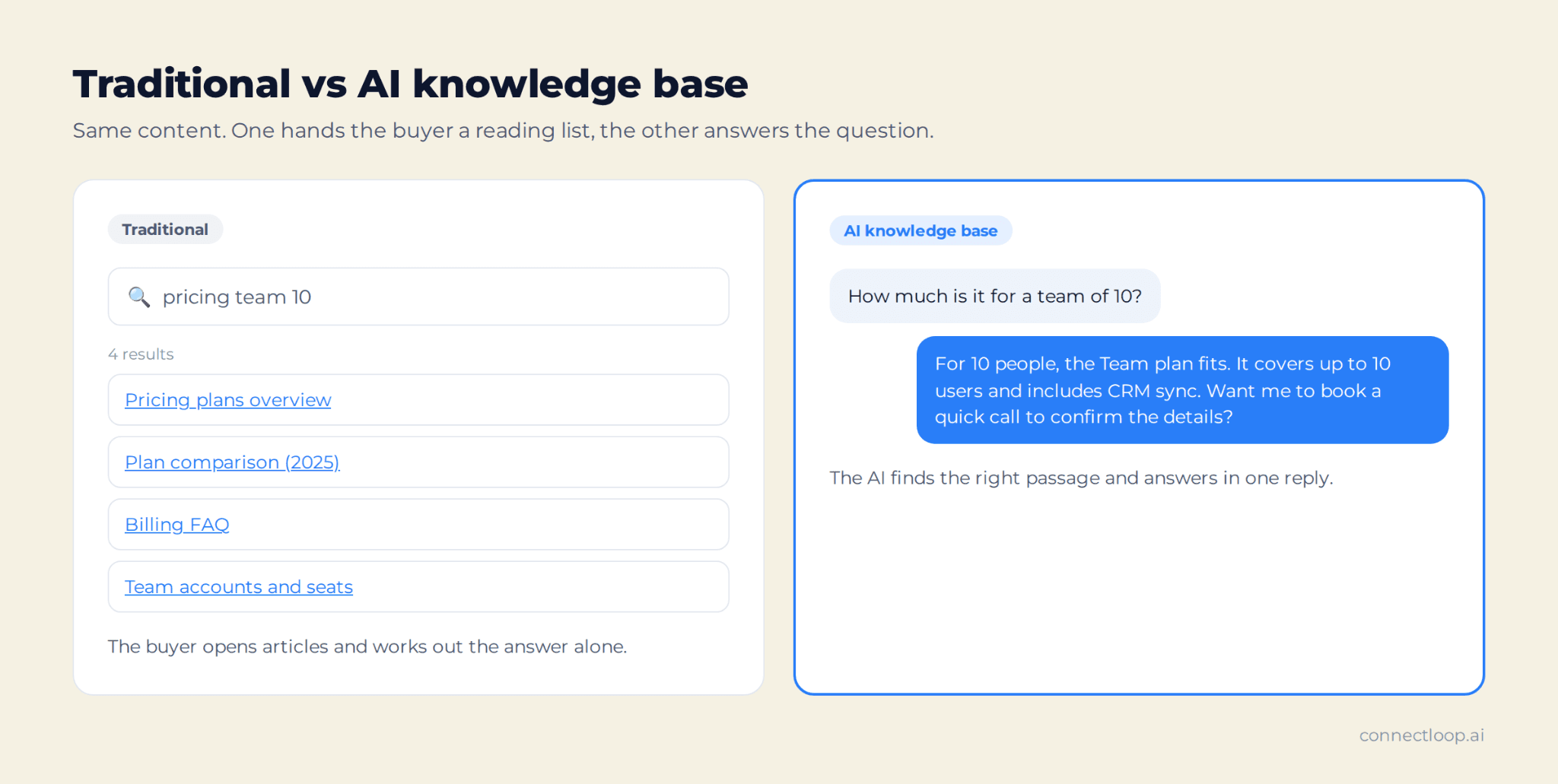
A traditional knowledge base is a library of articles people search and read themselves. An AI knowledge base is read by an AI agent, which finds the relevant part and answers in plain language. One needs good navigation; the other needs content clear enough for the AI to find the right sentence. ConnectLoop is built around the AI version.
| Traditional knowledge base | AI knowledge base | |
|---|---|---|
| Who reads it | People, one article at a time | An AI agent, on the buyer's behalf |
| How people search | Keywords in a search box | A question in their own words |
| What they get | A list of articles | A direct answer in the conversation |
| When it fails | "No results found" | The question is logged as a knowledge gap |
| Who it serves best | Existing customers looking up how-tos | Buyers and customers who want a quick answer |
| What makes it good | Good navigation and article titles | Clear, consistent, specific content |
How does an AI knowledge base work?
An AI knowledge base works in three steps. First, your content is added and split into searchable passages. Second, when someone asks a question, the AI finds the passages that best match its meaning, not only its keywords. Third, it writes an answer from those passages. ConnectLoop adds a fourth step: questions it can't answer are logged for your team.
In more detail:
- Content goes in. You add website URLs and documents. The system reads them and organises the text so specific passages can be found later. Many systems split long pages into smaller passages (chunking) and add metadata and tagging, such as topic or date.
- The question is understood. Natural language processing and machine learning work out the user intent behind user queries. "Do you work with HubSpot?" and "Can I connect my HubSpot CRM?" are treated as the same question.
- The right passages are found. Semantic search pulls the parts of your content most relevant to the question's meaning. This is often called retrieval, or retrieval-augmented generation (RAG).
- An answer is written. Generative AI writes a reply using those passages, in the tone you set.
- Gaps are recorded. When nothing relevant is found, a good system says so and records the question, instead of guessing.
The quality of step 4 depends almost entirely on steps 1 and 3. That is why the rest of this guide focuses on content, not technology.
What is a grounded answer?
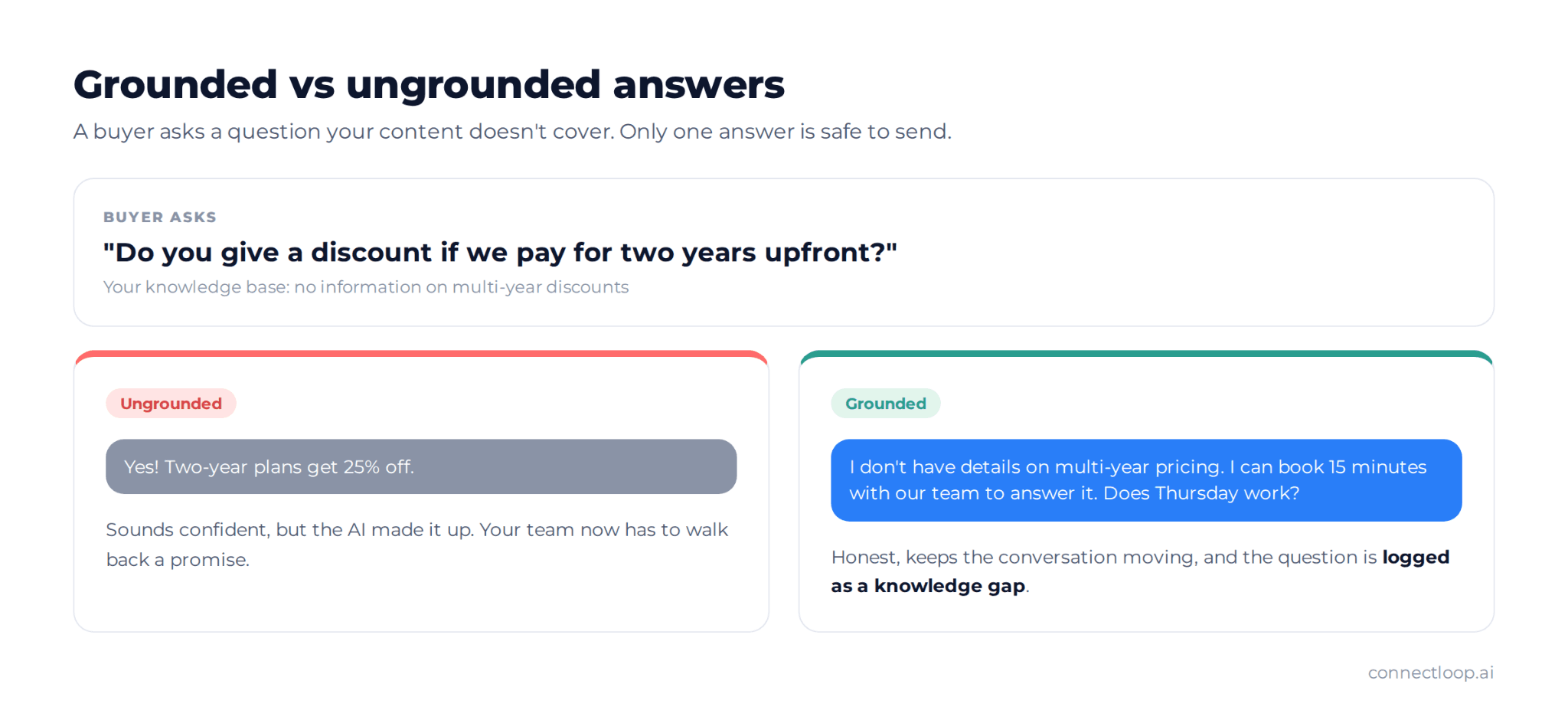
A grounded answer is a reply an AI builds only from approved sources, such as your knowledge base, not from general knowledge or guesswork. If the facts aren't in the source, a grounded AI says it doesn't know instead of inventing them. That is what makes an AI agent safe in front of buyers. ConnectLoop's Lia answers this way.
An ungrounded answer is where "hallucinations" come from: a confident reply that sounds right and is wrong. In a sales conversation, that might be a discount you don't offer, an integration you don't have, or a delivery time you can't meet. Each one creates a promise your team then has to walk back.
Grounding is a big concern for companies using AI. In Futurum Group's 1H 2026 AI Platforms Decision Maker Survey of 820 decision makers, 55% named reliability and hallucination management as their top challenge with generative AI. A well-built knowledge base is the most practical answer to that challenge.
What happens when the AI doesn't know the answer?
When a grounded AI can't find the answer in its knowledge base, it should say so plainly, offer a next step such as a call with the team, and log the question. Those logged questions become your to-do list for improving the knowledge base. In ConnectLoop, they appear in a Knowledge Gaps list, and your notification emails flag them too.
A good "I don't know" reply keeps the conversation going. For example: "I don't have the details on that. I can book you 15 minutes with our team, who can answer it directly. Does Thursday work?" The buyer still gets a path forward, and your team gets a question to answer once, for every future buyer. For how that hand-over should work, see our guide to AI-to-human handoff.
Why does a sales team need an AI knowledge base?
A sales team needs an AI knowledge base because buyers ask their first questions before they ever talk to a rep, often outside office hours. An AI agent can answer those questions instantly, but only if it has accurate content on pricing, fit, integrations and next steps. ConnectLoop's Lia uses its knowledge base to answer, qualify and book meetings.
Sales questions are different from support questions. A support knowledge base answers "how do I reset my password?" A sales knowledge base has to answer:
- "How much does it cost for a team of ten?"
- "Do you integrate with Salesforce?"
- "Is this a fit for a clinic, or only for software companies?"
- "How is this different from what we use today?"
- "How long does setup take?"
Buyers are cautious about AI on exactly these topics. In SurveyMonkey's study of 2,017 US adults, fielded in December 2025, 71% said they prefer a human for pricing questions and only 12% prefer AI. The same study found 89% believe companies should always offer the option to speak with a person.
That makes two jobs for your knowledge base. It must make the AI's pricing and fit answers precise enough to trust. It must also make it easy to reach a person when the question goes beyond what's written down. A fast, accurate first answer also protects your speed to lead, because the buyer gets a reply while they're still on your site.
What should go into an AI knowledge base for sales?
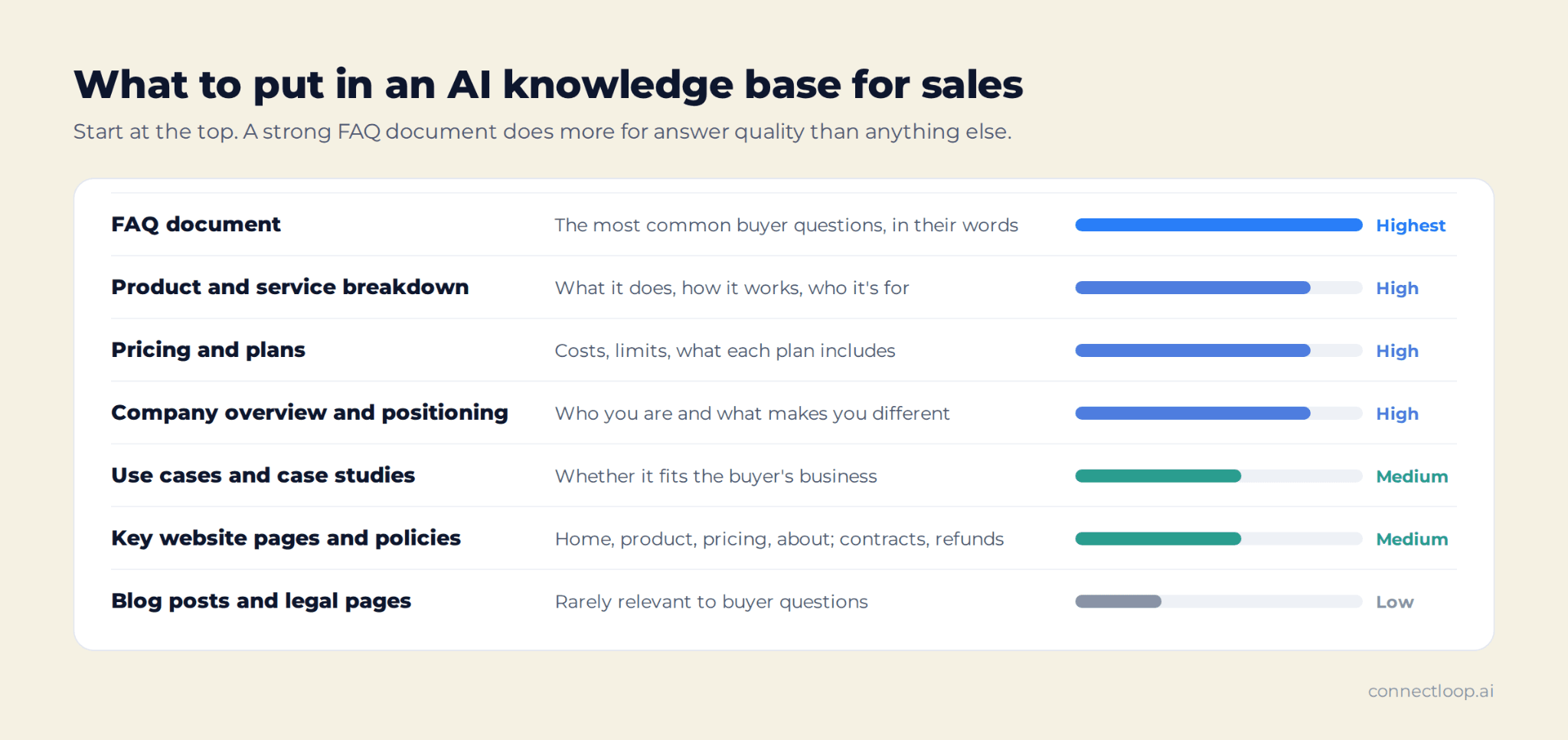
Start with the content buyers ask about most: what you do, who it's for, what it costs, how it works and how you compare. A strong FAQ document has the biggest impact, followed by a clear product explanation, defined positioning and real use cases. ConnectLoop's own setup guidance ranks content in that order.
| Content | What it lets the AI answer | Priority |
|---|---|---|
| FAQ document | The most common buyer questions, in their words | Highest |
| Product and service breakdown | What it does, how it works, who it's for | High |
| Pricing and plans | Costs, limits, what each plan includes | High |
| Company overview and positioning | Who you are, what makes you different | High |
| Use cases and case studies | Whether it fits the buyer's business | Medium |
| Key website pages | Home, product, pricing, about, solution pages | Medium |
| Policies | Contracts, cancellation, refunds, data handling | Medium |
| Blog posts and legal pages | Rarely relevant to buyer questions | Low |
Structured content, such as FAQs, plan tables and product sheets, gives the clearest answers. Unstructured content, such as long web pages and case studies, adds context. Combine documents with selected website pages, including your pricing page, rather than relying on one source. Website pages are the fastest start. Structured documents give the AI clearer, more reliable context than raw web pages alone. If you're also identifying who visits those pages, our guide to identifying anonymous website visitors explains how browsing history adds context to each lead.
What questions should your FAQ document answer?
Your FAQ document should answer the questions a buyer asks before they buy: what you do, who it's for, how it works, what it costs, how you're different and how to get started. Write each answer in two to four sentences. The list below is adapted from the FAQ template ConnectLoop gives every customer during setup.
Copy these and replace the brackets with your details:
- What exactly does [Company] do?
- Who is [Product] designed for?
- How does [Product] work?
- How is [Company] different from other [category] providers?
- Why should I choose [Company] over [alternative approach]?
- What is the pricing model for [Product]?
- How much does [Product] cost?
- What results have other clients achieved with [Company]?
- What is your refund or cancellation policy?
- Who is the team behind [Company]?
- When was [Company] founded, and why?
- Does [Company] partner with anyone?
- Where are you located, and what are your hours?
- How can I contact [Company]?
Add your own questions from sales calls and chats. The best FAQ documents grow every month from real conversations.
How do you build an AI knowledge base, step by step?
Build an AI knowledge base by starting small and expanding from real questions. List the questions buyers ask, collect the content that answers them, write an FAQ document, add your key website pages, test the AI as a buyer would, then fix the gaps every week. ConnectLoop follows these same steps during setup.
- List the questions. Pull 20 to 30 real questions from sales calls, chat history, emails and your sales team's memory. These define what the knowledge base must cover.
- Run a content audit. Find the pages and documents that answer those questions. Mark outdated content, duplicate content and conflicting information, and name one content owner.
- Write the FAQ document. Answer every question on your list directly, using the template above as a starting point.
- Add your highest-value pages. Home, product, pricing, about and solution pages. Leave out pages that rarely answer buyer questions.
- Add structured documents. Product breakdown, pricing and plans, company overview and one or two use cases.
- Test it like a buyer. Ask the AI the questions on your list, plus a few hard ones. Check every answer for accuracy and tone.
- Launch, then iterate weekly. Review unanswered questions every week and fill the content gaps they reveal.
Most teams can complete steps 1 to 6 in a day. Step 7 never ends, and that is the part that makes the knowledge base good.
How do you write content an AI can answer from?
Write for an AI the way you'd brief a new sales rep: clear headings, direct answers, one topic per section, and no contradictions. State limitations explicitly, so the AI can answer "no" correctly instead of guessing. Clarity and structure matter more than length. ConnectLoop's setup guide gives the same advice for every training document.
Five rules make the biggest difference:
- Answer first, then explain. Put the direct answer in the first sentence of each section.
- Use the buyer's words. If buyers say "price", don't only write "investment".
- Keep one version of each fact. Two different prices on two pages will produce two different answers.
- State what you don't do. "We don't offer on-site installation" lets the AI answer correctly.
- Be specific. "Setup takes about one day for most teams" beats "setup is quick and easy".
A before-and-after example shows the difference:
| Before | After |
|---|---|
| "Our flexible platform integrates seamlessly with leading tools to power your workflows." | "We integrate with Salesforce, HubSpot and Zoho CRM. Leads and contacts sync automatically. We don't currently integrate with other CRMs." |
The "after" version gives the AI three facts and one clear limit. The "before" version gives it nothing to answer with.
How do you keep an AI knowledge base up to date?
Keep an AI knowledge base up to date with a short weekly routine: review the questions the AI couldn't answer, add the missing facts, and update anything that changed in your product or pricing. Assign one owner so it doesn't drift. ConnectLoop logs every unanswered question in a Knowledge Gaps list to make that review quick.
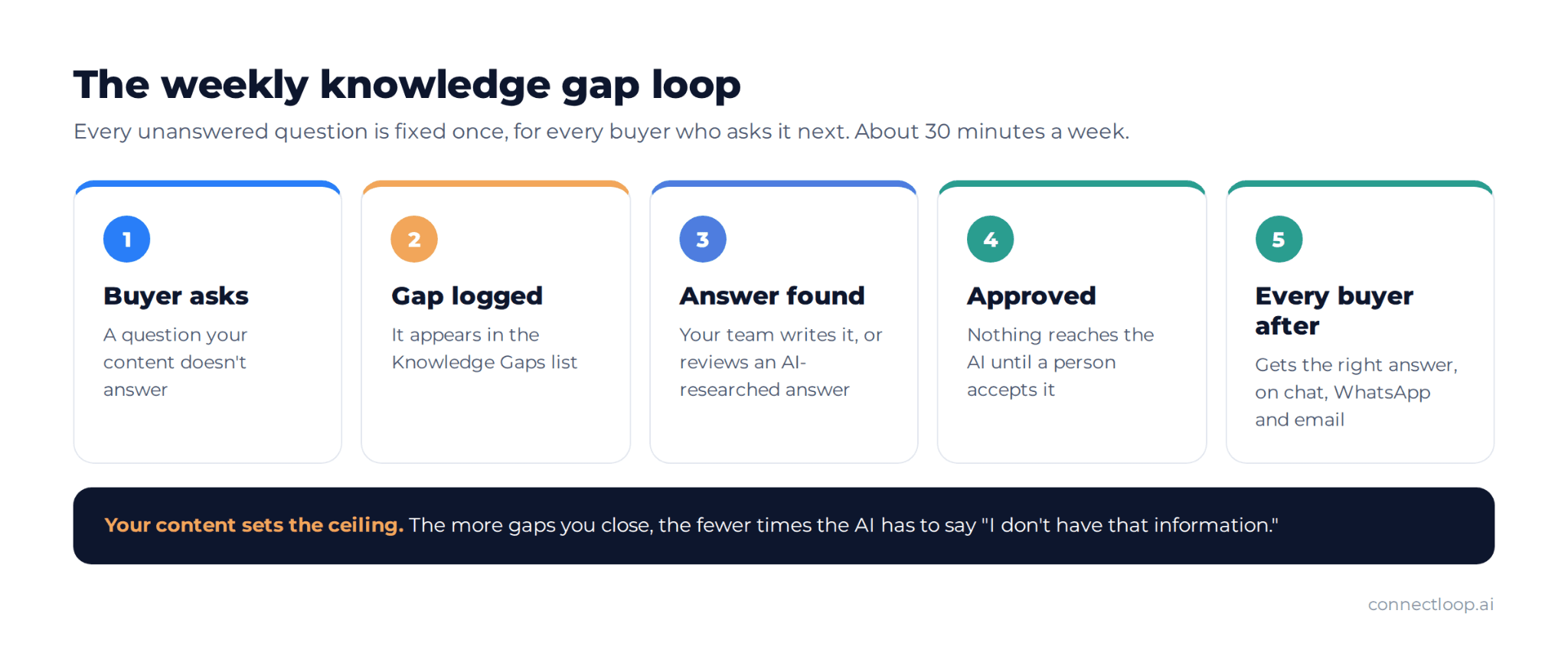
A 30-minute weekly routine works for most teams:
- Open the unanswered questions from the past week.
- Answer the ones that matter, and add them to your FAQ document or knowledge base.
- Ignore the ones that don't, such as off-topic or test questions.
- Check for changes: new features, new pricing, retired plans, new integrations.
- Remove or archive outdated content, so old facts can't come back.
This creates a feedback loop: every gap a buyer exposes is fixed once, for every buyer after them. Tie updates to your release process too. When the product changes, the knowledge base changes the same day. Outdated content is more harmful than missing content, because the AI will repeat it confidently.
How do you know if your AI knowledge base is working?
Your AI knowledge base is working when buyers get accurate answers, unanswered questions fall week by week, and conversations end in a qualified lead or booked meeting rather than a dead end. Track a few simple measures monthly rather than many complex ones. ConnectLoop reports gaps, conversations and lead outcomes in one place.
| Measure | What it tells you | Good direction |
|---|---|---|
| Unanswered questions per week | How much is missing (the AI version of failed searches) | Falling |
| Repeat questions | Whether answers are clear the first time | Falling |
| Answer accuracy (spot checks) | Whether answers match your real offer | Rising |
| Requests for a human (escalation) | Where buyers need more than written answers | Stable, and handled fast |
| Qualified leads from conversations | Whether answers move buyers forward | Rising |
| Meetings booked from conversations | Whether buyers trust the answers enough to act | Rising |
Support teams often track deflection rate. For a sales knowledge base, conversations that end in a meeting matter more, so read your analytics with that goal in mind. Spot-check accuracy yourself every few weeks. Ask ten real buyer questions and read every answer as if you were the buyer. For how to judge lead quality from those conversations, see our guide to inbound lead qualification.
What are the most common AI knowledge base mistakes?
The most common mistakes are adding everything instead of the right things, leaving contradictions between pages, writing vague marketing copy, never stating limitations and never reviewing gaps after launch. Each one leads to wrong or empty answers. ConnectLoop's setup process is designed to avoid all five.
- Uploading everything. Old blog posts and legal pages add noise. Start with the content that answers buyer questions.
- Contradictions. Two prices, two setup times or two feature lists break consistency. Keep one single source of truth for each fact.
- Vague copy. Marketing language without facts gives the AI nothing specific to say.
- No limitations. If your content never says what you don't do, the AI can't answer "no" with confidence.
- Set and forget. A knowledge base that isn't reviewed weekly falls behind your product within a month or two.
Can one knowledge base answer on chat, WhatsApp and email?
Yes. One knowledge base can serve every channel, so a buyer gets the same answer on your website chat, on WhatsApp and by email. Keeping one source avoids the common problem of different teams giving different answers on different channels. ConnectLoop's Lia uses the same knowledge base on all three channels.
This matters because buyers switch channels. A prospect might ask about pricing on your website on Monday, follow up on WhatsApp on Tuesday and reply to an email on Thursday. If each channel ran on different content, they could hear three different things. Our guide to conversational messaging covers how to run sales across all three, and how a WhatsApp AI agent works explains the WhatsApp side in detail.
How does ConnectLoop build and maintain Lia's knowledge base?
ConnectLoop builds Lia's knowledge base from your website and documents, then keeps it current through Knowledge Gaps and Query Buster. When you enter your website, Lia selects your highest-value pages, typically 5 to 10. You can add documents, specific URLs and files from Google Drive, OneDrive or GitHub. Nothing new reaches Lia without your approval.
Here is how it works in practice:
- Training from your website. Lia reads your homepage plus pages like About, Products, Services and Pricing, so answers stay focused on what you sell. It also picks up your brand colours and logo for the chat widget.
- Adding documents. Upload PDF, DOC or DOCX files, add individual page URLs, or import from Google Drive, OneDrive and GitHub.
- Testing before launch. Live Test lets you ask Lia questions as a buyer would and check the answers before any visitor sees them.
- Knowledge Gaps. Every question Lia couldn't answer is listed, from website chats and from buyer questions on Sales Assistance calls.
- Query Buster. On Growth plans and above, Query Buster researches open questions every night, up to 25 per run. Each proposed answer shows its source and a High, Medium or Low confidence label. Your team accepts, edits or rejects it, and accepted answers are used within about a minute.
Lia uses the same knowledge base to qualify buyers and book meetings, not only to answer questions. Read what an AI sales agent is for the full picture, or see AI appointment booking for how the booking step works.
What sets the limit on answer quality?
Your content sets the ceiling. Lia answers from what you give it, so a knowledge base with clear pricing, a full FAQ and stated limitations produces confident, accurate answers. Thin or outdated content produces more "I don't have that information" replies, which show you exactly what to add next. ConnectLoop makes those gaps visible rather than hiding them.
Plan limits also shape how much you can add. The Free plan includes one training document, Growth includes nine, and Scale includes fifty, alongside your website pages. Most teams find a few well-written documents beat many long ones.
Key takeaways
- An AI knowledge base is the approved content an AI agent answers from: website pages, FAQs, product and pricing documents.
- A grounded answer comes only from that content. If the fact isn't there, a grounded AI says so instead of guessing.
- For sales, the knowledge base must answer pricing, fit, integrations and next steps precisely, because buyers are cautious about AI on these topics.
- A strong FAQ document has the biggest impact on answer quality, followed by a clear product explanation and defined positioning.
- Write answer-first, in the buyer's words, with one version of each fact and clear statements of what you don't do.
- Review unanswered questions every week. Outdated content does more harm than missing content.
- One knowledge base should serve website chat, WhatsApp and email, so buyers hear the same answer everywhere.

About the author
ConnectLoop Staff
Written by the ConnectLoop team. ConnectLoop is an AI sales agent for inbound revenue teams, based in Cambridge, Massachusetts.
About ConnectLoop →Frequently asked questions
A knowledge base is the content itself: your pages, documents and FAQs. A vector database is one technical way of storing that content so an AI can search it by meaning. Most teams never need to manage a vector database directly. ConnectLoop handles the technical side, so your team only manages the content.
Less than you'd think. A clear FAQ document answering 20 to 30 real buyer questions, plus your product, pricing and about pages, covers most first conversations. Quality beats volume: a few accurate documents produce better answers than many outdated ones. ConnectLoop agents start from a handful of your highest-value pages.
A first version can be ready in a day: collect the questions, write the FAQ document, add key pages and test. It becomes genuinely good over the following weeks as you fill the gaps real conversations reveal. ConnectLoop generates a working Lia agent from your website in a few minutes, so testing can start the same day.
No. Start with the content that answers buyer questions and fix it where it's vague, outdated or contradictory. Most teams rewrite their FAQ and pricing details first, then improve other pages as gaps appear. ConnectLoop's Knowledge Gaps list shows which content to improve next, so you rewrite only what matters.
It improves as you add to it. Each unanswered question is a signal of missing content, and each answer you add helps every future buyer who asks the same thing. Some tools also suggest answers for your approval. ConnectLoop's Query Buster researches open questions nightly and proposes answers your team reviews before Lia uses them.
Yes, but be deliberate. For a buyer-facing AI agent, only include information you're happy for any buyer to read, such as public pricing, product details and policies. Keep internal notes, margins and private negotiation guidance out. ConnectLoop's Lia answers buyers directly, so its knowledge base should hold buyer-ready content.
No. It handles the repeated first questions so your team spends time on conversations that need judgment: custom pricing, complex deals and negotiations. Buyers still want a person available, especially on pricing. ConnectLoop's Lia answers and qualifies, then hands buyers to your team with the full conversation.
The knowledge base is the content. The chatbot or AI agent is what talks to people using it. A rule-based chatbot or virtual assistant follows fixed scripts, while an AI agent reads the knowledge base and answers in natural language. ConnectLoop's Lia is an AI agent. Our comparison of chatbots vs AI agents explains the difference.
What would your AI say to your next buyer?
Pick the five questions buyers ask most, ask your AI agent each one, and read the answers as if you were the buyer. Every weak answer points to a page or document to fix. ConnectLoop lets you train Lia on your website, test it in Live Test and see every gap before buyers do.