
Sales Enablement
ChatGPT Prompts for Sales: 32 Copy-Ready Prompts for Every Stage of the Deal
ChatGPT prompts for sales are instructions that turn a general AI tool into a useful sales assistant, for writing emails, researching prospects, handling objections and drafting follow-ups. This guide gives you 32 fill-in-the-blank prompts organized by sales stage, a simple formula for writing your own, example output, and a checklist for using AI safely. It also shows where ConnectLoop takes over once copy-and-paste prompts stop scaling.

Published
Table of contents
- What are ChatGPT prompts for sales?
- How do you write a ChatGPT prompt that gives usable sales output?
- What should you never paste into ChatGPT?
- Which ChatGPT prompts work for prospect research?
- Which ChatGPT prompts work for sales emails and cold outreach?
- Which ChatGPT prompts work for inbound leads?
- Which ChatGPT prompts help you prepare for discovery calls?
- Which ChatGPT prompts work for follow-ups?
- Which ChatGPT prompts help with objection handling?
- Which ChatGPT prompts help you close deals?
- Which ChatGPT prompts work for existing customers?
- Which ChatGPT prompts help sales managers coach the team?
- How do you check ChatGPT output before you send it?
- How do you build a prompt library for your sales team?
- When do ChatGPT prompts stop being enough?
- How does ConnectLoop help sales teams beyond prompts?
- What can't ChatGPT prompts do for sales?
- Key takeaways
- Frequently asked questions
What are ChatGPT prompts for sales?
ChatGPT prompts for sales, also called AI prompts for sales, are written instructions that tell ChatGPT what sales task to do, who it is for, and what the result should look like. A good prompt gives the AI tool the context a new sales rep would need: the product or service, the buyer, the goal and the tone. The better the prompt, the less you edit.
Think of ChatGPT, like other generative AI tools, as a fast junior assistant. It writes a first draft in seconds, but it only knows what you tell it. Ask "write a sales email" and you get a generic email. Ask with your buyer persona, their pain points and one clear call to action, and you get something close to sendable.
Sales reps, SDRs, account executives, sales managers and founders use sales prompts for the same jobs: prospect research, cold email, follow-up email, objection handling, call prep and coaching. ConnectLoop's view of ChatGPT for sales is simple: prompts are great for drafting, and people stay in charge of what gets sent. You don't need prompt engineering skills, just a clear structure.
How do you write a ChatGPT prompt that gives usable sales output?
Write every sales prompt with five parts: a role for ChatGPT, context about the buyer and your offer, a clear task, the output format you want, and rules such as word count and tone. This structure turns vague answers into drafts you can use with light editing. ConnectLoop calls it the role, context, task, format and rules formula.
Most weak prompts are missing context. ChatGPT can't see your CRM, your call notes or your website, so anything it doesn't know, it guesses. Guesses are where generic copy and hallucinations come from.
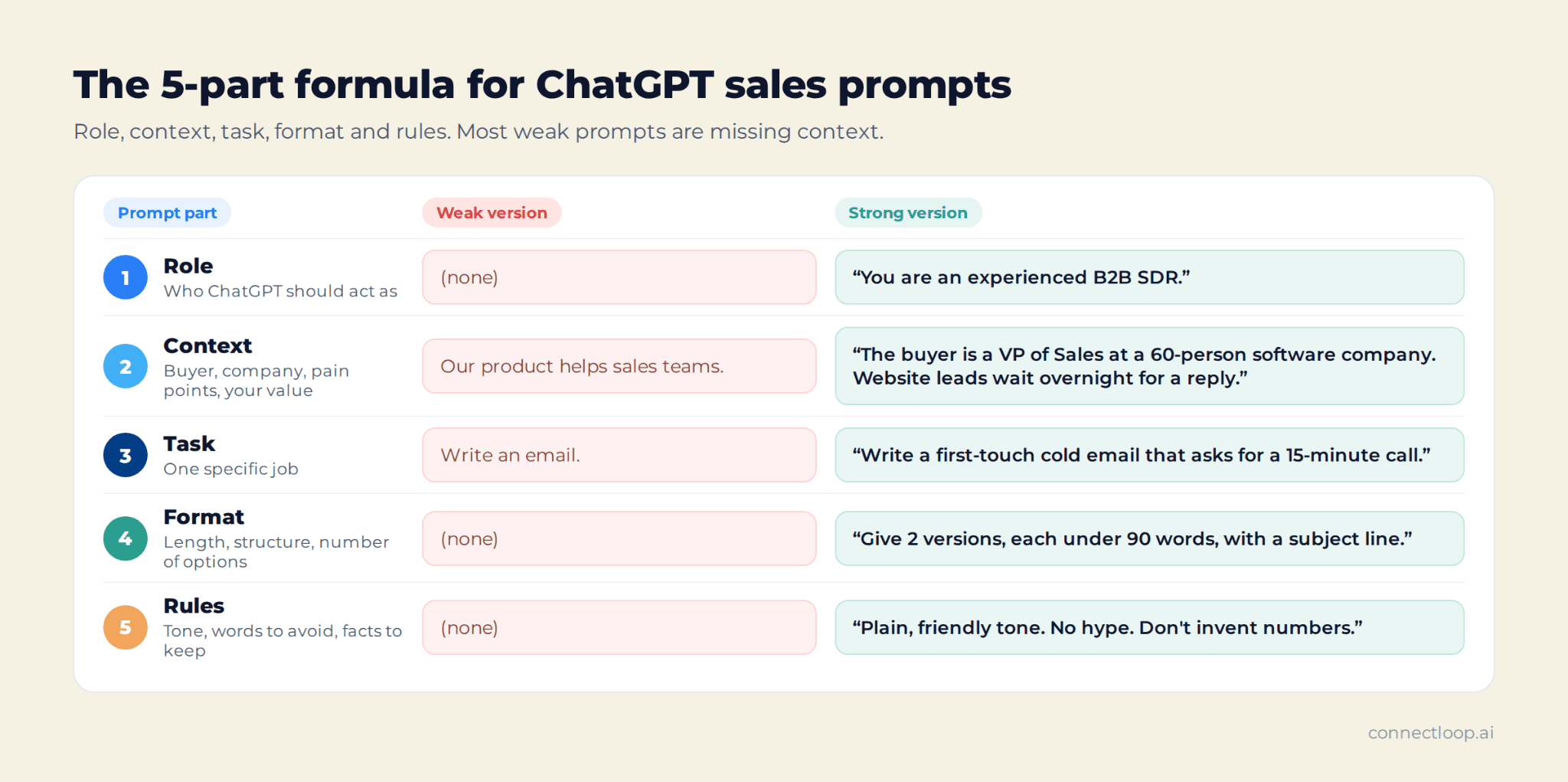
| Part | What to include | Weak version | Strong version |
|---|---|---|---|
| Role | Who ChatGPT should act as | (none) | "You are an experienced B2B SDR." |
| Context | Buyer, company, pain points, your value proposition | "Our product helps sales teams." | "The buyer is a VP of Sales at a 60-person software company. Leads from the website wait overnight for a reply." |
| Task | One specific job | "Write an email." | "Write a first-touch cold email that asks for a 15-minute call." |
| Format | Length, structure, number of options | (none) | "Give 2 versions, each under 90 words, with a subject line." |
| Rules | Tone, words to avoid, facts to keep | (none) | "Plain, friendly tone. No hype. Don't invent numbers." |
Two more habits make a big difference:
- Give examples. Paste one email you've written that worked, and ask ChatGPT to match its tone and brand voice.
- Iterate. Treat the first answer as draft one. Ask for "shorter", "more specific to their industry" or "a softer call to action".
Every prompt in this ConnectLoop guide follows the formula. Replace anything in [brackets] with your own details.
What should you never paste into ChatGPT?
Never paste information you wouldn't put in an email to a stranger: customer data such as full names with contact details, contract terms, pricing agreements, passwords, private call recordings or anything covered by a customer agreement. Data privacy rules and your company's AI policy come first. ConnectLoop recommends anonymizing details before you prompt.
A simple rule keeps sales teams safe: describe the situation, not the person.
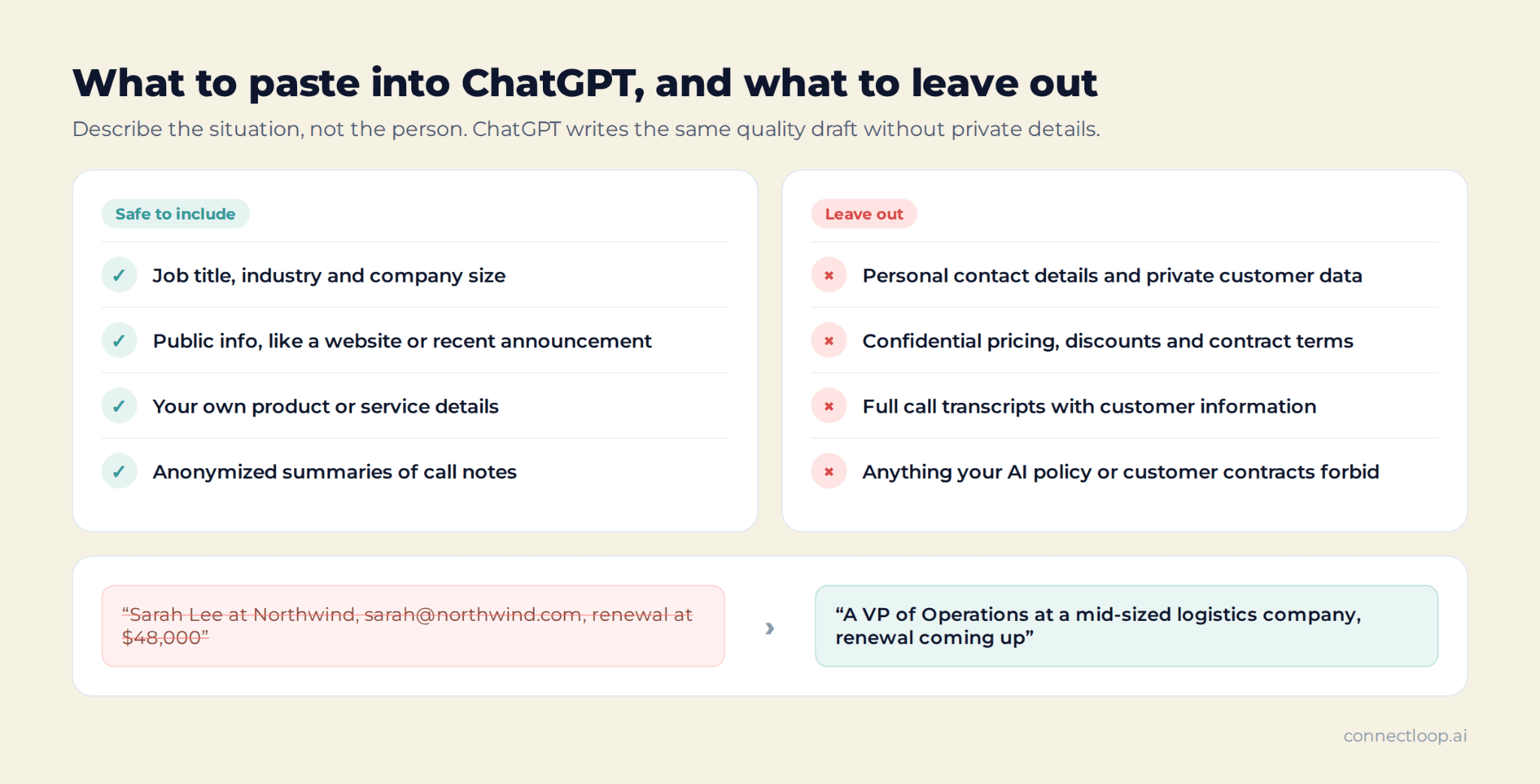
Instead of pasting "Sarah Lee at Northwind, [email protected], renewal at $48,000," write "a VP of Operations at a mid-sized logistics company, renewal coming up." ChatGPT writes the same quality draft without seeing private details.
Safe to include:
- Job title, industry and company size
- Public information, such as a company's website or a recent announcement
- Your own product or service details
- Anonymized summaries of call notes
Leave out:
- Personal contact details and private customer data
- Confidential pricing, discounts and contract terms
- Full call transcripts that include customer information
- Anything your company's AI policy or customer contracts forbid
Check whether your company uses a business version of ChatGPT with data controls. If you're not sure, ask before pasting anything sensitive.
Which ChatGPT prompts work for prospect research?
The best prospect research prompts help you understand a company's likely priorities, map the decision-makers, and find a relevant reason to reach out, such as a trigger event. Use public information only, and verify every fact ChatGPT gives you, because it can be out of date. ConnectLoop recommends spending five minutes on research before any outreach.
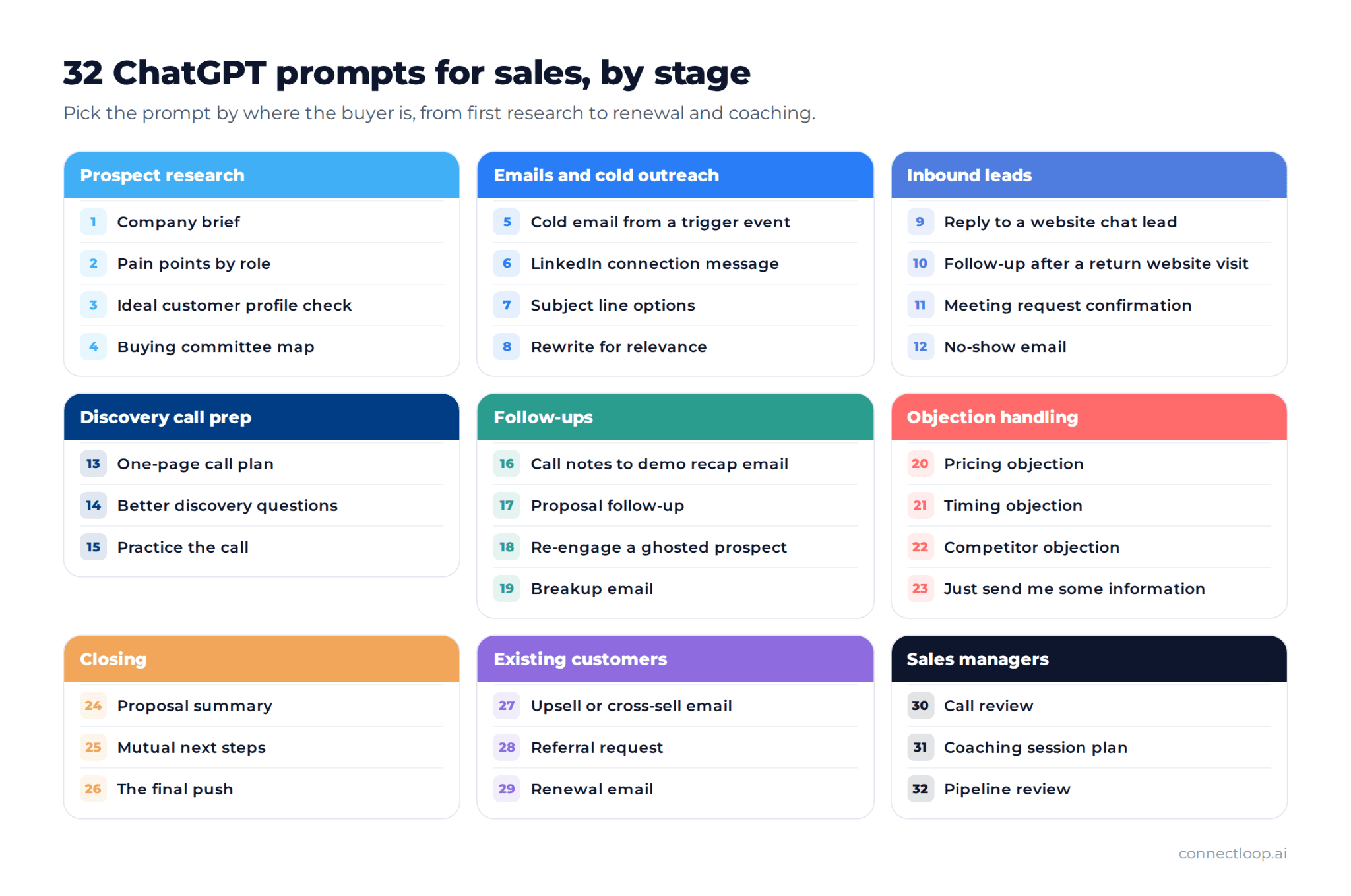
These ChatGPT prompts for prospecting go faster when ChatGPT turns scattered information into a short brief. Paste text from the company's website or a recent announcement, then ask for a summary you can act on.
Prompt 1: Company brief
Prompt: You are a B2B sales researcher. Here is text from [company]'s website: [paste text]. Summarize in 5 bullet points what they sell, who their customers are, and 3 likely business priorities this year. Mark anything you're unsure of as "check".
Prompt 2: Pain points by role
Prompt: I sell [product or service] to [industry]. List the 5 most common pain points a [job title] at a company with [number] employees usually has related to [your area]. For each, write one question I could ask on a discovery call.
Prompt 3: Ideal customer profile check
Prompt: Here is my ideal customer profile: [paste ICP]. Here is a description of a prospect: [paste anonymized description]. Score how well they fit from 1 to 5 for each ICP criterion, explain each score in one line, and say what I'd need to confirm.
Prompt 4: Buying committee map
Prompt: For a [company size] [industry] company buying [type of product], list the people usually involved in the decision, what each one cares about, and the one question that would matter most to each. Format as a short list.
Use the answers as a starting point, not as facts. Confirm job titles and priorities in the CRM or on LinkedIn before you write.
Which ChatGPT prompts work for sales emails and cold outreach?
Strong cold outreach prompts give ChatGPT one real reason to write, the buyer's likely problem, and a single low-friction call to action. Ask for short versions, a subject line and a preview line, then pick the best and edit it. ConnectLoop's rule: the opening line must be about the reader, not your company.
ChatGPT prompts for sales emails are fast at drafting a cold email, a LinkedIn message and subject line variations, and at adding personalization once you supply the details. It is weak at knowing why this person should care today, so the trigger event and the pain point must come from you. For complete, tested examples, see ConnectLoop's sales email templates.
Prompt 5: Cold email from a trigger event
Prompt: You are an experienced SDR. Write a cold email to a [job title] at a [industry] company. Reason for reaching out: [trigger event, e.g. they just opened a new office]. Their likely problem: [pain point]. My value proposition: [one sentence]. Ask for a 15-minute call. Under 90 words, plain text, friendly tone, no hype. Give 2 versions and a subject line for each.
Prompt 6: LinkedIn connection message
Prompt: Write a LinkedIn connection request under 280 characters to a [job title] at [type of company]. Mention [shared interest or recent post topic] in one factual line. End with a simple question. No flattery and no sales language.
Prompt 7: Subject line options
Prompt: Here is my sales email: [paste email]. Write 10 subject lines under 6 words each. Make 5 specific to the reader's situation and 5 curiosity-based. Avoid words that look like spam, such as "free" or "urgent".
For a bigger list by situation, see ConnectLoop's guide to email subject lines for sales.
Prompt 8: Rewrite for relevance
Prompt: Here is a draft cold email: [paste]. Rewrite it so the first sentence is about the reader, the email body explains one business outcome instead of features, and the call to action is a yes or no question. Keep it under 80 words.
What does good output look like?
Here is a real-style before-and-after using Prompt 5, written for a VP of Sales at a growing software company.
ChatGPT's first draft: "I hope this email finds you well. Our innovative AI platform revolutionizes the way sales teams engage leads, driving unprecedented growth. Would you like to schedule a demo to learn more?"
After one round of edits: "Saw that your team doubled its sales hires this year. When teams grow that fast, website leads often wait until morning for a reply. Is that something you're seeing too?"
The edit removed hype, opened with the reader, named one problem and ended with an easy question. That editing step is where your judgment adds value.
Which ChatGPT prompts work for inbound leads?
Inbound prompts help you reply to people who already raised their hand: a website chat lead, a demo request, a return visit to your pricing page, or a missed meeting. These replies should answer first, use what the buyer already shared, and offer specific times. Speed matters more here than anywhere else, which is where ConnectLoop helps most.
Most prompt lists only cover cold outreach. Yet a warm lead who asked a question on your website is far more likely to buy, and every hour of delay lowers the chance of a reply. ConnectLoop's guide to speed to lead explains why.
Prompt 9: Reply to a website chat lead
Prompt: A prospect asked this on our website chat: "[question]". They mentioned [detail they shared]. Write a short email reply that answers the question in one sentence, connects it to their situation, and offers two specific meeting times: [time 1] or [time 2]. Under 80 words.
Prompt 10: Follow-up after a return website visit
Prompt: A lead who signed up for a free trial last week came back to our [pricing page / integrations page] today. Write a helpful follow-up email that offers a 15-minute walkthrough of [topic]. Don't mention that we track visits. Under 70 words.
Prompt 11: Meeting request confirmation
Prompt: Write a meeting confirmation email for a discovery call on [day and time]. Confirm the time, mention their stated goal [goal], and invite them to reply with anything else they want to cover. Under 60 words.
Prompt 12: No-show email
Prompt: A prospect missed our scheduled call today. Write a friendly, no-guilt email that offers my booking link [link] to pick a new time and gives them an easy way to say the timing isn't right. Under 50 words.
These prompts help, but they still depend on someone noticing the lead in time. ConnectLoop's AI sales agent, Lia, answers the chat question when it's asked, qualifies the buyer and books the meeting on the spot. When a known lead returns to your website, Proactive Outreach drafts a follow-up email that a person on your team reviews, edits and sends, or dismisses.
Which ChatGPT prompts help you prepare for discovery calls?
Discovery call prompts turn your research into a short call plan: likely pain points, the questions to ask, and possible objections. They help reps walk in prepared instead of improvising. Keep the plan to one page, and adapt it once the buyer starts talking. ConnectLoop's Sales Assistance gives live guidance during the call itself.
Prompt 13: One-page call plan
Prompt: I have a 30-minute discovery call with a [job title] at a [company size] [industry] company. They came in through [source]. Create a one-page call plan: a 2-sentence opening, 6 discovery questions in order, 3 likely objections with short responses, and a clear next-step ask.
Prompt 14: Better discovery questions
Prompt: Here are my discovery questions: [paste]. Rewrite them so they're open-ended, focused on business outcome and cost of the problem, and easy to say out loud. Add 2 follow-up questions for each.
For a full list by stage, see ConnectLoop's discovery call questions.
Prompt 15: Practice the call
Prompt: Act as a skeptical [job title] at a [industry] company. I'm going to run a discovery call with you about [product]. Answer briefly, raise realistic objections, and don't make it easy. After 8 exchanges, give me feedback on what I did well and what I missed.
Role-play with ChatGPT is useful practice, but it isn't scored or consistent. ConnectLoop's Sales Training gives reps AI buyers with four personas and three difficulty levels, and scores each step from 0 to 100 with a reason.
Which ChatGPT prompts work for follow-ups?
Good ChatGPT prompts for follow-ups give ChatGPT the call notes or the last email and ask for one clear next step. Each follow-up email should add something new: a recap, an answer, a resource or a direct question. Never send "just checking in". ConnectLoop's Sales Assistance creates a follow-up email draft from what the buyer actually said.
Prompt 16: Call notes to demo recap email
Prompt: Here are my anonymized call notes from today's demo: [paste]. Write a demo recap email (a short meeting summary) with: a thank-you line, 3 bullet points summarizing what I heard (goal, challenge, what matters in a solution), next steps with owner and date, and the question "Did I miss anything?" Under 130 words.
Prompt 17: Proposal follow-up
Prompt: I sent a proposal to a [job title] 6 days ago with no reply. Write a short follow-up that names the most likely concern at this stage [pricing / setup / timeline] and offers a call with their [finance / IT] lead. Under 70 words.
Prompt 18: Re-engage a ghosted prospect
Prompt: A prospect went quiet 3 weeks ago after showing interest in [goal]. Write a re-engagement email that asks whether [goal] is still a priority this quarter, offers one useful idea, and makes "not now" an easy answer. Under 80 words.
Prompt 19: Breakup email
Prompt: Write a respectful breakup email to a prospect who hasn't replied to 4 emails. Say I'll stop reaching out, leave the door open, and avoid guilt or pressure. Under 50 words.
For timing and more wording, see ConnectLoop's guide to the follow-up email after no response.
Which ChatGPT prompts help with objection handling?
ChatGPT prompts for objection handling help you prepare calm, specific responses to pricing, timing, competitor and "send me information" objections. Ask ChatGPT to acknowledge the concern, ask a clarifying question, and offer proof, such as a case study, testimonial or other social proof you actually have. ConnectLoop's rule: never let AI invent proof you can't back up.
Prompt 20: Pricing objection
Prompt: A [job title] says our price of [price range] is too high compared to doing nothing. Write 3 responses that acknowledge the concern, ask one question to understand their budget or priorities, and connect the cost to [business outcome]. Each under 60 words. Don't invent numbers.
Prompt 21: Timing objection
Prompt: A prospect says "Now isn't a good time, come back next quarter." Write 2 responses: one that respects the timing and sets a specific follow-up date, and one that asks what would need to change for this to become a priority.
Prompt 22: Competitor objection
Prompt: A prospect is also looking at [type of alternative]. Without criticizing anyone, write a short response that asks what matters most in their decision and explains where [product] is strongest, using only these facts: [paste facts].
Prompt 23: "Just send me some information"
Prompt: A prospect says "Just send me some information." Write a reply that agrees, asks one question to make sure I send the right thing, and suggests a 10-minute call to walk through it. Under 50 words.
For 25 common sales objections with full answers, see ConnectLoop's objection handling guide.
Which ChatGPT prompts help you close deals?
Closing prompts help you summarize value, confirm next steps and remove the last blockers, such as an unclear proposal or a missing stakeholder. Use ChatGPT to structure the message, then add the exact terms yourself. ConnectLoop recommends never letting AI write pricing, discounts or contract terms without a careful human review.
Prompt 24: Proposal summary
Prompt: Summarize this proposal for a busy [job title] in 5 bullet points: the problem, the solution, the business outcome, the investment and the next step. Plain language, no jargon. Proposal: [paste anonymized proposal].
Prompt 25: Mutual next steps
Prompt: We've agreed in principle to move forward. Draft a short email listing the remaining steps to signature, with an owner and target date for each: [list steps]. Ask the buyer to confirm or correct the list.
Prompt 26: The final push
Prompt: A deal has been in the negotiation stage for 3 weeks. Write a direct but respectful email asking what's still holding up the decision and offering two ways I can help. Under 70 words.
ConnectLoop's guide to sales closing techniques covers how to ask for the decision without pressure.
Which ChatGPT prompts work for existing customers?
Prompts for existing customers should start from the customer's results, not your product list. Use them to draft upsell, cross-sell, referral and renewal emails that connect to something the customer said or achieved. ConnectLoop's view: the best expansion emails feel like help, because they solve a problem the customer already mentioned.
Prompt 27: Upsell or cross-sell email
Prompt: A customer mentioned on our last call that [trigger, e.g. three new reps start next month]. Write a short email offering [upgrade or add-on] as a way to help with that, framed as help, not a sales pitch. Under 80 words.
Prompt 28: Referral request
Prompt: A customer just told us [positive result]. Write a short, natural email thanking them and asking if they know one other [job title] who might have the same problem. Make it easy to say no.
Prompt 29: Renewal email
Prompt: Write a renewal email sent 60 days before [date]. Lead with these results from the past year: [results]. Invite them to a 20-minute review of results and plans. Under 90 words.
For more ideas, see ConnectLoop's guide to upselling and cross-selling.
Which ChatGPT prompts help sales managers coach the team?
Sales managers can use ChatGPT for light sales analytics: reviewing calls, planning coaching sessions and spotting patterns in the pipeline and sales funnel. The key is giving it structure: a framework, anonymized notes and a clear question. ChatGPT finds patterns quickly, but managers should confirm every conclusion. ConnectLoop's Customer Intelligence answers these questions from real customer conversations.
Prompt 30: Call review
Prompt: Here are anonymized notes from a rep's sales call: [paste]. Review them against this framework: [framework steps]. List what the rep did well, the 2 biggest gaps, and one specific thing to practice before their next call.
Prompt 31: Coaching session plan
Prompt: Create a 30-minute one-on-one coaching plan for a rep who struggles with [skill, e.g. asking for next steps]. Include a short role-play scenario, 3 questions to ask the rep, and one measurable goal for the next two weeks.
Prompt 32: Pipeline review
Prompt: Here is an anonymized list of open deals with deal stage, last activity date and next step: [paste]. Flag deals with no activity in over 14 days, deals with no clear next step, and the 3 deals most worth attention this week. Explain each in one line.
ConnectLoop's guide to the benefits of sales coaching has more coaching prompts and routines.
How do you check ChatGPT output before you send it?
Check every draft for facts, names, tone, length and compliance before it reaches a buyer. ChatGPT can produce hallucinations, meaning confident statements that are wrong, so verify any claim, number or detail it adds. A two-minute review protects your credibility. ConnectLoop's approach is the same for every AI draft: a person reviews and sends.
Use this six-step checklist on every AI draft:
- Fact-check. Remove or confirm every number, claim or customer detail you didn't provide.
- Check names and details. Confirm the person's name, company and job title. Look for leftover [brackets].
- Check the tone. Does it sound like you and your brand voice, or like a press release?
- Check the length. Most sales emails should fit on a phone screen without scrolling.
- Check the call to action. One clear, low-friction ask, not three.
- Check compliance. Cold emails in the US must follow CAN-SPAM, including an unsubscribe option and your business address. Recipients in Europe have stricter rules.
The human touch is what turns a decent AI draft into an email someone wants to answer. Reading it out loud is the fastest test.
How do you build a prompt library for your sales team?
A prompt library is a shared document of tested sales prompts, organized by sales stage, that every rep can copy and adapt. It keeps quality consistent, saves time for new hires and shows which prompts produce replies. Start with 10 prompts and improve them monthly. ConnectLoop recommends tracking reply rate for each one.
Build it in five steps:
- Collect. Ask your best reps for the prompts they actually use.
- Standardize. Rewrite each one with the role, context, task, format and rules formula.
- Organize by stage. Research, first contact, discovery, follow-up, objections, closing and existing customers, matching the stages of your sales pipeline.
- Add an example. Under each prompt, paste one good output and one note on what to edit.
- Measure and update. Track reply rate, meetings booked and conversion rate for emails written with each prompt. Retire prompts that underperform.
A shared library also helps with onboarding new reps. Instead of starting from a blank page, they start from what already works, and the time savings add up across the whole team.
When do ChatGPT prompts stop being enough?
ChatGPT prompts stop being enough when the bottleneck is speed and volume, not writing. Prompts help one rep draft one email at a time, but someone still has to notice each lead, copy context in, and send the reply. When leads arrive at night or faster than your team can answer, an AI sales agent like ConnectLoop's Lia fills that gap.
| ChatGPT with prompts | An AI sales agent (Lia by ConnectLoop) | |
|---|---|---|
| How it starts | A rep opens ChatGPT and pastes context | The buyer starts a conversation on your website or other channels |
| Response time | Whenever a rep gets to it | In real time, 24/7 |
| Context | Only what the rep pastes in | Your website content and the conversation so far |
| Qualification | The rep does it manually | Lia qualifies and scores leads Hot, Warm or Cold with reasons |
| Meeting booking | The rep sends times by email | Lia books the meeting on the calendar |
| Follow-up | The rep remembers and writes it | Proactive Outreach drafts it; a person reviews and sends |
| Best for | Drafting, research, practice and coaching | Answering and converting inbound leads at any hour |
Both have a place. ChatGPT is a writing and thinking tool for your team, while automation handles the repeat work at scale. An AI sales agent works inside the buyer conversation itself. For a deeper explanation, see ConnectLoop's guide to what an AI sales agent is.
How does ConnectLoop help sales teams beyond prompts?
ConnectLoop is an AI sales agent platform for inbound revenue teams. Its agent, Lia, answers buyers in real time, qualifies leads and books meetings 24/7, while the rest of the platform keeps follow-ups and deals on track. It replaces a live chat tool, scheduling app, follow-up sequencer and support inbox with one system.
Here is how each part connects to the prompts in this guide:
- Lia, the AI sales agent: answers buyer questions on website chat, WhatsApp and email, qualifies leads in conversation, scores them Hot, Warm or Cold with reasoning, and books meetings through Google Calendar, Outlook or Calendly. This replaces Prompts 9 to 12 for most inbound leads.
- Proactive Outreach: when a known lead returns to your website, ConnectLoop drafts a personalized follow-up email. A person reviews it, edits it, and sends or dismisses it. It never sends on its own.
- Sales Assistance: gives reps live guidance on Google Meet and Zoom calls, then creates a post-call report with action items, a coaching note and a follow-up email draft. This covers Prompts 13 and 16 automatically.
- Customer Intelligence: tracks the pipeline, flags stalled deals and unanswered buyer questions, and lets managers ask plain-language questions across customers. This covers Prompt 32 with real data.
- Sales Training: lets reps practice with AI buyers across four personas and three difficulty levels, scored step by step.
Every conversation is tracked from first message to booked call, so nothing depends on someone remembering to paste context into ChatGPT. ConnectLoop is CASA Verified by Google, a Verified Meta Business and an official Meta Business Partner. To see how ConnectLoop qualifies inbound buyers, read the guide to inbound lead qualification.
What can't ChatGPT prompts do for sales?
ChatGPT prompts can't replace relationships, judgment or real buyer conversations. ChatGPT doesn't know your customers, can't see your CRM unless connected, and may produce confident errors. It drafts well, but it can't decide what's true, what's appropriate or when to call instead of email. ConnectLoop is built on the same principle: AI drafts, people decide.
Keep these limitations in mind:
- No live knowledge of your buyer. It only knows what you paste in.
- Hallucinations. It can invent facts, quotes or numbers that sound right.
- Generic by default. Without context and examples, every rep gets the same email.
- No memory of your pipeline. It can't remind you that a buyer has been waiting.
- Your responsibility. Compliance, accuracy and tone are always on the sender.
That's also true of ConnectLoop. Lia works from your website content and the conversation, so the quality of her answers depends on how complete your content is. Your content sets the ceiling, and keeping it current is part of the job.
Key takeaways
- ChatGPT prompts for sales work best when they include a role, context, task, format and rules.
- Organize prompts by sales stage: research, outreach, inbound leads, discovery, follow-ups, objections, closing and existing customers.
- Describe the situation, not the person: keep customer data and confidential terms out of ChatGPT.
- Treat every output as a first draft, and fact-check numbers, names and claims before sending.
- Inbound leads need speed more than perfect wording, and prompts alone can't reply at 11 PM.
- A shared prompt library, measured by reply rate, keeps quality consistent across the team.
- ChatGPT is a drafting and thinking tool; an AI sales agent like Lia works inside the buyer conversation.
- ConnectLoop drafts follow-ups and call recaps automatically, and a person always reviews and sends.

About the author
ConnectLoop Staff
Written by the ConnectLoop team. ConnectLoop is an AI sales agent for inbound revenue teams, based in Cambridge, Massachusetts.
About ConnectLoop →Frequently asked questions
The best ChatGPT prompts for sales are specific: they name the buyer, the problem, the goal and the format. The most useful ones cover prospect research, cold emails, inbound lead replies, call prep, follow-ups and objection handling. Start with a proven prompt and adapt it to your product and audience.
Give ChatGPT a role, the buyer's job title and situation, one reason for writing, your value proposition and a single call to action. Then set rules: a word count, a plain tone and no invented facts. Ask for two versions and edit the better one.
ChatGPT can write a strong first draft, but replies come from relevance: a real trigger event, a specific problem and an easy ask. Those details must come from your research. Edit every draft so the first line is about the reader, and keep it short.
No. Always review AI drafts for accuracy, tone, length and compliance. ChatGPT can include wrong facts or generic phrasing that buyers recognize instantly. A two-minute edit makes the email sound like you and protects your credibility.
ChatGPT can prepare responses to common objections about price, timing, competitors and "send me information". Ask it to acknowledge the concern, ask a clarifying question and connect to a business outcome, using only facts and proof you provide.
Only share what your company's AI policy allows. A safe habit is to describe the situation instead of the person, using job titles and anonymized summaries rather than names, contact details, contract terms or full call transcripts.
No. ChatGPT helps SDRs research and write faster, but it can't notice new leads, start conversations, qualify buyers in real time or book meetings on its own. An AI sales agent handles more of that work for inbound leads, while people focus on relationships and outbound strategy.
ChatGPT drafts text when a rep asks. ConnectLoop's AI sales agent, Lia, works inside the buyer conversation: she answers inbound buyers in real time, qualifies them and books meetings. ConnectLoop also drafts follow-ups and call recaps automatically, and a person reviews and sends each one.
Which of these prompts is your team retyping every week?
Copy the four or five you'd actually use into a shared doc today, and track the reply rate on each. Then look at the inbound ones, 9 to 12: those are the prompts that only help if someone is awake to run them. ConnectLoop answers those buyers the moment they ask, and drafts the follow-up for a person to review and send.