
Sales Enablement
Sales Call Report Template: 5 Free Templates and How to Fill Them In
A sales call report is a short record of what happened on a sales call: who joined, what the buyer needs, what was agreed and what happens next. A good template makes it quick to write and easy for anyone to read. ConnectLoop sees the call report as the bridge between one conversation and the next.

Published
Table of contents
- What is a sales call report?
- Why do sales call reports matter in 2026?
- What should a sales call report include?
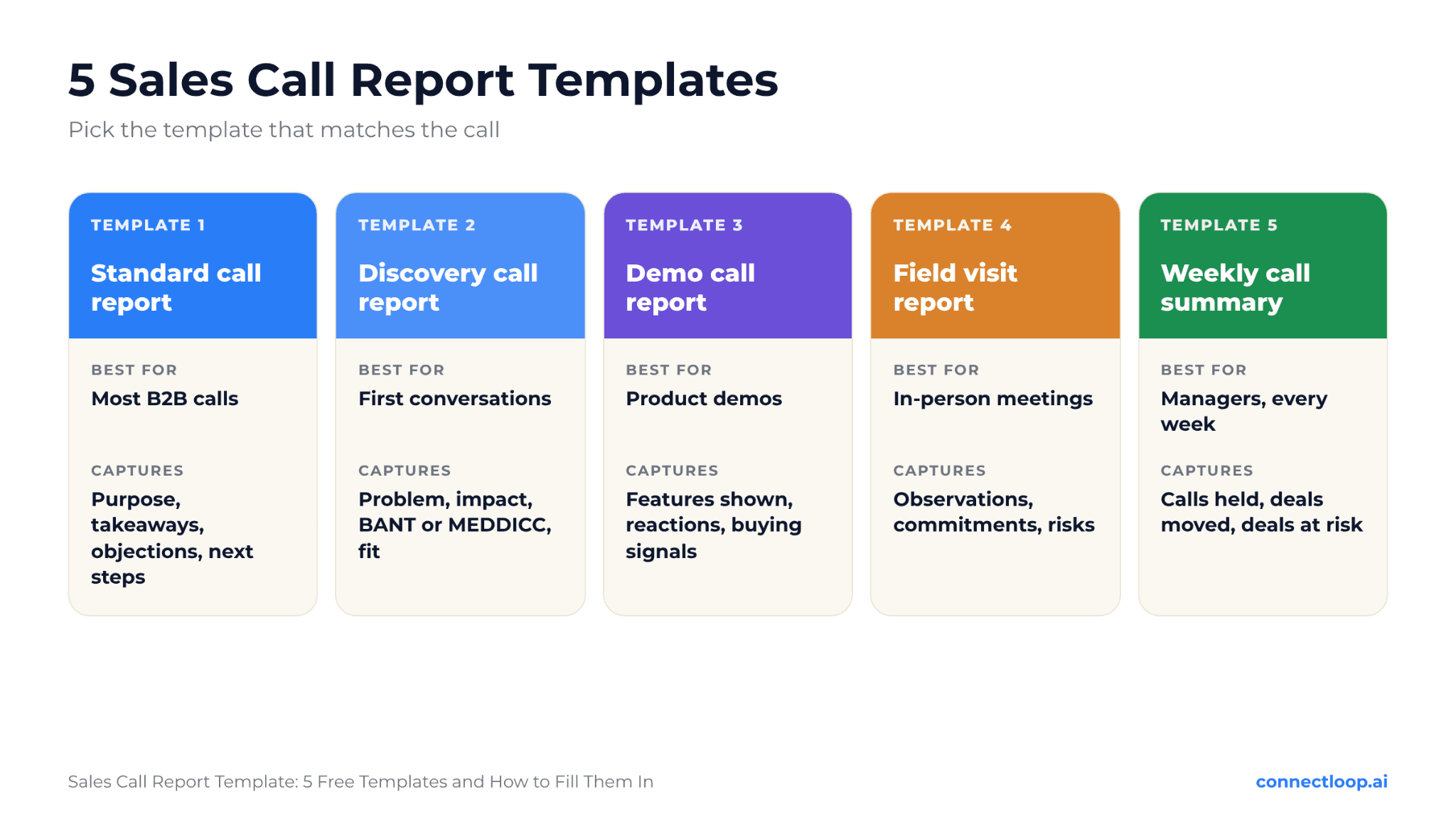
- Template 1: What does a standard sales call report look like?
- What does a completed call report look like?
- Template 2: What goes in a discovery call report?
- Template 3: What goes in a demo call report?
- Template 4: What goes in a field visit report?
- Template 5: What does a weekly call summary look like?
- How do you write a call report in under five minutes?
- Can AI write sales call reports for you?
- What mistakes make call reports less useful?
- Key takeaways
- Frequently asked questions
What is a sales call report?
A sales call report, sometimes called a call summary or visit report, captures the key facts from a sales conversation in a consistent format. It records the buyer's situation, needs, objections and agreed next steps. ConnectLoop treats it as the single source of truth a rep, manager or teammate can read in under a minute.
Call reports serve three readers:
- The rep, who needs a reliable memory of every conversation across dozens of active deals.
- The manager, who needs to understand deal health without joining every call.
- The wider team, such as solutions engineers, customer success and leadership, who need context before they step in.
A call report is different from a transcript. A transcript records every word. A report keeps only what matters for moving the deal forward.
Why do sales call reports matter in 2026?
Call reports matter in 2026 because buying groups are larger, deals take longer and reps spend too much time on admin. A short, consistent report keeps everyone aligned without adding hours of note-taking. ConnectLoop sees well-structured reports as the easiest way to protect selling time.
Two 2026 findings show the pressure:
- Admin eats into selling time. Pipedrive's CRM Trends Report 2026 found 42% of sales and marketing professionals say non-revenue-generating tasks consume at least 40% of their day.
- Field reps feel it most. Spotio's State of Field Sales 2026 report found field sales reps spend just 44% of their time on active selling.
A clear template does not add more admin. It replaces long, messy notes with a short, predictable format. The faster a rep can write a report, the more time they have for the next conversation.
What should a sales call report include?
A sales call report should include the basics, the buyer's situation, needs and pain, any objections, the decision process, the agreed next step and the rep's assessment of the deal. Keep each section to a few lines. ConnectLoop recommends the same order for every report, so readers always know where to look.
| Section | What to capture | Why it matters |
|---|---|---|
| Call details | Date, company, attendees, call type | Context at a glance |
| Purpose | Why the call happened | Shows whether the goal was met |
| Situation | The buyer's current setup and team | Grounds every recommendation |
| Needs and pain | The problem in the buyer's own words | Keeps the deal focused on value |
| Objections | Concerns raised and how they were answered | Prepares the next call |
| Decision process | Who decides, budget, timeline | Shows real deal risk |
| Next step | What, who and when | Keeps the deal moving |
| Rep assessment | Deal stage, confidence, risks | Helps the manager coach |
The buyer's own words are the most valuable part. "We lose about 30 leads a month because nobody answers at night" tells the team far more than "lead response issues."
Template 1: What does a standard sales call report look like?
The standard sales call report is a one-page format that works for most B2B calls. It covers call details, purpose, key takeaways, objections, decision process, next steps and the rep's assessment. ConnectLoop recommends starting with this template and adding sections only when a call type needs them.
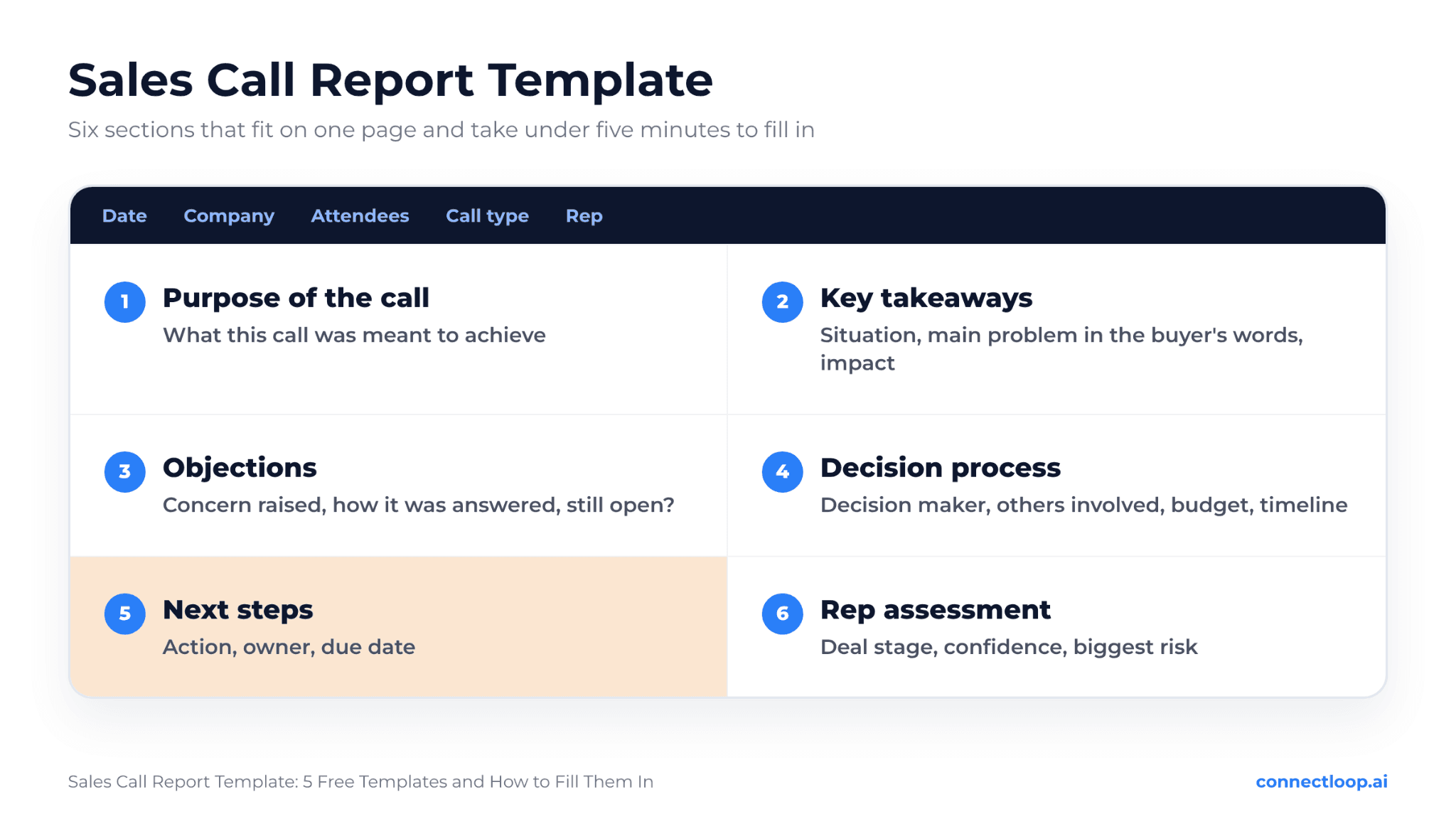
Copy this template:
Sales Call Report
- Date:
- Company:
- Attendees (name, role):
- Call type: Discovery / Demo / Follow-up / Negotiation / Other
- Rep:
1. Purpose of the call
One sentence on what this call was meant to achieve.
2. Key takeaways
- Buyer's current situation:
- Main problem, in the buyer's words:
- Impact of the problem (time, money, risk):
- What success looks like for them:
3. Objections or concerns
- Concern:
- How it was addressed:
- Still open? Yes / No
4. Decision process
- Decision maker:
- Others involved:
- Budget:
- Timeline:
5. Next steps
- Action:
- Owner:
- Due date:
6. Rep assessment
- Deal stage:
- Confidence: High / Medium / Low
- Biggest risk:
- Help needed from the team:
What does a completed call report look like?
A completed call report reads like a quick briefing: specific, short and focused on the next step. Here is a filled example for a fictional company, so you can see the level of detail that works. ConnectLoop recommends writing reports in plain language anyone on the team can understand.
Sales Call Report
- Date: November 17, 2026
- Company: Northfield Logistics (example company)
- Attendees: Dana Ruiz, VP of Sales; Omar Patel, Sales Operations Manager
- Call type: Discovery
- Rep: Alex Morgan
1. Purpose of the call
Understand how Northfield handles inbound demo requests and whether faster response could lift their booked meetings.
2. Key takeaways
- Situation: 6 sales reps, inbound leads from the website and paid search, CRM in place.
- Main problem: "Leads that come in after 6 p.m. wait until the next morning, and by then many have booked with someone else."
- Impact: Dana estimates 20 to 25 lost demo requests a month.
- Success looks like: every serious inbound lead gets an answer and a meeting option within minutes.
3. Objections or concerns
- Concern: worried AI answers might sound robotic to enterprise buyers.
- How it was addressed: shared how answers come from their own website content and how complex questions hand over to a person.
- Still open? Partly. Dana wants to test it on their own site first.
4. Decision process
- Decision maker: Dana Ruiz
- Others involved: Omar (setup), CFO for final approval
- Budget: set aside for Q1 sales tools
- Timeline: decision before end of January
5. Next steps
- Action: send a short recap and set up a trial on their website
- Owner: Alex
- Due date: November 19
6. Rep assessment
- Deal stage: Qualified opportunity
- Confidence: Medium
- Biggest risk: CFO not yet involved
- Help needed: a short ROI summary for the CFO
Notice what makes this useful: the buyer's own words, a number for the impact, a named decision maker and one clear next step with a date. ConnectLoop's guide to sales qualified opportunities explains when a deal reaches that stage.
Template 2: What goes in a discovery call report?
A discovery call report focuses on the buyer's problem, its impact, how they decide and whether the deal is a fit. It goes deeper on pain and qualification than the standard template. ConnectLoop recommends mapping it to the same framework your team uses on calls.
Copy this template:
Discovery Call Report
- Date, company, attendees:
- How they found your company:
Their situation
- Team size and structure:
- Current process or tools:
The problem
- Main challenge, in their words:
- How long it has been a problem:
- What they have already tried:
The impact
- Cost of the problem (time, money, missed revenue):
- Who feels it most:
Qualification
- Budget:
- Authority (who decides):
- Need (how urgent):
- Timing:
Fit
- Strong fit / Possible fit / Not a fit
- Why:
Next step
- Action, owner, date:
The qualification section follows BANT, but you can swap in MEDDICC fields for complex deals. ConnectLoop covers those fields in its guide to the MEDDPICC sales methodology, and its guide to discovery call questions helps fill each section.
Template 3: What goes in a demo call report?
A demo call report records which features were shown, how the buyer reacted, what questions came up and how close the buyer is to a decision. It helps the next person on the deal pick up where the demo left off. ConnectLoop recommends noting reactions as much as features.
Copy this template:
Demo Call Report
- Date, company, attendees:
- Use case shown:
What was shown
- Feature or workflow 1:
- Feature or workflow 2:
- Feature or workflow 3:
Buyer reactions
- What got the strongest positive reaction:
- What raised questions or doubts:
Questions asked
- Question:
- Answer given:
- Follow-up needed? Yes / No
Buying signals
- Mentioned timeline, budget or rollout? Yes / No
- Asked about pricing, contracts or onboarding? Yes / No
Next step
- Trial / proposal / second demo / security review
- Owner and date:
Questions and reactions are often more useful than the feature list. They show what the buyer cares about. ConnectLoop's guide to objection handling helps answer the doubts that come up in demos.
Template 4: What goes in a field visit report?
A field visit report records in-person meetings at a customer's site, including who attended, what was observed, any orders or commitments and follow-up actions. It suits field sales, account management and partner visits. ConnectLoop recommends filling it in right after the visit, before the next meeting.
Copy this template:
Field Visit Report
- Date and location:
- Account:
- People met (name, role):
- Purpose of visit:
Observations
- What was observed on site:
- Changes since the last visit:
Discussion points
- Topic 1:
- Topic 2:
Commitments
- Orders, trials or agreements:
- Promises made by your team:
Opportunities and risks
- New opportunities spotted:
- Risks to the account:
Next visit or follow-up
- Action, owner, date:
Field reps often skip reports because they move quickly between visits. A short mobile-friendly version of this template, filled in from the car park, beats a detailed report written days later.
Template 5: What does a weekly call summary look like?
A weekly call summary rolls up a rep's calls into one short view for managers: calls held, deals that moved, deals at risk and help needed. It replaces long status meetings. ConnectLoop recommends sending it on the same day every week.
Copy this template:
Weekly Call Summary
- Rep:
- Week of:
| Metric | This week | Last week |
|---|---|---|
| Calls held | 18 | 15 |
| Discovery calls | 7 | 6 |
| Demos | 5 | 4 |
| Next steps booked | 9 | 7 |
Example numbers. Replace them with your own each week.
Deals that moved forward
- Company, new stage, why:
Deals at risk
- Company, risk, plan:
Common objections this week
- Objection, how often:
Help needed
- What, from whom:
Patterns across the week are where managers find coaching opportunities. ConnectLoop's guide to inbound sales metrics covers which numbers deserve a spot in this summary.
How do you write a call report in under five minutes?
Write a call report in under five minutes by filling it in straight after the call, using one consistent template, capturing the buyer's own words, skipping anything the reader won't use and always ending with a dated next step. ConnectLoop recommends blocking five minutes after every call for this.
- Write it immediately. Details fade fast, especially after back-to-back calls.
- Use one template. The same order every time makes reports quick to write and read.
- Quote the buyer. One sentence in the buyer's words beats a paragraph of interpretation.
- Keep it short. If a section has nothing new, write "No change."
- Add numbers. Team size, lost leads, budget and dates make reports useful.
- End with a next step. Every report needs an action, an owner and a date.
- Share it. Save it where the team works, such as your CRM or shared workspace.
A short recap email to the buyer can come straight from the report. ConnectLoop's guide to the follow-up email after no response helps when a buyer goes quiet after the call.
Can AI write sales call reports for you?
Yes, AI can now create most of a call report automatically. It listens to the call, summarizes the key points, tracks framework coverage and drafts a follow-up. The rep reviews and adds judgment. ConnectLoop's Sales Assistance saves each call with a score, a coaching note and a follow-up draft.
What AI handles well:
- Capturing what was said, so reps can focus on the buyer instead of typing.
- Tracking framework steps, such as which MEDDICC or SPIN items were covered.
- Scoring the call, so managers see quality at a glance.
- Drafting the follow-up, for the rep to review and send.
What the rep still adds:
- Their read on the deal, including confidence and risk.
- Context from outside the call, such as a hallway conversation or past history.
- The final decision on next steps and priorities.
ConnectLoop's Sales Assistance runs in the browser during Google Meet and Zoom calls in Chrome or Edge, with no bot joining the meeting. Each call is saved to call history, so the core of the report is ready when the call ends. ConnectLoop's guides to sales call scoring and real-time sales coaching explain what happens during and after the call.
What mistakes make call reports less useful?
The mistakes that make call reports less useful are writing them days later, copying the transcript, leaving out the buyer's words, skipping the next step, using a different format each time and never reading them. ConnectLoop recommends fixing timing and next steps first, because they have the biggest effect on deals.
Watch for these:
- Writing too late. Reports written days after a call lose the details that matter.
- Too much detail. A report is a summary, not a transcript.
- Vague language. "Good call, interested" tells the team nothing.
- No next step. A report without an action, owner and date leaves the deal drifting.
- Inconsistent formats. Different layouts make reports slow to scan.
- Nobody reads them. Managers should use reports in pipeline reviews and coaching.
Honest limitation: a template cannot make a weak call strong. If the right questions were never asked, the report will have gaps. The template simply makes those gaps visible, which is useful for coaching. ConnectLoop's guide to the sales call script helps reps plan calls that produce better reports.
Key takeaways
- A sales call report records who joined, what the buyer needs, what was agreed and what happens next.
- Pipedrive's CRM Trends Report 2026 found 42% of sales and marketing professionals spend at least 40% of their day on non-revenue tasks.
- Spotio's State of Field Sales 2026 found field reps spend just 44% of their time actively selling.
- Use one consistent template, and adapt it for discovery calls, demos, field visits and weekly summaries.
- Capture the buyer's own words, add numbers and end every report with a dated next step.
- Write the report straight after the call, in under five minutes.
- AI can capture the call, score it and draft the follow-up, while the rep adds judgment.
- ConnectLoop's Sales Assistance saves every call with a score, a coaching note and a follow-up draft.

About the author
ConnectLoop Staff
Written by the ConnectLoop team. ConnectLoop is an AI sales agent for inbound revenue teams, based in Cambridge, Massachusetts.
About ConnectLoop →Frequently asked questions
A sales call report is a short summary of a sales conversation. It records attendees, the buyer's needs, objections, decision process and agreed next steps. ConnectLoop recommends one consistent format, so reps and managers can read any report in under a minute.
Include call details, purpose, the buyer's situation, needs in their own words, objections, the decision process, next steps and the rep's assessment. Keep each section brief. ConnectLoop's standard template above covers all of these in one page.
Most call reports should fit on one page and take under five minutes to write. Discovery calls may need a little more detail. ConnectLoop recommends cutting anything a reader would not use to move the deal forward.
Write it immediately after the call, while the details are fresh. Waiting even a few hours leads to missing information. ConnectLoop recommends blocking five minutes after every call for the report and follow-up email.
Call notes are what a rep jots down during the conversation. A call report is the organized summary written afterward in a standard format for others to read. ConnectLoop's Sales Assistance captures the conversation, so reps can focus on the buyer instead of note-taking.
Yes. Copy the sections into a note template or custom fields in your CRM, so every rep uses the same format. ConnectLoop integrates with popular CRMs, including HubSpot, Salesforce and Zoho, to keep buyer information in one place.
Reps use them to remember details, managers use them for pipeline reviews and coaching, and teammates such as solutions engineers use them for context before joining a deal. ConnectLoop recommends writing every report for someone who was not on the call.
Yes. AI can capture the conversation, summarize key points, score the call and draft a follow-up email. The rep reviews it and adds their judgment. ConnectLoop's Sales Assistance saves each call with a score, a coaching note and a follow-up draft.
The best call report is the one already written when the call ends
Sales Assistance listens during Google Meet and Zoom calls in your browser, with no bot joining the meeting. Each call is saved with a score against your framework, a coaching note and a follow-up draft, so the report starts filled in and the rep only adds judgment.