
Visitor Intelligence
Website Visitor Identification: What It Is, How It Works and How to Use It
Website visitor identification is the process of finding out who is behind the visits to your website, at the company or person level, so your team can follow up with the right people at the right time. This guide explains how it works, compares the four main methods, covers accuracy, privacy and consent, and shows how ConnectLoop turns identified visitors into booked meetings.

Published
Table of contents
- What is website visitor identification?
- Why does website visitor identification matter?
- How does website visitor identification work?
- What are the main visitor identification methods?
- What's the difference between company-level and person-level identification?
- How is visitor identification different from tracking and web analytics?
- What can you learn about an identified visitor?
- How accurate is website visitor identification?
- Is website visitor identification legal?
- What does visitor identification look like in practice?
- How do you turn identified visitors into pipeline?
- How can a small team get started?
- What are the most common visitor identification mistakes?
- Where does visitor identification reach its limits?
- Key takeaways
- Frequently asked questions
What is website visitor identification?
Website visitor identification means connecting an anonymous website visit to a real company or person. Most people who visit a B2B website never fill in a form, so your team can't see who was interested. Visitor identification fills that gap, so sales and marketing know who is researching them and can follow up with context.
Most of that anonymous traffic is invisible to sales. Think of your website as a store with the lights off. People walk in, look at the shelves, and leave. Visitor identification turns the lights on, so you can see who came in, what they looked at and whether they came back.
There are two levels:
- Company-level identification tells you which organization a visit came from.
- Person-level identification tells you which individual it was, such as their name, role and email.
ConnectLoop focuses on the person level, using a consent-first approach. Visitors are identified when they start a conversation and share their own details, and ConnectLoop then attaches their whole browsing history to their record.
Why does website visitor identification matter?
Website visitor identification matters because most of your interested buyers stay anonymous. They read your pricing page, compare options and leave without a word. Without identification, your team only talks to the few who fill in a form. With it, sales can reach serious buyers sooner, with context about what they looked at.
What visitor identification gives your team:
- Earlier conversations. Reach buyers while they're still researching, not after they've chosen a vendor.
- Better context. Know which pages a buyer viewed before the first call.
- Smarter prioritization. Focus on visitors showing buying intent, not on every visit.
- Clearer attribution. See which channels and pages bring buyers who convert.
- Faster follow-up. Speed to lead matters, and you can't be fast with someone you can't see. See the ConnectLoop guide to speed to lead.
ConnectLoop is built around that last point. Knowing who visited only helps if your team acts while the buyer is still interested.
How does website visitor identification work?
Website visitor identification, sometimes called identity resolution, works in four steps. A tracking script records each visit, the visit is matched to a company or a person, the match is enriched with useful details, and the result is sent to your team's tools, like a CRM. The matching step is where methods differ the most, from reverse IP lookup to visitors identifying themselves in a conversation.
- Capture the visit. A small script on your website records each session: pages viewed, time spent and whether it's a return visit.
- Match the visit. The visit is connected to a company or person, using one or more identification methods.
- Enrich the record. Enrichment adds firmographic data, such as company size and industry, or details like role.
- Act on it. The identified visitor is checked against your ICP, scored, sent to the CRM and routed to the right person on your team.
ConnectLoop handles step 2 differently from most tools. Instead of guessing from an IP address, ConnectLoop links the visitor's journey to their record the moment they share their details with Lia, ConnectLoop's AI sales agent, in website chat, WhatsApp or email.
What are the main visitor identification methods?
The four main visitor identification methods are reverse IP lookup, cookies and identity graphs, form fills, and conversations. Reverse IP lookup and identity graphs guess who a visitor is from data in the background. Forms and conversations rely on the visitor sharing their own details, which is more accurate and consent-first.
| Method | How it works | What it identifies | Accuracy | Consent |
|---|---|---|---|---|
| Reverse IP lookup | Matches the visitor's IP address to a company that owns it | Company only | Varies: remote workers and shared networks are hard to match | Background, no action from the visitor |
| Cookies and identity graphs | Matches a browser cookie to profiles in a large data network | Sometimes a person | Probabilistic: a best guess | Depends on cookie consent and local law |
| Form fills | The visitor types their name and email into a form | The person | Deterministic: exact | The visitor chooses to share |
| Conversations | The visitor shares their details in chat, WhatsApp or email | The person, plus their needs | Deterministic: exact | The visitor chooses to share |
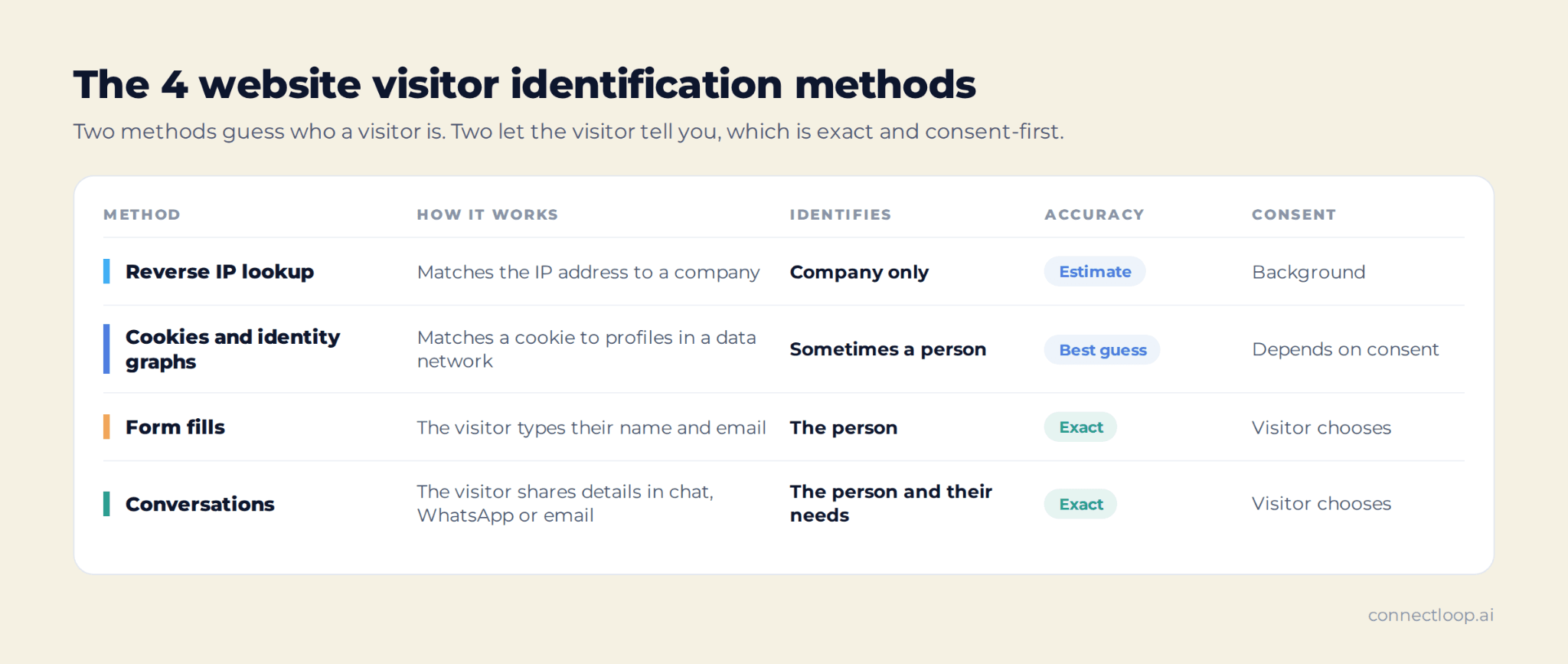
Deterministic matching means the identity is confirmed, because the visitor gave it. Probabilistic matching means it's an educated guess based on signals.
Many teams combine methods. ConnectLoop focuses on the conversation method, because it identifies the person, captures what they need, and starts the sales conversation in the same moment.
What's the difference between company-level and person-level identification?
Company-level identification tells you an organization visited your website, for example that someone from a logistics firm read your pricing page. Person-level identification tells you exactly who it was, with their name, role and contact details. Company-level is useful for account-based marketing; person-level is what your sales team needs to start a real conversation.
| Company-level | Person-level | |
|---|---|---|
| What you learn | The company name, industry, size and location | The person's name, role, email and phone |
| Typical method | Reverse IP lookup | Forms, conversations, identity graphs |
| Best for | ABM, account lists, retargeting and ad audiences | Sales follow-up, personalization, personal outreach |
| Main challenge | You don't know who at the company to contact | Getting the visitor to share their details |
| Next step | Research the buying group and reach out | Follow up directly, with context |
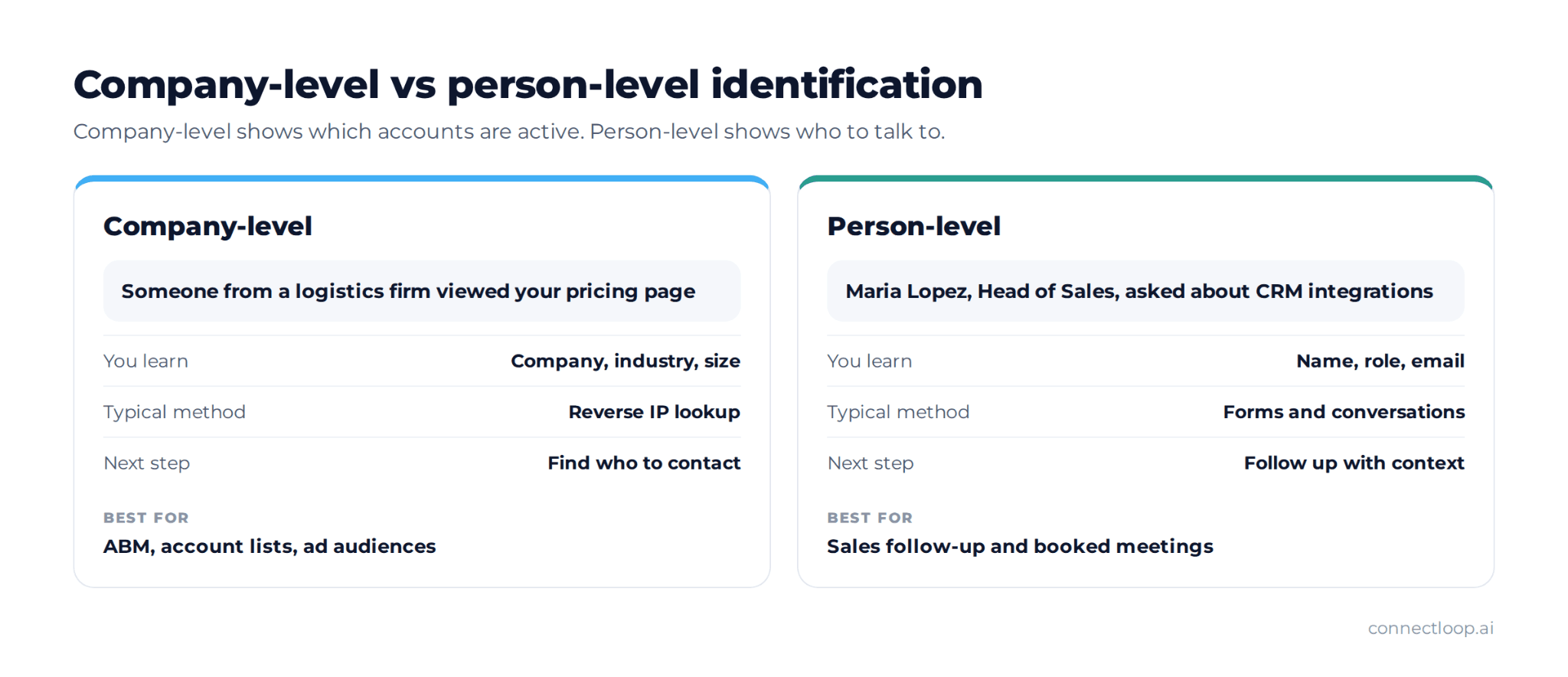
The two levels work well together. Company-level data shows which accounts are active, and person-level data shows who to talk to. ConnectLoop gives your team the person-level view, attached to the full visitor journey.
How is visitor identification different from tracking and web analytics?
Web analytics tells you how many people visited and what they did, in totals. Website visitor tracking follows individual sessions without knowing who they are. Visitor identification adds the missing piece: who the visitor actually is. Analytics answers "how many," tracking answers "what did they do," and identification answers "who was it."
| Web analytics | Website visitor tracking | Visitor identification | |
|---|---|---|---|
| Main question | How many visited, and from where? | What did each visitor do? | Who is this visitor? |
| Level | Totals and trends | Individual, anonymous sessions | Named company or person |
| Typical output | Traffic reports, conversion rates | Session paths, return visits | A lead or account record |
| Used by | Marketing | Marketing and product | Sales and marketing |
Standard analytics tools don't identify individual visitors, by design. To know who a visitor is, you need an identification method on top. ConnectLoop combines tracking and identification: it follows the anonymous journey first, then connects it to a real person once they start a conversation.
What can you learn about an identified visitor?
Once a visitor is identified, you can see who they are, how they found you, which pages they viewed, how often they came back and how strong their buying intent looks. The most useful details are behavioral: return visits and time on high-intent pages, like pricing, often tell you more than a job title does.
| What you learn | Example | Why it matters |
|---|---|---|
| Identity | Name, company, role, email | Who to contact |
| Source | Website, WhatsApp, email, a lead capture popup | Which channel brings buyers |
| Pages viewed | Pricing, integrations, case studies | What they care about |
| Time spent | Several minutes on the pricing page | How seriously they're researching |
| Return visits | Back three times in a week | Interest is growing |
| Intent level | High, Medium or Low | Who to follow up with first |
ConnectLoop's Visitor Intelligence shows all of this in one place. The Visitor Insights table lists known customers and anonymous visitors together, with source, latest interaction and latest website visit. Each visitor's details page shows:
- Activity totals: total visits, active days and pages viewed, plus the first and last visit.
- Top Pages Viewed: the pages that held their attention.
- Return Visitor Behavior: how often they come back and the average gap between visits.
- An AI-written summary: an intent level of High, Medium or Low.
How accurate is website visitor identification?
Accuracy depends on the method. Visitor details shared directly in a form or conversation are exact. Reverse IP lookup and identity graphs are estimates, and match rates vary by country, company size and how people work: remote employees and shared networks are harder to match. Ask any provider how they measure accuracy before you trust their numbers.
What affects accuracy:
- Remote and hybrid work. People working from home use home internet, which can't be matched to their employer.
- Region. IP data is more complete in some countries than others.
- Company size. Large companies with their own networks are easier to match at the company level.
- Cookie limits. Browsers delete or block cookies, which breaks identity graphs over time.
- Consent. Visitors who decline cookies can't be tracked the same way.
The most accurate identity is one the visitor gives you. That's why ConnectLoop's approach is built on conversation. When a buyer tells Lia their name and email to book a meeting, there's no guessing involved, and their earlier browsing is attached to the right person.
Is website visitor identification legal?
Website visitor identification is legal in most markets when it's done with the right consent and transparency, but the rules differ by region. GDPR in Europe and CCPA in California set clear requirements for personal data, cookies and consent. Company-level data and person-level data are treated differently. Always check with your legal team for your specific situation.
Good practice for any visitor identification setup:
- Use a cookie consent banner. Ask visitors before tracking them, and respect their choice.
- Explain it in your privacy policy. Say what you collect and why.
- Prefer first-party data. Data your visitors share with you directly is easier to justify than data bought from third parties.
- Collect only what you need. Don't gather personal data you won't use.
- Make opting out easy. Visitors should be able to say no.
ConnectLoop's Visitor Intelligence is built for this approach. It's available on the Growth plan and above, and works with the Cookie Consent Banner switched on. Identification happens when visitors choose to share their details in a conversation, which keeps it consent-first.
What does visitor identification look like in practice?
Here's one visitor's journey from first anonymous visit to booked meeting. It shows how tracking, identification and follow-up fit together, and why the history before identification matters. The example is illustrative, but every step reflects how ConnectLoop's Visitor Intelligence and Lia work together.
| Day | What happens | What your team sees |
|---|---|---|
| Monday | An anonymous visitor reads a blog article, then views the pricing page | An anonymous visitor, source: website |
| Wednesday | The same visitor returns and spends time on the integrations page | Return visit recorded, intent rising |
| Thursday | They return again, view pricing and open website chat to ask about CRM integrations | Lia answers and asks a qualifying question |
| Thursday | They share their name and email to book a demo | Identified: the full browsing history is attached to the new lead |
| Thursday | Lia books the meeting on the team's calendar | Lead scored Hot, with reasoning; meeting booked |
| Friday | The sales rep prepares for the call | The rep sees every page viewed, the questions asked and the intent summary |
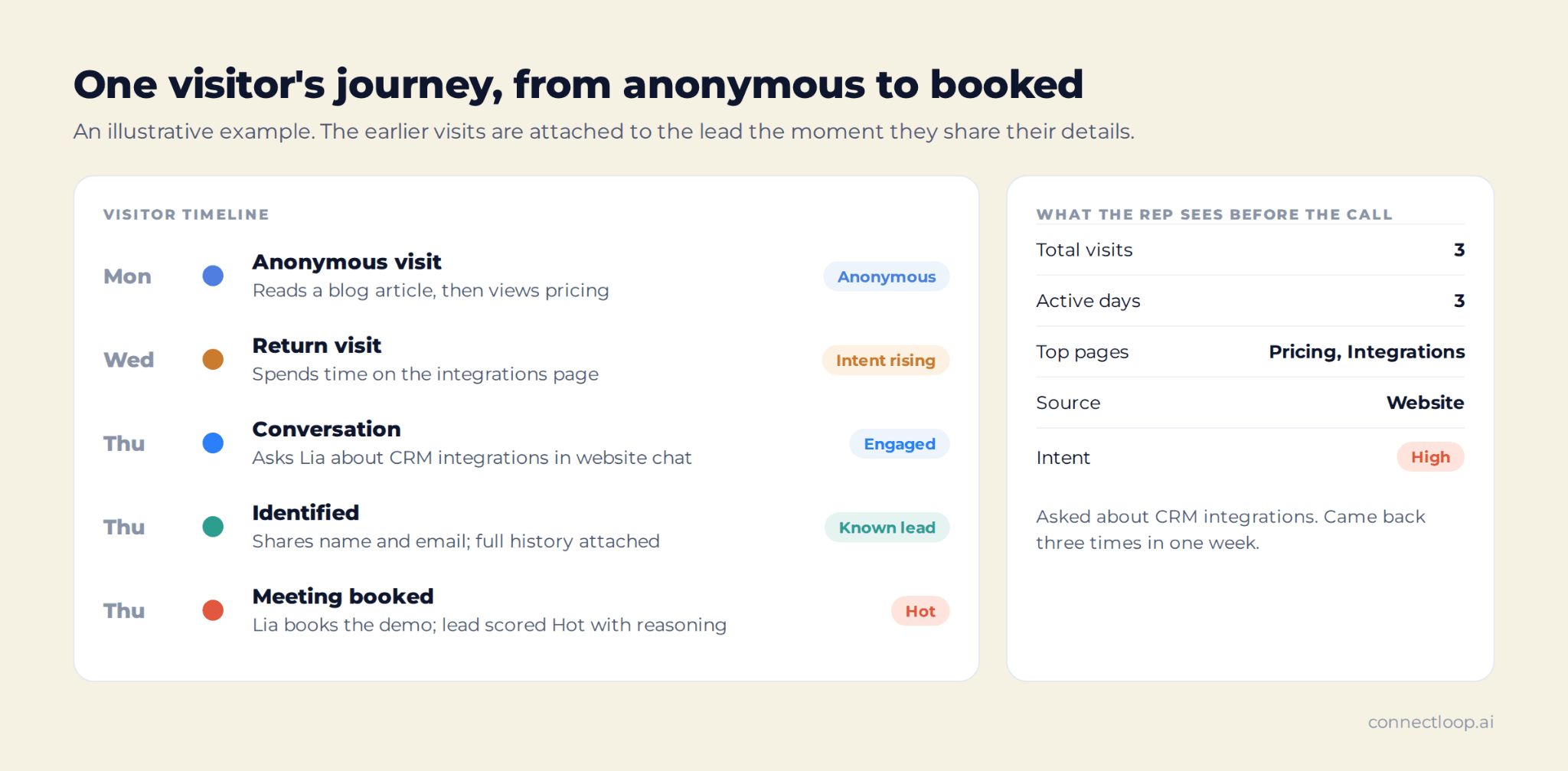
The rep walks into that call knowing the buyer cared about pricing and CRM integrations, and that they came back three times in one week. That's the difference between a cold first call and a warm one. The ConnectLoop guide on how to identify anonymous website visitors covers the practical steps to set this up.
How do you turn identified visitors into pipeline?
Identified visitors become pipeline when your team acts quickly and with context. Prioritize visitors with high intent, follow up while their interest is fresh, mention what they actually looked at, and route each lead to the right person. The faster the follow-up after a high-intent visit, the better the chance of a meeting.
- Score each visitor. Use intent signals like pricing page views and return visits to decide who comes first. The ConnectLoop guide to lead scoring explains how.
- Talk to them while they're on the site. The best moment to start a conversation is during the visit, not the next day.
- Qualify in the conversation. Ask about their needs, team and timing, and book the meeting if they're a fit. See inbound lead qualification.
- Follow up when they come back. A return visit from a known lead is a strong signal to reach out.
- Send everything to the CRM. Keep the journey, conversation and score on the lead record, so routing is automatic and the sales handoff carries full context.
- Measure what works. Track which sources and pages produce meetings. See inbound sales metrics.
ConnectLoop covers each of these steps:
- Steps 2 and 3: Lia answers visitors on website chat, WhatsApp and email at any hour, qualifies them, scores each lead Hot, Warm or Cold with the reasoning, and books the meeting.
- Step 4: Proactive Outreach, available on Growth and above, drafts a follow-up email when a known lead returns. A person on your team reviews it and sends it.
- Step 5: leads sync to Salesforce, HubSpot and Zoho CRM.
For the full path from visit to calendar, see how to convert website traffic into booked meetings.
How can a small team get started?
A small team can start with visitor identification in a day: add a consent banner, add a tracking and chat tool to the website, decide which pages signal intent, and agree on who follows up and how fast. You don't need an ABM program or a data team. Start simple, then add more as you learn.
- Turn on cookie consent. Make sure visitors can accept or decline tracking.
- Add tracking and chat. Choose a tool that records visits and lets visitors start a conversation.
- List your high-intent pages. Pricing, demo, integrations and comparison pages usually matter most.
- Set a follow-up rule. For example: every High-intent visitor gets a reply the same day.
- Review once a week. Check which visitors became meetings and which pages they viewed first.
Many small teams use ConnectLoop this way, with Lia handling conversations around the clock and Visitor Intelligence showing who's serious. If you're weighing a chat tool against an AI agent, the ConnectLoop guide to chatbot vs AI agent helps you choose.
What are the most common visitor identification mistakes?
The most common visitor identification mistakes are treating every visit as a lead, following up too slowly, ignoring consent, trusting match rates without checking them, and contacting visitors without using what they actually viewed. Each one wastes time or damages trust with buyers who were genuinely interested.
- Treating every visit as a lead. A careers page visit isn't buying intent. Focus on high-intent pages and return visits.
- Following up days later. Interest fades fast. Act within hours, not days.
- Ignoring consent. Skipping the consent banner creates legal risk and erodes trust.
- Trusting match rates blindly. Check a sample of identified visitors before you build a process on them.
- Generic follow-up. "I saw you visited our website" without context feels intrusive. Mention what they looked at, and offer help.
- Leaving sales out. If identified visitors only go into a marketing report, nobody follows up.
ConnectLoop helps avoid the slow follow-up and generic message problems: Lia replies during the visit, and every lead record shows the pages behind the interest. For follow-up wording, see the follow-up email after no response guide.
Where does visitor identification reach its limits?
Visitor identification works best when visitors are interested enough to engage. Some will browse and leave without sharing anything, and the most respectful approach is to let them. Conversation-led identification trades a larger list of guessed names for a smaller list of real, consented buyers who want to talk.
That trade-off is the core of ConnectLoop's approach. Identification is consent-first and conversation-led, so every identified visitor is someone who chose to start a conversation, with their full journey attached. For teams that want both inbound and outbound reach, the inbound vs outbound sales guide covers how the two motions fit together.
Key takeaways
- Website visitor identification connects anonymous visits to a real company or person, so your team can follow up with context.
- It works in four steps: capture the visit, match it, enrich it and act on it.
- The four main methods are reverse IP lookup, cookies and identity graphs, form fills and conversations.
- Company-level identification shows which accounts are active; person-level identification shows who to talk to.
- Details a visitor shares directly are exact, while reverse IP and identity graphs are estimates.
- Use a cookie consent banner, explain your data use and prefer first-party data.
- Identified visitors become pipeline when you score them, follow up fast and use what they viewed.
- ConnectLoop identifies visitors through conversation, attaches their full browsing history and lets Lia qualify and book them on the spot.

About the author
ConnectLoop Staff
Written by the ConnectLoop team. ConnectLoop is an AI sales agent for inbound revenue teams, based in Cambridge, Massachusetts.
About ConnectLoop →Frequently asked questions
Website visitor identification is the process of finding out which company or person is behind a visit to your website. It helps sales and marketing teams reach interested buyers who didn't fill in a form, using methods like reverse IP lookup, identity graphs, forms and conversations.
A script on your website records each visit. The visit is then matched to a company or person, enriched with details like company size or role, and sent to your CRM or sales team. The matching method decides how accurate the result is.
Yes, partly. Reverse IP lookup can often show the company, and identity graphs can sometimes suggest a person, but both are estimates. A website chat or WhatsApp conversation gives visitors a faster way than a form to share their details, and the result is exact.
Company-level identification shows which organization visited, usually through reverse IP lookup. Person-level identification shows the individual, with their name and contact details. Company-level data suits account-based marketing, while person-level data is what sales needs for follow-up.
It's legal in most markets when done with proper consent and transparency. GDPR and CCPA set rules for personal data and cookies, so use a cookie consent banner, explain your data use in your privacy policy, and check with your legal team for your region.
It depends on the method. Details a visitor shares in a form or conversation are exact. Reverse IP lookup and identity graphs are estimates, and their match rates vary by region, company size and remote work. Always check a sample before trusting any provider's numbers.
No. Google Analytics shows traffic totals, sources and behavior, but it doesn't identify individual visitors by design. To know who a visitor is, you need a visitor identification method, such as a conversation tool that lets visitors share their details.
ConnectLoop follows each visitor's journey from their first anonymous visit. When the visitor starts a conversation with Lia on website chat, WhatsApp or email and shares their details, ConnectLoop attaches the full browsing history to their record, with an intent summary and a Hot, Warm or Cold lead score.
How many of this week's visitors could your team name?
Open your analytics and count last week's sessions, then count the leads your team actually spoke to. The gap between those two numbers is what identification closes. Turn on a consent banner, pick your three highest-intent pages, and let ConnectLoop's Lia answer and identify the buyers who land on them.