
Sales Enablement
AI Sales Training Tools: Simulators, Call Review, and Coaching on the Live Call
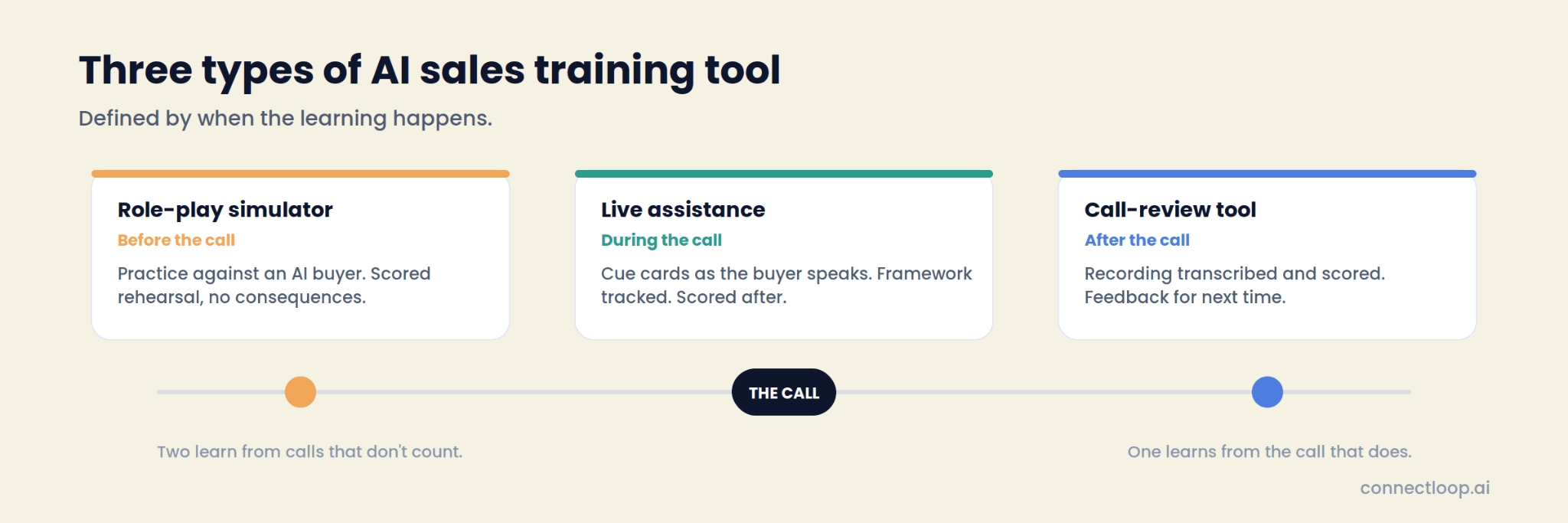
AI sales training tools come in three kinds. Role-play simulators let a rep practise against an AI buyer before the real call. Call-review tools record the real call and score it afterwards. Live assistance coaches the rep during the call that counts, with cues as the buyer speaks and a score when it ends. ConnectLoop's Sales Assistance is the third kind, and this article explains all three.

Published
Table of contents
- What do AI sales training tools actually do?
- What are the three types of AI sales training tool?
- How do role-play simulators work, and where do they stop?
- How do call-review tools work, and where do they stop?
- How does coaching on the live call work?
- What does the rep see during a coached call?
- How is framework coverage scored, and why does it matter for training?
- Which framework should the training run on?
- What does training look like across a customer relationship?
- Same objection, three tools: a worked example
- How do you measure whether AI sales training is working?
- How do you combine the three types?
- How do you set up live-call coaching for a team?
- Which type is right for a small team?
- Key takeaways
- Frequently asked questions
What do AI sales training tools actually do?
They change when and how a rep learns. Classic sales training happens in a room, weeks before the call it was meant to improve. AI sales training tools move the learning closer to the call: into a practice session the night before, into a review the day after, or into the call itself. Which of those three you pick decides what the rep learns and how fast.
The word "training" covers all three, and that is where buyers get confused. A simulator trains by rehearsal. A review tool trains by feedback. A live assistant trains by doing the real call with a coach beside the rep. They can share a methodology and a dashboard; they are different products with different moments.
ConnectLoop's AI sales coaching page covers the coaching side in general. This article is about the tools, and where each one earns its place.
What are the three types of AI sales training tool?
Role-play simulators, call-review tools and live assistance. The cleanest way to tell them apart is to ask when the learning happens: before the call, after the call, or during it.
| Role-play simulator | Call-review tool | Live assistance | |
|---|---|---|---|
| When the learning happens | Before the call, in practice | After the call, in review | During the call |
| What the rep does | Talks to an AI buyer | Reads or listens to their own call | Runs the real call with cues beside them |
| What the manager sees | Practice scores | Scored recordings, clips | Framework coverage with evidence, cues used, coaching note |
| Pressure | Simulated | None; the call is over | Real |
| Time cost to the rep | An hour of practice per session | Minutes to hours of review | None beyond the call itself |
| Feedback loop | Immediate, on invented calls | Delayed, on real calls | Immediate, on real calls |
| Where it stops | The buyer is invented | The deal has already moved | Needs the rep to run the call in the browser |
| Best for | Onboarding, a new pitch | Manager's weekly read | Every real call from day one |
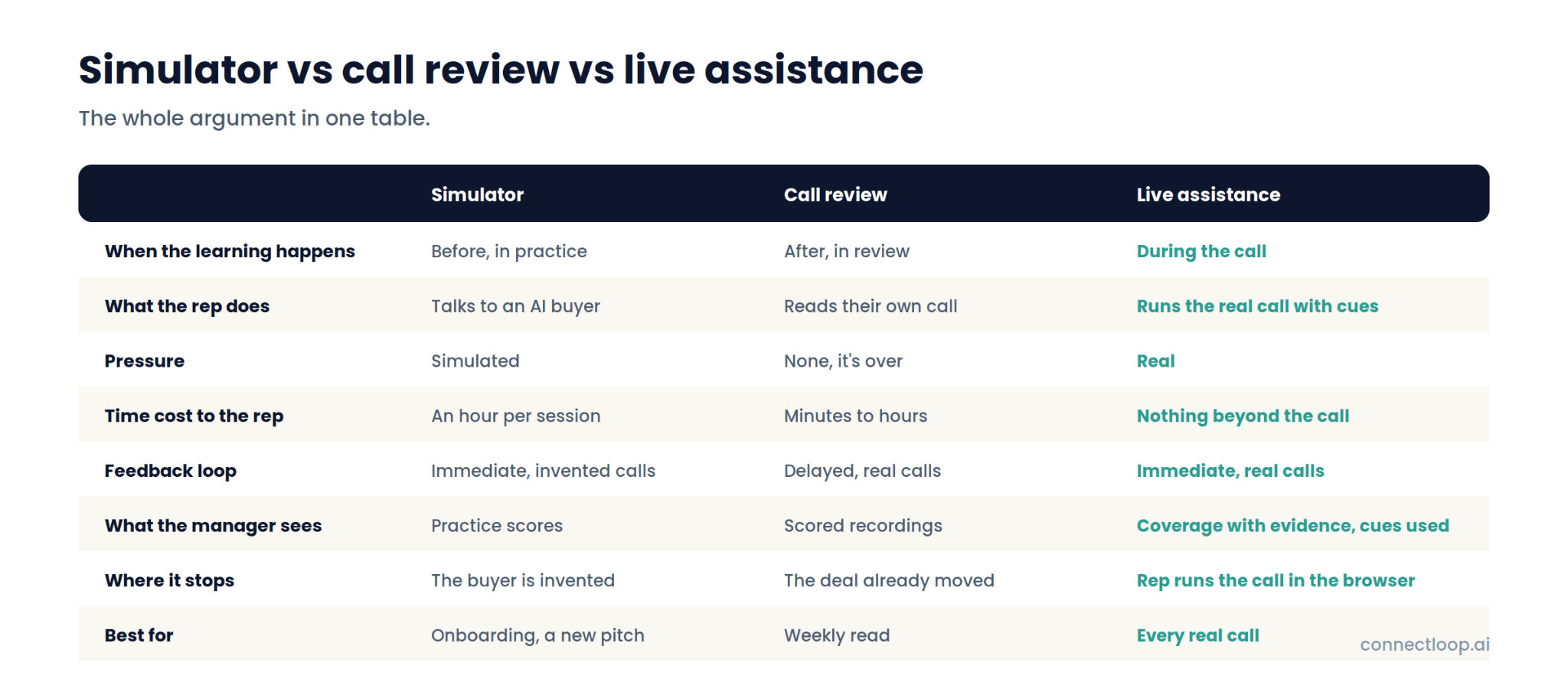
The table is the whole argument in one place. Two of the three learn from calls that don't count. One learns from the call that does.
How do role-play simulators work, and where do they stop?
A simulator gives the rep a persona to sell to: an AI buyer with a scenario, objections and a mood. The rep runs the conversation, the tool scores it against a rubric, and the rep tries again. For a new hire who has never handled a pricing objection, that is a safe first attempt.
The value is repetition without consequence. A rep can run the same objection ten times in an afternoon. Managers get a score before the rep has spoken to a real customer, which is useful for onboarding and for rolling out a new pitch.
Where it stops is the buyer. The AI persona was written by someone, so it objects the way that person expected buyers to object. Real buyers interrupt, go quiet, change the subject, ask the question three minutes early. The pressure in a simulator is the pressure of a test. The habits that matter under real pressure, the pause, the follow-up question, the decision to skip a step, only form on real calls.
How do call-review tools work, and where do they stop?
A call-review tool records the real call, transcribes it, and scores it afterwards: talk ratio, questions asked, keywords, sentiment, sometimes framework adherence. Managers get clips and a scorecard; reps get feedback on what they said.
The value is truth. The call was real, the buyer was real, and the transcript shows what happened rather than what the rep remembers. For a manager reviewing a team, a week of scored calls is the best coaching input available after the fact.
Where it stops is the timing. The review arrives after the call ended, which means after the objection was mishandled, the step was skipped and the promise was forgotten. The rep learns for next time. The deal on this call has already moved. And the review takes a manager's time, which is the scarcest input in most sales teams.
How does coaching on the live call work?
Live assistance sits beside the meeting in a browser tab. It hears both sides, follows the framework the team chose, and surfaces the right cue at the moment it fits: the objection response as the objection lands, the next framework step as the previous one closes, the promise from last call as the topic comes up. When the call ends, the score and the write-up are already done.
In ConnectLoop's Sales Assistance, audio is captured in the browser from the meeting tab and the rep's mic. Nothing joins the meeting, and the buyer's experience is unchanged. The rep runs the call as normal with the ConnectLoop tab beside it.
The training happens in the call because that is where the rep's habits form. A cue that says "ask what's working about the current setup before comparing" arrives while the buyer is saying "we already use another tool." The rep uses it, or reads it and says something better. Either way the lesson was learned on a real objection with a real buyer, and it will be scored afterwards with the quote as evidence. ConnectLoop's benefits of sales coaching guide covers why feedback on the real call sticks.
What does the rep see during a coached call?
An assist feed of cue cards, a rail with four tabs, and live meters. The rep can switch between seeing everything, seeing only the single most important cue, or a compact overlay strip.
| Element | What it shows |
|---|---|
| Assist feed | Cue cards as the buyer speaks. Seven kinds: memory from prior calls, discovery questions from the framework, pricing, objection responses, battlecards, product knowledge, action items. Each with the wording, why it was raised, and branches for likely replies. Urgent cards jump the queue. |
| Context tab | The objective, prospect context and watch-outs set before the call, plus customer memory from prior interactions. |
| Progress tab | The framework tracker: each step covered, now or not yet, with Skip and Undo, and "from previous calls" so settled steps aren't re-asked. |
| Script tab | The uploaded talk track, section by section, each line marked shown this call or queued. |
| Transcript tab | The live transcript, You versus Buyer. |
| Meters | Talk ratio, pace in words per minute, buyer sentiment, updated throughout. |
| Views | Cockpit for everything, Focus for one cue, Overlay for a strip. |
Cue pace is set per call: relaxed, balanced or rapid, with objection cues always coming through. Product knowledge cues pull from the workspace knowledge base, so the rep has the answer to "does it integrate with X" without leaving the call.
How is framework coverage scored, and why does it matter for training?
After each call, every framework step is marked covered, partial or not covered, with the evidence: who said it, when, and the quote. That turns "work on discovery" into "you covered Situation and Problem, skipped Implication, and here is the moment it should have happened." It is the difference between an opinion and a coaching note.
ConnectLoop scores this automatically, and pairs it with two honest metrics most tools skip. Cues surfaced is how many the assistant showed. Cues used is how many the rep acted on. The gap between them is the real adoption number, and when it is wide the cause is usually timing rather than the rep: the cue arrived while they were mid-sentence. Cue pace fixes that; a training programme built on "cues surfaced" alone never finds it.
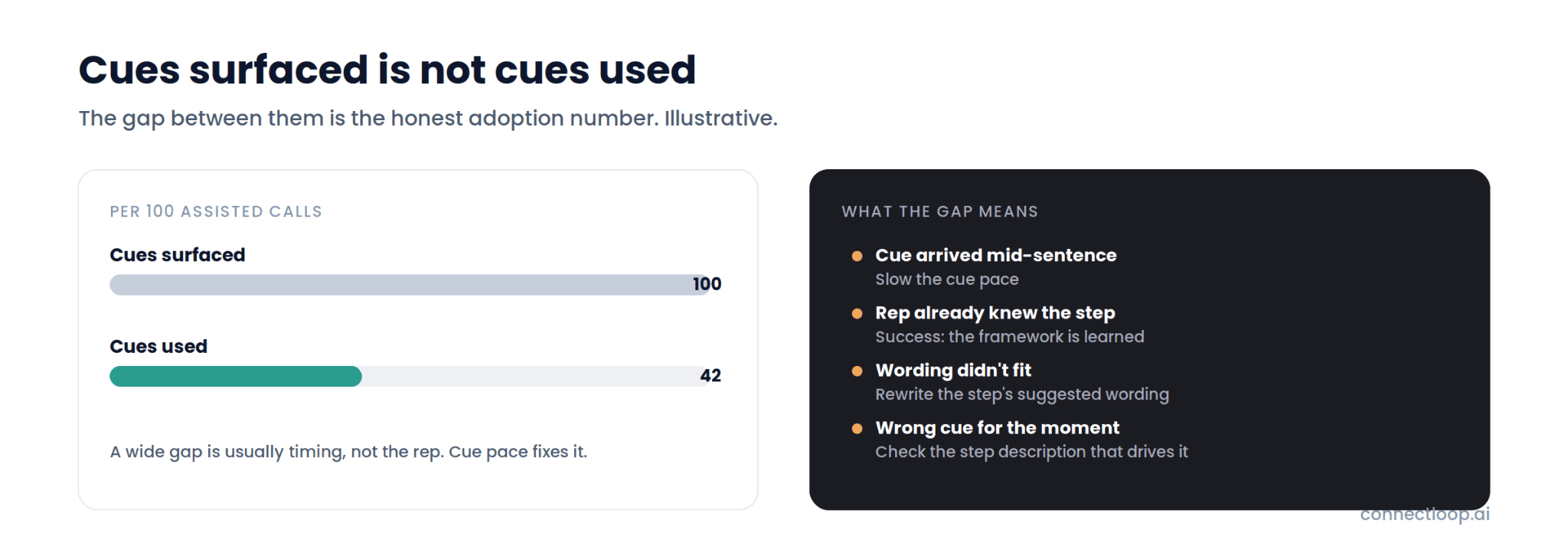
The post-call write-up also includes a call score, buyer sentiment, key moments linked to the transcript, action items captured as they were agreed, a coaching note on where the call could have gone better, and a follow-up email draft for the rep to review and send. The manager reads one page; the rep reads the same page.
Which framework should the training run on?
Whichever one your team sells with, written as steps with the wording you want. Live assistance trains against a framework, so the framework is the curriculum. ConnectLoop ships five and lets you build your own.
- The ConnectLoop YES Framework™. Twenty-four steps in five stages: Discover, Define, Connect, Validate, Commit. The workspace default, with each stage also available on its own so a discovery call and a closing call run different halves.
- SPIN Selling. Situation, Problem, Implication, Need-payoff. The discovery framework; the SPIN selling questions guide has forty examples that drop straight into the steps.
- MEDDICC. Seven checkpoints for complex deals; the MEDDPICC guide explains each.
- BANT. Four steps for fast triage of inbound leads.
- Challenger. Six steps that reframe the buyer's thinking.
- Custom. Up to twelve steps, each with a name, a description that drives the live cue, and suggested wording. Duplicate a standard and edit it, or import steps from several into a hybrid such as SPIN plus BANT.
The sales playbook guide covers how to write those steps. Once a framework is marked "use for next call," every rep starts from it, and coverage is scored against it.
What does training look like across a customer relationship?
Most training tools score one call. A relationship is several. ConnectLoop's customer dossier accumulates across every assisted call with the same account: framework coverage across all calls, open promises with how overdue each is, a "still open" list that carries into the next session, and the stakeholders, including who has never joined a call.
For training that means the next call starts from the right place. The rep sees that Commit was left open last time, that the pricing document was promised nine days ago, and that the head of admissions has never been on a call. The assistant loads those as memory cues. The rep doesn't re-ask what was settled, and the manager can see coverage improving, or stalling, across the account rather than per call.
This is also where the stages of the sales process become visible: which stage each call reached, and what it left for the next one.
Same objection, three tools: a worked example
A buyer says, forty seconds into a discovery call: "We already use another tool for this." Here is what each type of training tool does with it.
| Role-play simulator | Call-review tool | Live assistance | |
|---|---|---|---|
| When | Last Tuesday, in practice, against an AI persona that raised this objection because someone wrote it into the scenario | Tomorrow, when the manager opens the recording | Now, four seconds after the buyer said it |
| What the rep gets | A score on how they handled the practice version | A clip and a note: "handled competitor objection weakly at 0:40" | A cue card: "Ask what's working about the current setup before comparing. Suggested wording: 'What's working well about the current setup?' If they say 'everything,' ask what prompted the call." |
| What happens to this deal | Unaffected; the practice was a different conversation | Unaffected; the moment has passed | The rep asks the question, the buyer names the gap, discovery continues |
| What the manager sees | A practice score | A scored recording, when they find time | Coverage per step with the buyer's quote, whether the cue was used, and a coaching note, without opening the recording |
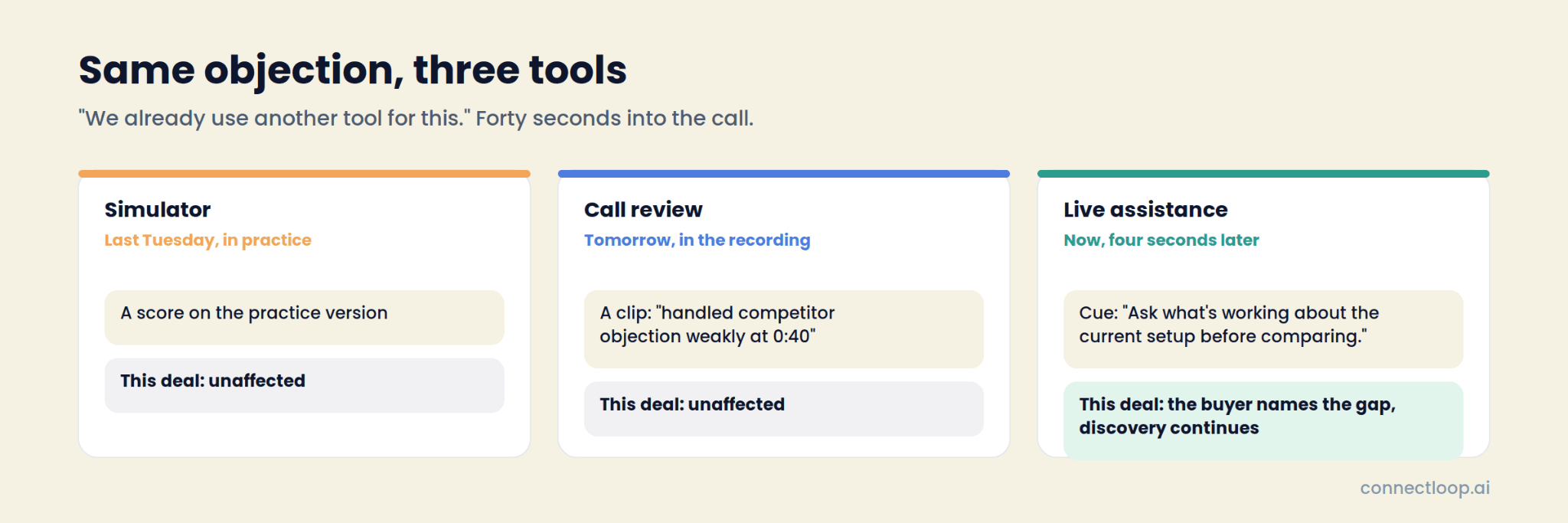
The simulator prepared the rep in general. The review tool will explain what went wrong. The live assistant changed what happened. For training, all three are learning. For the deal, only one of them counts. The how to negotiate in sales guide covers what the rep does once the objection is understood.
How do you measure whether AI sales training is working?
Four numbers, tracked per period and per rep: calls assisted, cues accepted, average framework coverage, and open action items. Rising coverage with rising cues accepted means the training is landing. Rising coverage with flat cues accepted means reps are learning the framework and no longer need the cue, which is also success.
ConnectLoop's Sales Assistance dashboard shows the four with a 7, 30 or 90-day range, plus call volume against coverage over time, a per-framework breakdown of which methodologies are actually being run, the score distribution across calls, recurring customers, and a by-rep table of calls, average score, coverage and open items.
The by-rep table is where coaching gets specific. Two reps with the same average score and different coverage are two different conversations. The step the whole team skips is a framework problem, not a people problem, and the fix is rewriting the step's wording rather than another training session.
How do you combine the three types?
Use all three, in the order the rep's week actually runs, and give each the job it is good at.
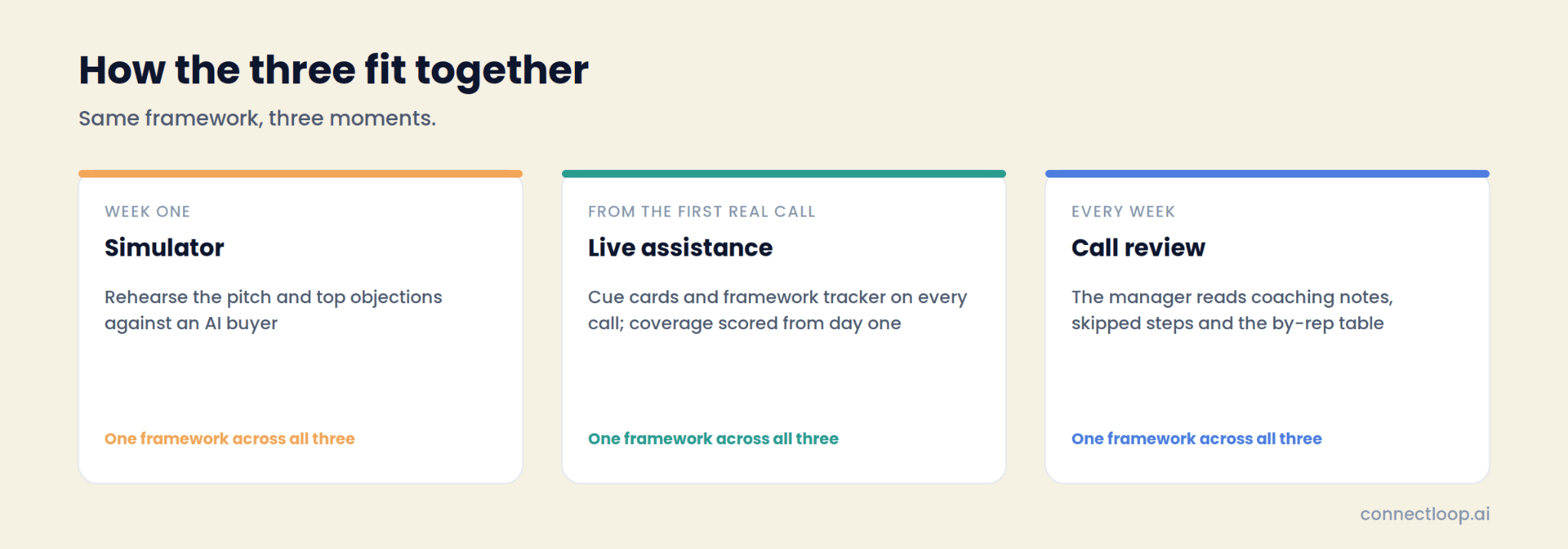
- Simulators for the first week. A new hire runs the pitch and the top five objections against an AI buyer before they meet a real one. Cheap rehearsal, no consequences.
- Live assistance from the first real call. The framework tracker and the cue cards are the training wheels that never have to come off, because they get quieter as the rep gets better. Coverage is scored from day one.
- Call review as the manager's weekly read. Not every call, and not the whole recording: the coaching notes, the skipped steps and the by-rep table, with the key moments linked when a specific call needs a listen.
- Frameworks as the single curriculum. The simulator scenario, the live tracker and the post-call score should all run on the same steps, so the rep is learning one thing three ways rather than three things.
- Cues used as the honest metric. Track whether the suggestion was taken, not whether it appeared.
A team running only simulators is training for a buyer that doesn't exist. A team running only review is training for a call that already happened. Live assistance is the one that pays on the call in front of the rep, and the other two make it better.
How do you set up live-call coaching for a team?
Five steps, most of them minutes.
- Pick the framework. Open Sales Assistance → Frameworks. Use the ConnectLoop YES Framework, a standard, or duplicate one and rewrite the steps in your language. Mark it "use for next call."
- Add a script, optionally. Upload the talk track as PDF, Word, text or Markdown. Set cue pace and whether product knowledge cues pull from the knowledge base.
- Start the session. Pick the customer, add the meeting link if you want it on the record, click Start live assist.
- Share meeting audio. Choose the Meet or Zoom tab and tick "Also share tab audio." Keep the ConnectLoop tab beside the meeting window.
- Work the feed, then end the session. Coverage, action items, the coaching note and the follow-up draft are waiting when the call ends.
Every session, framework, script and dossier stays inside the workspace, so a team with several business units or clients keeps each one's training separate.
Which type is right for a small team?
Live assistance, because it is the only one of the three that costs the rep nothing beyond the call and the manager nothing beyond reading a page. A five-person team has no enablement budget for simulator seats and no manager with hours to review recordings. It has real calls, and a coach beside each one is the training that fits.
The setup is proportionate: pick a framework, share the tab. Coverage scoring starts on the first call. The coaching note replaces the review meeting. The follow-up draft replaces the twenty minutes after the call. ConnectLoop runs it per workspace, so a small team gets the same tracker and dashboard as a large one, sized to the calls it actually makes.
Key takeaways
- AI sales training tools come in three types, defined by when the learning happens: simulators before the call, review tools after, live assistance during.
- Simulators train against an invented buyer; review tools train on a call that already moved; live assistance trains on the call in front of the rep.
- ConnectLoop's Sales Assistance captures audio in the browser with no bot, surfaces seven kinds of cue card as the buyer speaks, and tracks the call against your framework step by step.
- Framework coverage is scored per step with the buyer's quote as evidence, and cues used, not cues surfaced, is the honest adoption number.
- The framework is the curriculum: the YES Framework, SPIN, MEDDICC, BANT, Challenger, or your own steps with your own wording.
- The customer dossier carries coverage, promises and open items across calls, so training compounds per account.
- Use simulators for week one, live assistance from the first real call, and review as the manager's weekly read, all on the same framework.
- For a small team, live assistance is the only type that costs nothing beyond the call itself.

About the author
ConnectLoop Staff
Written by the ConnectLoop team. ConnectLoop is an AI sales agent for inbound revenue teams, based in Cambridge, Massachusetts.
About ConnectLoop →Frequently asked questions
Training builds a skill; coaching improves a specific performance. Simulators are mostly training. Call review is mostly coaching. Live assistance does both: it coaches the call in progress and scores it afterwards so the skill improves across calls.
In ConnectLoop's Sales Assistance, nothing joins the meeting. Audio is captured in the rep's browser from the meeting tab and their microphone. Nothing appears in the participant list and no calendar integration is required. Works with Google Meet and Zoom in Chrome or Edge.
It is a coach in the room. The rep still runs the call, decides whether to use each cue, and answers in their own words. The buyer hears a person who was prepared and remembered the last conversation. Sales teams have used call notes and battle cards for decades; this is the same idea at the right moment.
Yes. Build a framework of up to twelve steps with a name, a description and suggested wording per step, or duplicate a standard and edit it. The tracker, the cues and the coverage score all follow the steps you wrote.
Recording software scores the call after it ends. Live assistance coaches during the call and scores it after. ConnectLoop produces the recording's outputs too, transcript, key moments, score, coaching note, but the cue cards arrived while the call was still happening.
The dashboard shows cues surfaced against cues used, so the gap is visible. When it is wide, the cause is usually timing, and the cue pace setting fixes it. Reps who no longer need a cue because they have learned the step are the goal, not a problem.
Coverage is scored from the first assisted call, so the baseline exists on day one. Most of the improvement comes from rewriting the steps reps skip and adjusting cue pace, both of which show up in the next period's numbers.
Yes. The customer dossier accumulates framework coverage, open promises and a still-open list across every call with that account, and loads them as memory cues in the next session.
It replaces the parts of the job that were reading recordings and writing notes. It hands the manager a page per call with the score, the skipped step and the coaching note, so the coaching conversation starts from evidence. The judgment about the rep and the account stays with the manager.
The best sales training a rep can get is the right cue on the call that counts
A score afterwards then shows what happened. ConnectLoop's Sales Assistance does both, on the framework you choose, from the first assisted call. Pick a framework, share the meeting tab, and see the first cue card arrive.