
How to Set Up AI Customer Support for WooCommerce on WhatsApp
To set up AI customer support for WooCommerce on WhatsApp, connect a WhatsApp Business number through Meta, sync your WooCommerce products, prices and stock, train the AI on your store policies, set rules for when a person takes over, then test before going live. With ConnectLoop, all of this happens in one place, and the AI starts answering shoppers around the clock.

Published
Table of contents
- Can AI handle WooCommerce customer support on WhatsApp?
- What do you need before you start?
- How do you set up AI customer support for WooCommerce on WhatsApp?
- What should the AI handle, and what should go to a person?
- How do you keep product answers accurate?
- How do WhatsApp's 24-hour window, templates and opt-in work?
- How do you test before going live?
- How do you measure AI support on WhatsApp?
- What are common setup mistakes to avoid?
- Key takeaways
- Frequently asked questions
Can AI handle WooCommerce customer support on WhatsApp?
Yes. An AI agent can answer most WooCommerce shopper questions on WhatsApp: product details, prices, stock, sizing, shipping and return policies. It replies in seconds, day and night, and passes complex or sensitive cases to your team. ConnectLoop connects WooCommerce and WhatsApp to one AI agent, so answers come from your real store data.
Many WooCommerce stores already have a basic WooCommerce WhatsApp integration, usually a WordPress plugin that adds a click-to-chat button. That button opens a chat, and then a person still has to reply. If the reply comes hours later, the shopper has often moved on.
An AI agent changes what happens after the click:
- It answers right away. Shoppers get a reply in seconds, even at midnight or on a holiday.
- It understands natural questions. Shoppers can type the way they talk, such as "Do you have this in blue, size M?"
- It uses your store's real information. Answers come from your products, prices, stock and policies.
- It knows when to stop. When a question needs a person, it hands the conversation to your team with the full history.
This is the difference between a WooCommerce WhatsApp chatbot or simple AI chatbot that follows a script and a WhatsApp AI agent that works toward a goal. ConnectLoop's agent, Lia, is built for the second job. It works as a WhatsApp AI agent for WooCommerce: answering, helping shoppers decide and moving them toward a purchase, with 24/7 support for mobile shoppers who prefer messaging. To see where this fits among other agent designs, read types of AI agents.
What do you need before you start?
Before you start, you need admin access to your WooCommerce store, a WhatsApp number you can connect to the WhatsApp Business API, a Meta Business account, your written store policies and one person on your team to handle escalations. ConnectLoop guides you through the WhatsApp and WooCommerce connections, so most of the work is gathering these items.
Use this checklist before setup day:
- WooCommerce admin access. You need it to connect your store and allow product sync.
- A WhatsApp number for the API. It can be a new number or an existing business number. Check during signup whether your number can stay on the regular WhatsApp Business app, as some setups require moving it.
- A Meta Business account. This is where your WhatsApp Business profile, display name and phone number verification live. Most AI platforms connect through the WhatsApp Cloud API, either directly or through a Business Solution Provider.
- Your store policies in writing. Shipping times, return rules, exchange rules, payment options and warranty terms.
- Your top 20 customer questions. Pull them from your inbox, past chats and phone calls.
- One escalation owner. The person who takes over when the AI hands off, plus their working hours.
- Your CRM and calendar (optional). Useful if you sell higher-value products and want the AI to book consultations or calls.
If you are still choosing between the regular WhatsApp Business app and the API, read WhatsApp Business App vs API first. AI customer support at scale runs on the API, which lets software reply to customers automatically. ConnectLoop is a Verified Meta Business and an official Meta Business Partner, so the WhatsApp connection follows Meta's official process.
How do you set up AI customer support for WooCommerce on WhatsApp?
Set up AI customer support for WooCommerce on WhatsApp in eight steps: connect WhatsApp, connect WooCommerce, train the AI on your website, add your policies, set handoff rules, connect your CRM and calendar, test real conversations, then go live. With ConnectLoop, the AI learns your website in about 60 seconds, so most setup time goes into policies and rules.
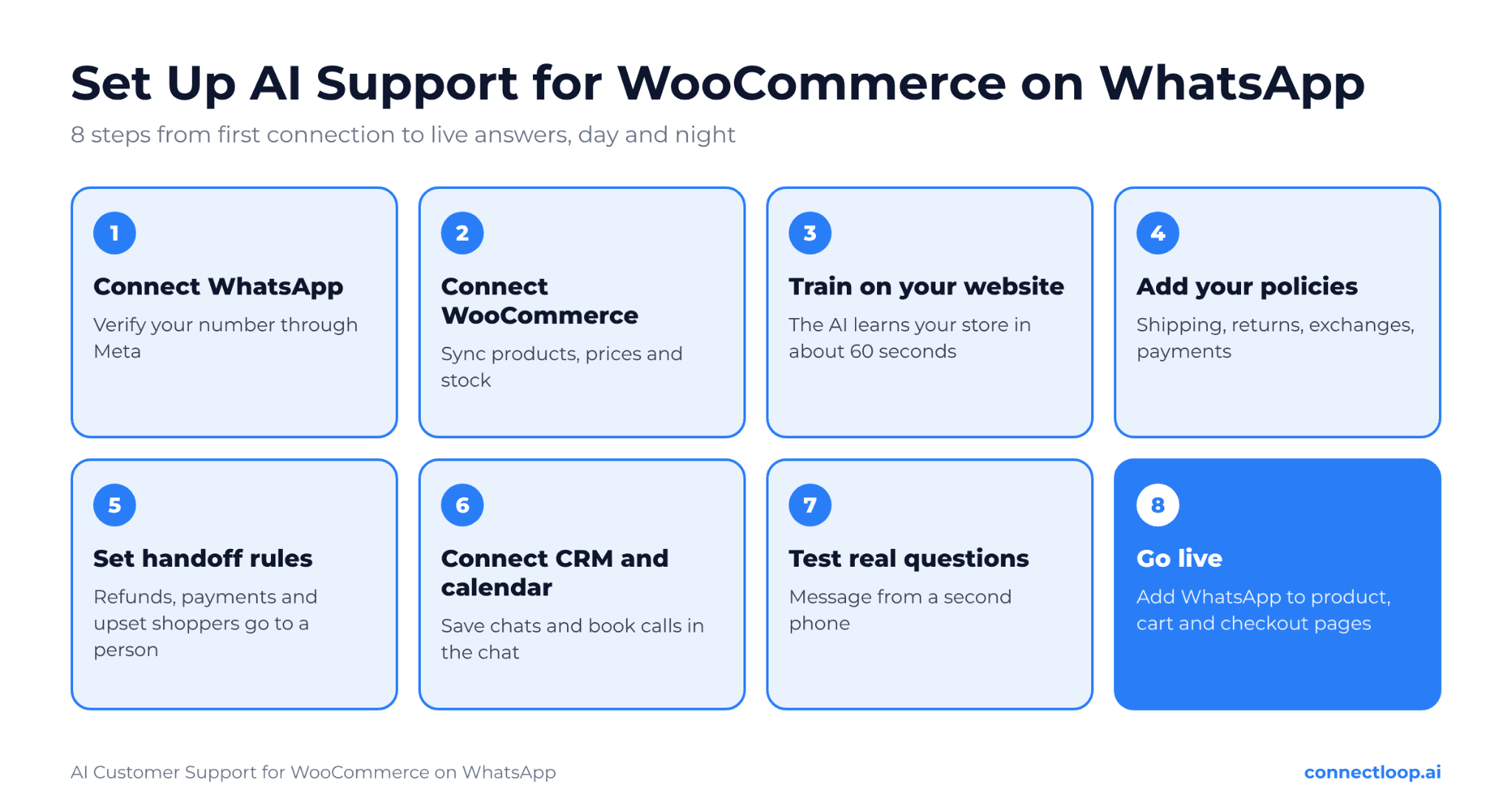
Step 1: Connect your WhatsApp number
In ConnectLoop, start the WhatsApp connection and sign in with the Facebook account linked to your Meta Business account. Choose or create your WhatsApp Business profile, add your number and complete the verification code. Set a clear display name, usually your store name, so shoppers know who they are talking to.
Step 2: Connect your WooCommerce store
Next, connect WooCommerce in ConnectLoop's integrations. The WooCommerce integration syncs your published products, prices and stock. This step matters most for accuracy. When a shopper asks "Is this in stock?" or "How much is the large size?", the AI answers about product availability and price from your live catalog, not from an old page.
Step 3: Train the AI on your store website
Add your store's website address. ConnectLoop reads your pages and trains the AI in about 60 seconds. This gives the agent your brand voice, category pages, about page and any FAQs you already publish.
Step 4: Add your policies to the knowledge base
Upload or paste your shipping, returns, exchanges and payment policies. Add answers to your top 20 customer questions. A clear AI knowledge base is what keeps answers correct and consistent. Write policies in plain language, with exact numbers, such as "Returns accepted within 30 days of delivery."
Step 5: Set your handoff rules
Decide which conversations go to a person. Common triggers include refund requests, payment problems, damaged items, angry messages and any shopper who asks for a human. Set who receives the handoff, whether your team uses a live takeover of the chat, and what after-hours support message the AI should send. ConnectLoop passes the full conversation history to your team, so the shopper never has to repeat themselves. Learn more in human handoff.
Step 6: Connect your CRM and calendar
Connect your CRM, such as HubSpot, Salesforce, Zoho or Google Sheets, so every WhatsApp conversation is saved with the customer record. If you sell high-value or custom products, connect Google Calendar, Outlook Calendar or Calendly so the AI can book a call or consultation inside the chat. See how this works in AI appointment booking.
Step 7: Test real conversations
Message your WhatsApp number from a different phone. Ask the questions your customers really ask. Check prices, stock answers, policy answers and the handoff. The testing section below gives you a full checklist.
Step 8: Go live and add WhatsApp to your store
Turn the agent on. Add a WhatsApp button or link on your product pages, cart page, checkout page and contact page, so shoppers can reach you where they have questions. You can also add ConnectLoop's website chat to the same store, so shoppers can talk on whichever channel they prefer, and your team sees every conversation in one place. WhatsApp then becomes one part of a wider customer engagement strategy.
What should the AI handle, and what should go to a person?
Let the AI handle questions with clear, written answers: products, prices, stock, sizing, shipping and return policies. Send anything that needs judgment, money decisions or empathy to a person: refunds, payment problems, damaged orders and upset customers. ConnectLoop applies these rules automatically and hands off with the full conversation attached.
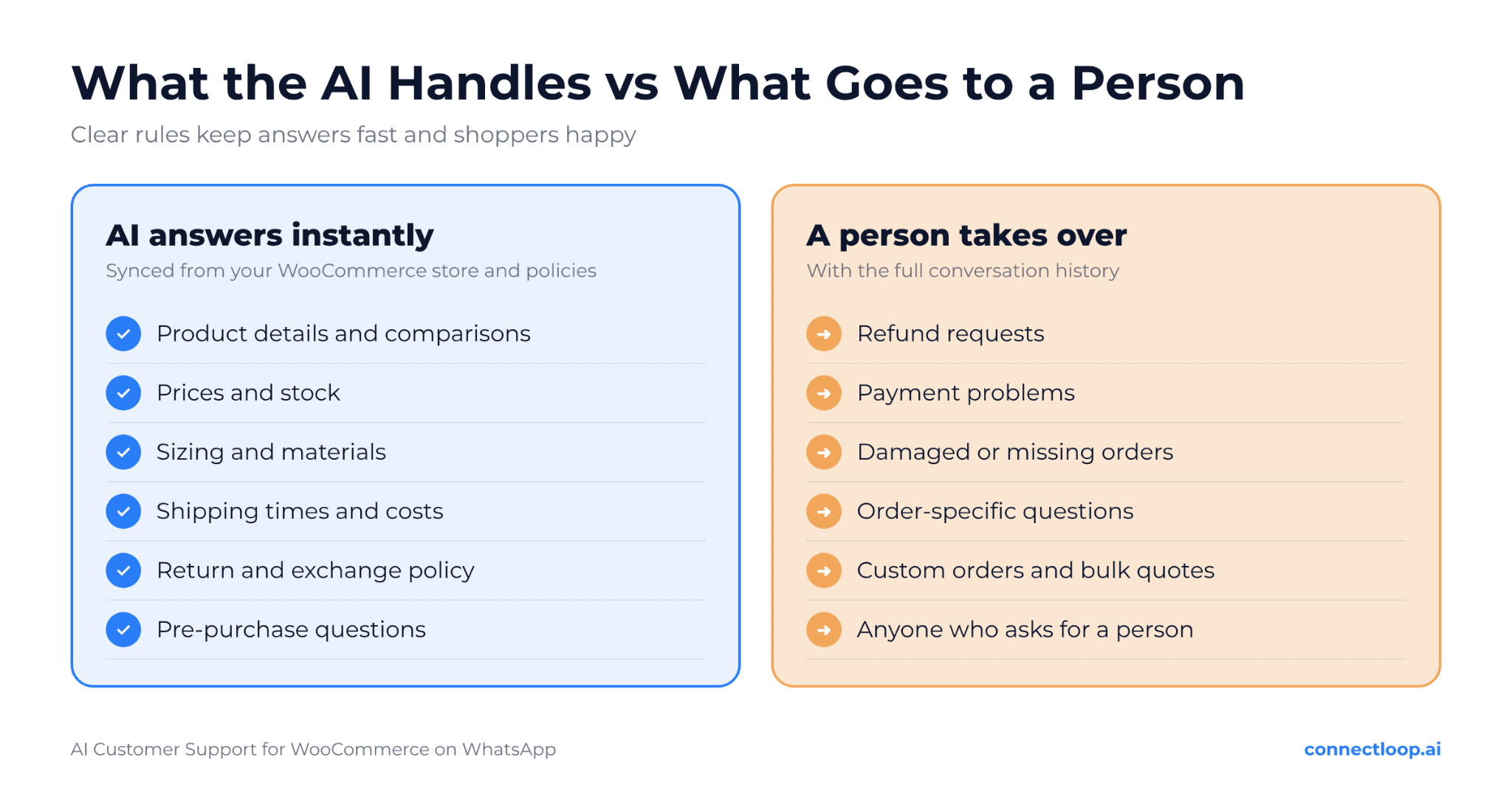
| Customer question | Who handles it | Why |
|---|---|---|
| "Do you have this in size M?" | AI | Stock comes from the WooCommerce sync |
| "How much is shipping to Texas?" | AI | Answered from your shipping policy |
| "What is your return policy?" | AI | Answered from your written policy |
| "Which of these two is better for running?" | AI | Product details and comparisons from your catalog |
| "Do you have a discount for bulk orders?" | AI, then a person | AI collects quantity and needs, then a person quotes |
| "Where is my order?" | Person or tracking link | Order-specific details come from your team or tracking page |
| "I want a refund." | Person | Money decisions need a human |
| "My package arrived damaged." | Person | Needs empathy and a fix |
| "Can you make a custom version?" | Person | Needs a quote and judgment |
| "Can I speak to someone?" | Person | Always honor this request |
For order status and order tracking questions like "Where is my order?", the smoothest setup is a clear handoff to your team, or an automatic reply with a link to your store's order-tracking page. Shoppers get a fast first response either way, and your team handles the details.
AI support on WhatsApp also works before the sale. Many messages are pre-purchase questions: sizing, materials, delivery time and compatibility. Most are small doubts, and answering them quickly works much like objection handling in a sales call. Fast answers help shoppers decide and buy, and a product question is also a natural moment to suggest a matching item, as covered in upselling and cross-selling. That is why ConnectLoop treats WhatsApp as a sales channel as much as a support channel, with the agent working like an AI sales agent, as explained in conversational commerce.
How do you keep product answers accurate?
Keep product answers accurate by syncing your WooCommerce catalog, keeping policies up to date and reviewing questions the AI could not answer. Product details, prices and stock should come from the store itself, not from copied text. ConnectLoop's WooCommerce integration syncs published products, prices and stock, so answers match what shoppers see on your site.
Follow these habits to keep answers right:
- Use the WooCommerce sync, not copied text. Prices and stock change often. A synced catalog stays current without manual updates.
- Keep product descriptions complete. The AI can only share details that exist. Add sizes, materials, dimensions and care instructions to each product page.
- Update policies the same day they change. A new return window or shipping rate should go into the knowledge base right away.
- Review unanswered questions weekly. Every question the AI could not answer shows a gap in your AI knowledge base. ConnectLoop collects these as knowledge gaps, and on Growth plans and above, Query Buster researches proposed answers for your team to approve before the AI uses them.
- Read a sample of conversations. Spot wrong or unclear answers early and fix the source content.
The rule is simple: the AI's answers are only as good as your store data. Clean product pages and clear policies make the AI sound like your best sales associate.
How do WhatsApp's 24-hour window, templates and opt-in work?
When a customer messages you on WhatsApp, a 24-hour customer service window opens. Inside it, your AI or team can reply freely. Outside it, you can only message the customer with a Meta-approved template, and only if they opted in. ConnectLoop's AI works inside this window, replying the moment a shopper writes.
Here is what each rule means for a WooCommerce store:
| Rule | What it means | What to do |
|---|---|---|
| 24-hour customer service window | Free-form replies are allowed within 24 hours of the customer's last message | Reply fast. An AI agent answers within seconds, well inside the window |
| Message templates | Messages sent outside the window must use a pre-approved template | Prepare templates for follow-ups, such as order updates or a reply your team owes |
| Template categories | Templates are grouped, for example as utility or marketing | Use utility templates for order updates and marketing templates only for promotions |
| Opt-in | Customers must agree to receive business-started messages | Add a clear WhatsApp opt-in at checkout or in your sign-up forms |
| Pricing | Meta may charge for some business-started template messages | Check Meta's current WhatsApp pricing for your country before running campaigns |
Customer-started conversations are where AI support shines. A shopper asks, the AI answers and the conversation stays inside the window. Business-started messages, such as abandoned cart recovery, order confirmation or shipping updates, need templates and opt-in, so plan them separately. Keep them short and useful, the same way you would write a follow-up email after no response.
Respect privacy at every step. Only ask for the details you need, explain how you use them and follow the rules that apply to your customers, such as GDPR for shoppers in the EU.
How do you test before going live?
Test before going live by messaging your WhatsApp number from a separate phone and running through real customer questions: products, stock, prices, policies, a handoff and an after-hours message. Fix any wrong or vague answer before launch. ConnectLoop shows every test conversation, so you can see exactly how the AI answered.
Use this test checklist:
- Ask about three products, including one that is out of stock
- Ask for a price and compare it with your store page
- Ask about shipping time and cost to two different locations
- Ask about returns and exchanges
- Ask a sizing or comparison question
- Ask "Where is my order?" and check the handoff or tracking link
- Ask for a refund and confirm a person is notified
- Send an angry message and check the tone and handoff
- Type "Can I talk to a person?"
- Message outside business hours and check the after-hours reply
- Confirm the conversation appears in your CRM
- Check that a shopper on your website chat and on WhatsApp gets the same answer
- If you sell to businesses, test bulk and wholesale questions against your inbound lead qualification criteria
Always test before launch, and keep testing after it. Read 10 to 20 real conversations a week during the first month. Small fixes to your policies and product pages make a big difference in answer quality.
How do you measure AI support on WhatsApp?
Measure AI support on WhatsApp by tracking first response time, resolution rate, handoff rate, customer satisfaction and conversations that lead to orders. These show whether shoppers get fast, correct help and whether that help turns into sales. ConnectLoop tracks conversations across WhatsApp, website chat and email, so you see the full picture in one place.
These numbers sit well alongside the inbound sales metrics many teams already track.
| Metric | What it shows | What good looks like |
|---|---|---|
| First response time | How fast shoppers get a reply | Seconds, at any hour |
| Resolution rate | Share of questions answered without a person | Rising as your knowledge base improves |
| Handoff rate | Share of chats passed to your team | Steady, with clear reasons |
| Customer satisfaction | How shoppers rate the help | Positive after each conversation |
| Conversations that lead to orders | Whether help turns into sales, your conversion rate from chat | Growing month over month |
| Unanswered questions | Gaps in your content | Falling week over week |
Ask a short satisfaction question at the end of resolved chats. ConnectLoop's guide to customer feedback questions has ready-made CSAT examples you can use.
Fast, helpful answers also keep customers coming back. A shopper who got a quick answer before buying is more likely to return. Read more in customer retention.
What are common setup mistakes to avoid?
The most common mistakes are launching without written policies, copying prices into the knowledge base instead of syncing them, skipping handoff rules, sending marketing messages without opt-in and never reviewing conversations after launch. Each one leads to wrong answers or frustrated shoppers. ConnectLoop's setup steps are designed to avoid each of these mistakes.
Avoid these mistakes:
- Launching with thin policies. If your return policy is vague, the AI's answer will be vague too.
- Typing prices into the knowledge base. Prices change. Use the WooCommerce sync so the AI always sees current prices and stock.
- No handoff plan. Shoppers who need a person and cannot reach one leave unhappy. Set clear triggers and an owner.
- Ignoring after-hours messages. Speed matters, as ConnectLoop explains in speed to lead. Tell shoppers when a person will follow up, so they know what to expect.
- Messaging without opt-in. Business-started messages need consent and approved templates.
- Hiding the WhatsApp entry point. Place WhatsApp on product, cart and checkout pages, where questions happen.
- Never reviewing conversations. Your first month of chats is the best training data you will ever get. Use it.
ConnectLoop works best when it starts with clean store data and clear rules. A well-prepared store can go from setup to live AI support on WhatsApp in a single afternoon. To see how AI agents fit into ecommerce more broadly, read AI agent for ecommerce.
Key takeaways
- AI customer support for WooCommerce on WhatsApp answers shoppers in seconds, at any hour, using your real store data.
- Before you start, gather WooCommerce admin access, a WhatsApp number for the API, a Meta Business account, written policies and an escalation owner.
- Setup takes eight steps: connect WhatsApp, connect WooCommerce, train on your website, add policies, set handoff rules, connect your CRM and calendar, test and go live.
- ConnectLoop syncs WooCommerce products, prices and stock, so answers match what shoppers see on your site.
- Let the AI handle product, stock and policy questions, and send refunds, payment issues and upset customers to a person.
- Reply inside WhatsApp's 24-hour window, and use approved templates and opt-in for business-started messages.
- Test with real questions before launch, then review conversations weekly during the first month.
- Measure first response time, resolution rate, handoff rate, satisfaction and conversations that lead to orders.

About the author
ConnectLoop Staff
Written by the ConnectLoop team. ConnectLoop is an AI sales agent for inbound revenue teams, based in Cambridge, Massachusetts.
About ConnectLoop →Frequently asked questions
Often, yes. You can connect an existing business number or a new one through Meta's signup process. During setup, check whether your number can stay on the regular WhatsApp Business app, since some setups require moving it to the API. ConnectLoop walks you through the connection step by step.
Yes. The WhatsApp Business API lets software, such as an AI agent, receive and reply to messages automatically. The regular WhatsApp Business app is designed for manual replies on a phone. ConnectLoop connects to the API through Meta's official process as a Verified Meta Business Partner.
The best setup for order-specific questions is a fast first reply plus a handoff to your team or a link to your store's order-tracking page. ConnectLoop's WooCommerce integration focuses on products, prices and stock, so the AI handles product questions while order details go to the right place.
There are two costs: your AI platform plan and Meta's WhatsApp charges. Replies inside the 24-hour customer service window are generally the core of support, while Meta may charge for some business-started template messages. Check Meta's current pricing for your country and ConnectLoop's pricing page for plan details.
Yes. Modern AI agents can understand and reply in the language the shopper writes in, which helps stores that sell across countries. Make sure your key policies are clear, so translated answers stay accurate. ConnectLoop's agent replies naturally in the shopper's language.
Yes. Many shoppers start on your website and continue on WhatsApp. ConnectLoop runs website chat, WhatsApp and email from one AI agent, so answers stay consistent and your team sees every conversation in one place.
It hands the conversation to your team with the full history, or tells the shopper when a person will follow up. The question is saved as a knowledge gap, so you can add the answer and the AI handles it next time. ConnectLoop makes this review part of your weekly routine.
Most stores can finish setup in an afternoon if their policies are ready. Meta's number verification and display name review can add some time. ConnectLoop trains the AI on your website in about 60 seconds, so the longest step is usually writing clear policies.
From setup to live answers in a single afternoon
Connect your WhatsApp number through Meta, sync your WooCommerce products, prices and stock, and let ConnectLoop train on your store's website in about 60 seconds. Shoppers get product, stock and policy answers in seconds at any hour, and refunds, damaged orders and anyone asking for a person go straight to your team with the full conversation attached.